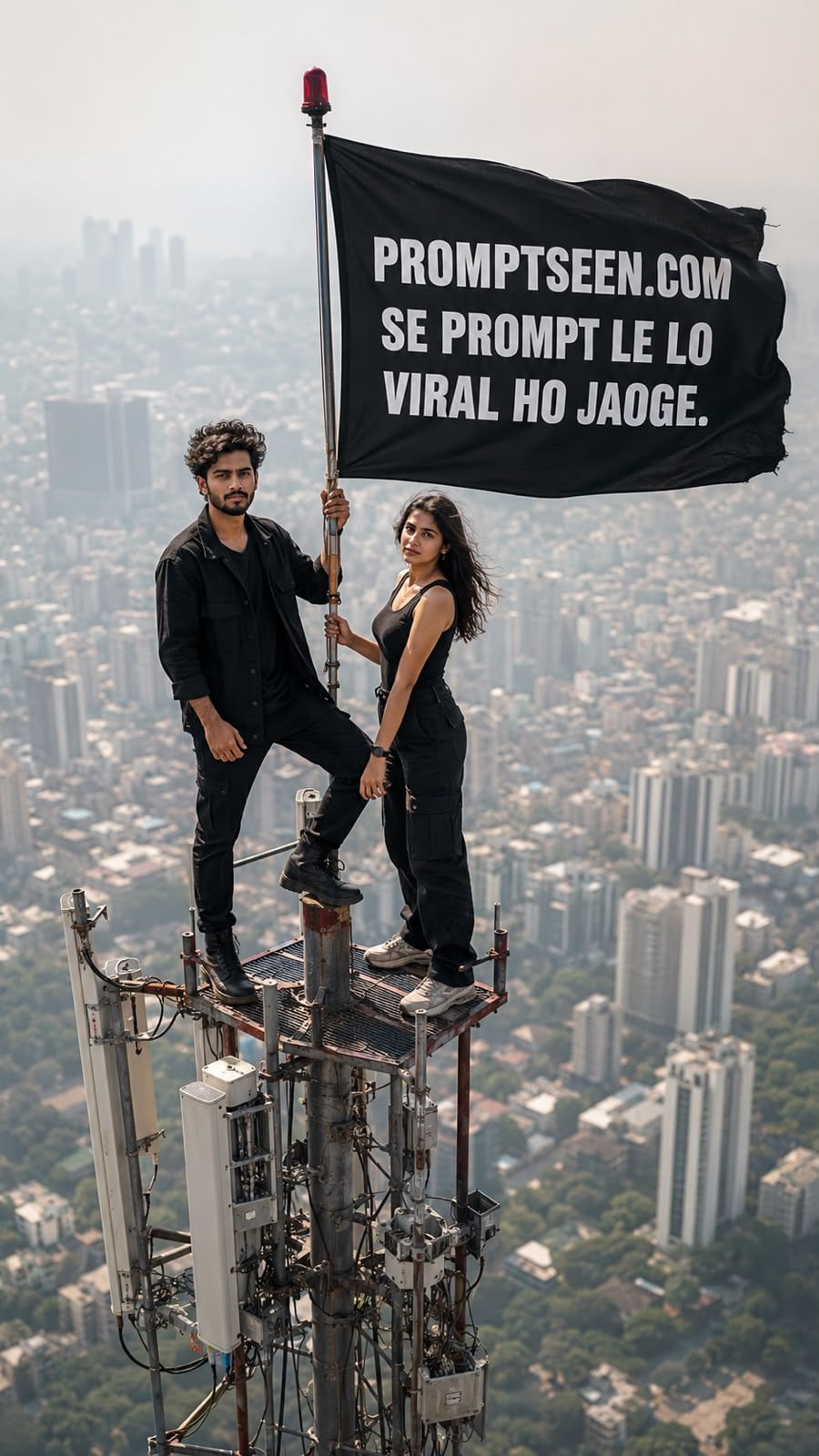
Viral Couple On Tower Photo and Video Editing Prompts
By Prompt Scene ·
▶ Result generated with this prompt
A Russian couple just gave the internet its most talked-about proposal story of 2026. Ivan Kuznetsov and Angela Nikolau climbed to the very top of the Empire State Building, unfurled a banner about love and peace, and got engaged more than 1,400 feet above New York City.
The video spread across every platform within hours.You do not need to risk your life to get a photo like theirs.
With the right AI photo editing prompts, you can turn a simple picture of you and your partner into a dramatic “top of the skyscraper” proposal moment, safely, from your own home.
New York Tower Couple Photo Prompt
Create an ultra-realistic vertical 9:16 cinematic drone shot of two young Indian adults standing on the tiny top platform of a very tall communication tower above a huge modern city skyline. The city below is blurred with atmospheric haze, giving an extreme height and vertigo feeling.

A young man with curly black hair and short beard is wearing an all-black outfit, standing confidently with one foot raised and one hand holding the antenna pole. Beside him, a youna woman in a black sleeveless outfit stands calmly, also holdir.g the pole. A large black flag is attached to the tower and blowing strongly in the wind.

On the flag, write in bold white uppercase text:

Prompt Scene.COM

SE PROMPT LELO

AUR HO JAO VIRAL

Keep the text clearly readable, centered on the flag, slightly following the cloth folds. Realistic lighting, warm daylight, telephoto lens compression, high altitude aerial photography, detailed metal tower, cinematic shadows, documenta. y realism, 8K, HDR, no extra people, no logo, no watermark
Why This Trend Is Going ViralThe story blew up because it mixed two things people love online: a big romantic gesture and a jaw-dropping stunt. News outlets confirmed the couple are professional “rooftoppers” who scale tall buildings and were even the subject of a Netflix documentary before this.
Their Empire State Building climb ended in arrest, but the photos and footage had already gone viral by then.This is exactly the kind of moment that AI photo trends are made for. People want to recreate the feeling of an epic, cinematic proposal without any of the danger or legal trouble.
Final Thoughts
Viral moments like this Empire State Building proposal do not last long online, so trends built around them move fast too. If you want to create your own version of this moment, save these prompts now and try them with your own couple photos today.For more trending AI photo prompt ideas as new viral moments happen, keep checking back for fresh, ready-to-copy prompts you can use right away.
Transform the uploaded photograph into a premium minimalist editorial collage inspired by luxury travel magazines, contemporary fashion editorials, and artistic outdoor photography FORMAT & COMPOSITION: Create a strict 3:4 vertical canvas. Use a warm ivory/off-white background with subtle paper texture and generous negative space Place a large, clean-edged vertical rectangular crop of the original
Place this person in the second photo in a realistic manner and adjust them to match the second photo; do not change anything else. Keep the background exactly as it is-do not alter it at all-and do not change the face. Enhance the image to 8K quality and set the aspect ratio to 3:4. And Backgroud ke accoding person size adjust
Create a cinematic 4K, highly detailed, photorealistic video by transferring the EXACT dance movements, body motion, performance, timing, expressions, and camera movements from the REFERENCE VIDEO onto the person shown in the TARGET IMAGE. Completely replace the original main dancer with the person from the TARGET IMAGE. Preserve the target person's exact facial identity, facial features, skin ton
Transform the uploaded mirror selfie into a luxury LED Mirror portrait. Replace the existing mitor frame with an elegant irregular organic shape mirror 1,832 featuring a soft warm golden LED Backlight glow around entire edge .keep the subject same
Create a **10-second photorealistic image-to-video recreation of the uploaded reference video**. ### REFERENCE PRIORITY — CRITICAL Use the uploaded references as follows: **REFERENCE IMAGE 1 — MY PHOTO** Use this as the ONLY identity reference for the main person. Preserve my exact face, facial proportions, eyes, eyebrows, nose, lips, jawline, skin tone, hairstyle and overall identity throughout t
Video-to-video character replacement. Keep @Video 1 exactly the same: same handheld iPhone camera movement and shake, same framing, timing, red backstage lighting, background, crowd, bodyguards, and the fan in the foreground holding the phone and the big DSLR lens. Do not change anyone else. Replace only the main man in the center (the one who walks in, talks to the fan and laughs) with the person
MASTER PROMPT — Ultra-Realistic Bridal Nail Art Car Selfie (9:16) Use the uploaded selfie as the STRICT FACIAL IDENTITY REFERENCE. Preserve the person's exact facial features, natural skin tone, eyes, nose, lips, face shape, age, and realistic skin texture. Do not beautify, reshape, or alter the facial identity. REFERENCE COMPOSITION: Create an ultra-realistic golden-hour photograph of a beautiful
Use the reference video as the exact blueprint. Recreate the SAME actions, hand movements, facial expressions, camera movement, timing, framing and transition — do not invent or change anything. Start with the first reference image as the opening look, then transition into the second reference image at the EXACT same moment and using the EXACT same transition style as the reference video. In the s