AI-powered baby dance videos are exploding on Instagram right now 📈. These adorable clips show children dancing perfectly in sync with music while lip-syncing popular dialogues — and they look unbelievably real.
The best part? You can make these viral-style AI videos for free using just a single full-body photo of a child.
In this guide, you’ll learn step-by-step how to create AI baby dance and dialogue videos that copy the moves and expressions of famous dancers or celebrities — without using any paid tools.
A cute baby dancing exactly to the rhythm of the provided song, precise beat synchronization, joyful baby expressions, smooth natural movements, no exaggeration, realistic body motion, high resolution, social media reel style
How To Create Video
First of all, you have to click on the below given button.
And you have to sign up in this
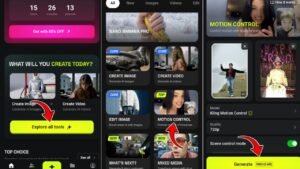
Now you have to explore all tools and click on it.
And then you have to click on motion control.
Then you have to add the reference video and your image and click on Generate.
And your video will be ready; you just need to download the video.
To create AI child dance videos, you first need to sign up on the Higgsfield AI website.
When you click “Try Free,” you’ll land on the homepage. Currently, the site only allows login through a Google account — there are no options for Facebook, Apple ID, or other methods.
After signing in, you’ll be asked a few onboarding questions. Answer them all to continue using the platform.
Conclusion
Now you know how to get started, generate prompts, and create AI dance videos. If you carefully follow the steps, you should be able to make your own video without trouble.
If you still face any issues, check out my Instagram Vmeditor01 or YouTube channel VM Editor and watch the trending AI baby dance tutorials there.
Start creating, follow the trend, and try to make your video go viral
Transform the uploaded photograph into a premium minimalist editorial collage inspired by luxury travel magazines, contemporary fashion editorials, and artistic outdoor photography FORMAT & COMPOSITION: Create a strict 3:4 vertical canvas. Use a warm ivory/off-white background with subtle paper texture and generous negative space Place a large, clean-edged vertical rectangular crop of the original
Place this person in the second photo in a realistic manner and adjust them to match the second photo; do not change anything else. Keep the background exactly as it is-do not alter it at all-and do not change the face. Enhance the image to 8K quality and set the aspect ratio to 3:4. And Backgroud ke accoding person size adjust
Create a cinematic 4K, highly detailed, photorealistic video by transferring the EXACT dance movements, body motion, performance, timing, expressions, and camera movements from the REFERENCE VIDEO onto the person shown in the TARGET IMAGE. Completely replace the original main dancer with the person from the TARGET IMAGE. Preserve the target person's exact facial identity, facial features, skin ton
Transform the uploaded mirror selfie into a luxury LED Mirror portrait. Replace the existing mitor frame with an elegant irregular organic shape mirror 1,832 featuring a soft warm golden LED Backlight glow around entire edge .keep the subject same
Create a **10-second photorealistic image-to-video recreation of the uploaded reference video**. ### REFERENCE PRIORITY — CRITICAL Use the uploaded references as follows: **REFERENCE IMAGE 1 — MY PHOTO** Use this as the ONLY identity reference for the main person. Preserve my exact face, facial proportions, eyes, eyebrows, nose, lips, jawline, skin tone, hairstyle and overall identity throughout t
Video-to-video character replacement. Keep @Video 1 exactly the same: same handheld iPhone camera movement and shake, same framing, timing, red backstage lighting, background, crowd, bodyguards, and the fan in the foreground holding the phone and the big DSLR lens. Do not change anyone else. Replace only the main man in the center (the one who walks in, talks to the fan and laughs) with the person
MASTER PROMPT — Ultra-Realistic Bridal Nail Art Car Selfie (9:16) Use the uploaded selfie as the STRICT FACIAL IDENTITY REFERENCE. Preserve the person's exact facial features, natural skin tone, eyes, nose, lips, face shape, age, and realistic skin texture. Do not beautify, reshape, or alter the facial identity. REFERENCE COMPOSITION: Create an ultra-realistic golden-hour photograph of a beautiful
Use the reference video as the exact blueprint. Recreate the SAME actions, hand movements, facial expressions, camera movement, timing, framing and transition — do not invent or change anything. Start with the first reference image as the opening look, then transition into the second reference image at the EXACT same moment and using the EXACT same transition style as the reference video. In the s