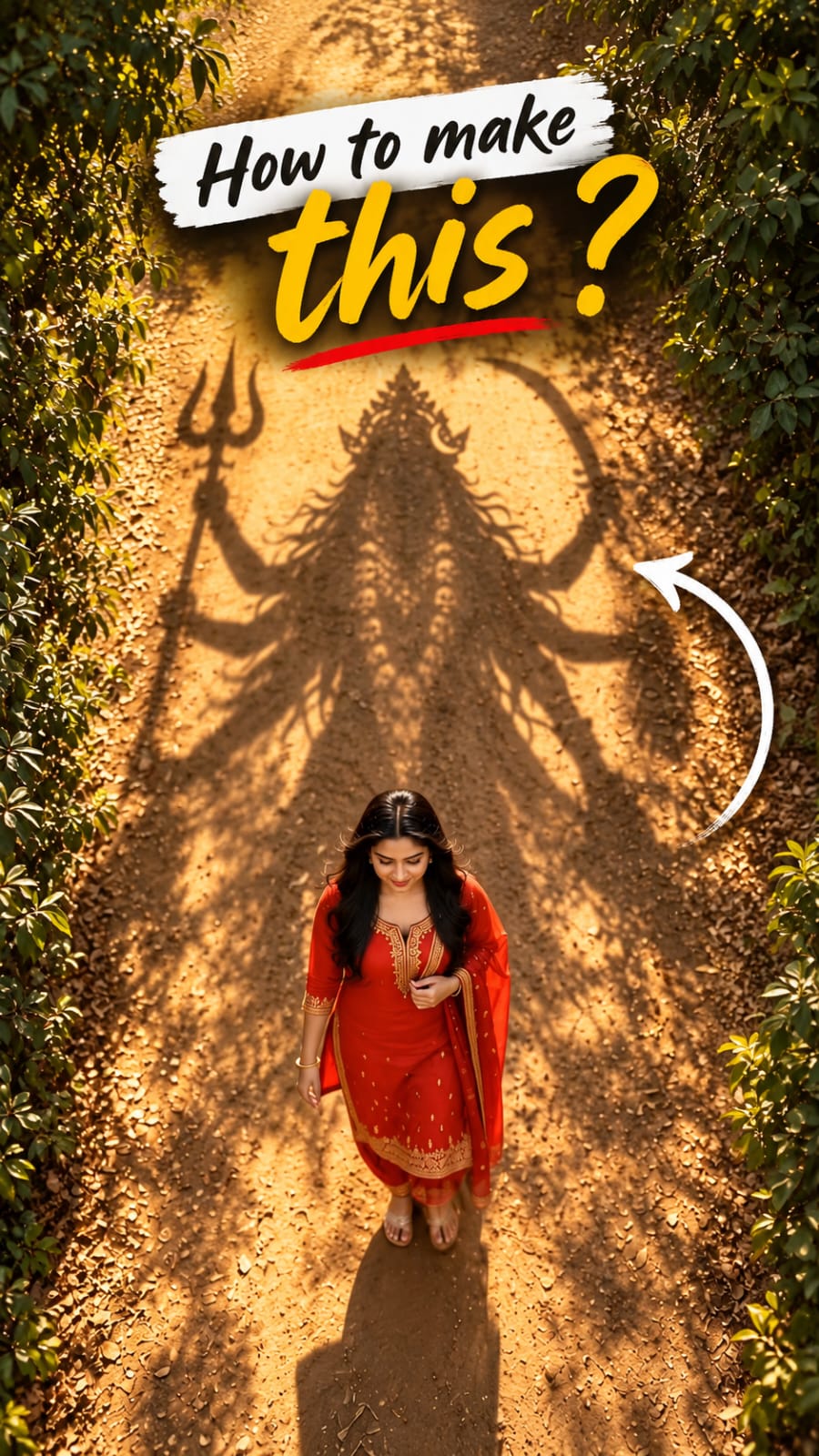
The Trending Kali Mata Walking Video Tutorial is a simple guide to creating a powerful and eye-catching AI video. This trend combines a walking scene with a dramatic Kali Mata shadow effect to create a unique devotional visual.
In this tutorial, you will learn how to create the required image and turn it into a smooth AI-generated video. The process is beginner-friendly and does not require advanced editing skills.
We’ll cover the important prompts, AI video generation steps, and basic editing techniques needed to create a similar Kali Mata Walking AI Video for Instagram Reels, YouTube Shorts, and other platforms.
Video Prompt
TEXT REVEAL – FINAL MOMENT:
As the woman continues walking, the camera slowly pulls back to reveal more of Maa Kali’s enormous shadow.
At the final moment, introduce the exact Hindi text:
माँ आ रही है”
The text appears dramatically over the ground in elegant, glowing golden Devanagari lettering, with a subtle divine golden shimmer and soft light rays.
The text fades in smoothly as the music reaches its emotional climax.
Keep the text perfectly spelled, clear, readable, and centered in the upper-middle portion of the frame without covering the woman or the most recognizable part of Maa Kali’s shadow.
AUDIO & ATMOSPHERE:
Powerful devotional cinematic background music with deep temple bells, a subtle damru rhythm, atmospheric wind, and a rising spiritual soundscape. Build anticipation toward the final text reveal.
Creating a Kali Mata Walking AI Video is easy when you have the right image, prompt, and video settings. By following the steps in this tutorial, you can create a cinematic and engaging devotional AI video.
You can also experiment with different camera movements, lighting, backgrounds, and visual effects to give your video a unique style. Small changes can make the final result look more creative and professional.
So, follow the complete Kali Mata Walking Video Tutorial, try the prompts, and create your own trending AI video. With a little practice, you can make high-quality AI videos that are ready to share on social media.
Transform the uploaded photograph into a premium minimalist editorial collage inspired by luxury travel magazines, contemporary fashion editorials, and artistic outdoor photography FORMAT & COMPOSITION: Create a strict 3:4 vertical canvas. Use a warm ivory/off-white background with subtle paper texture and generous negative space Place a large, clean-edged vertical rectangular crop of the original
Place this person in the second photo in a realistic manner and adjust them to match the second photo; do not change anything else. Keep the background exactly as it is-do not alter it at all-and do not change the face. Enhance the image to 8K quality and set the aspect ratio to 3:4. And Backgroud ke accoding person size adjust
Create a cinematic 4K, highly detailed, photorealistic video by transferring the EXACT dance movements, body motion, performance, timing, expressions, and camera movements from the REFERENCE VIDEO onto the person shown in the TARGET IMAGE. Completely replace the original main dancer with the person from the TARGET IMAGE. Preserve the target person's exact facial identity, facial features, skin ton
Transform the uploaded mirror selfie into a luxury LED Mirror portrait. Replace the existing mitor frame with an elegant irregular organic shape mirror 1,832 featuring a soft warm golden LED Backlight glow around entire edge .keep the subject same
Create a **10-second photorealistic image-to-video recreation of the uploaded reference video**. ### REFERENCE PRIORITY — CRITICAL Use the uploaded references as follows: **REFERENCE IMAGE 1 — MY PHOTO** Use this as the ONLY identity reference for the main person. Preserve my exact face, facial proportions, eyes, eyebrows, nose, lips, jawline, skin tone, hairstyle and overall identity throughout t
Video-to-video character replacement. Keep @Video 1 exactly the same: same handheld iPhone camera movement and shake, same framing, timing, red backstage lighting, background, crowd, bodyguards, and the fan in the foreground holding the phone and the big DSLR lens. Do not change anyone else. Replace only the main man in the center (the one who walks in, talks to the fan and laughs) with the person
MASTER PROMPT — Ultra-Realistic Bridal Nail Art Car Selfie (9:16) Use the uploaded selfie as the STRICT FACIAL IDENTITY REFERENCE. Preserve the person's exact facial features, natural skin tone, eyes, nose, lips, face shape, age, and realistic skin texture. Do not beautify, reshape, or alter the facial identity. REFERENCE COMPOSITION: Create an ultra-realistic golden-hour photograph of a beautiful
Use the reference video as the exact blueprint. Recreate the SAME actions, hand movements, facial expressions, camera movement, timing, framing and transition — do not invent or change anything. Start with the first reference image as the opening look, then transition into the second reference image at the EXACT same moment and using the EXACT same transition style as the reference video. In the s