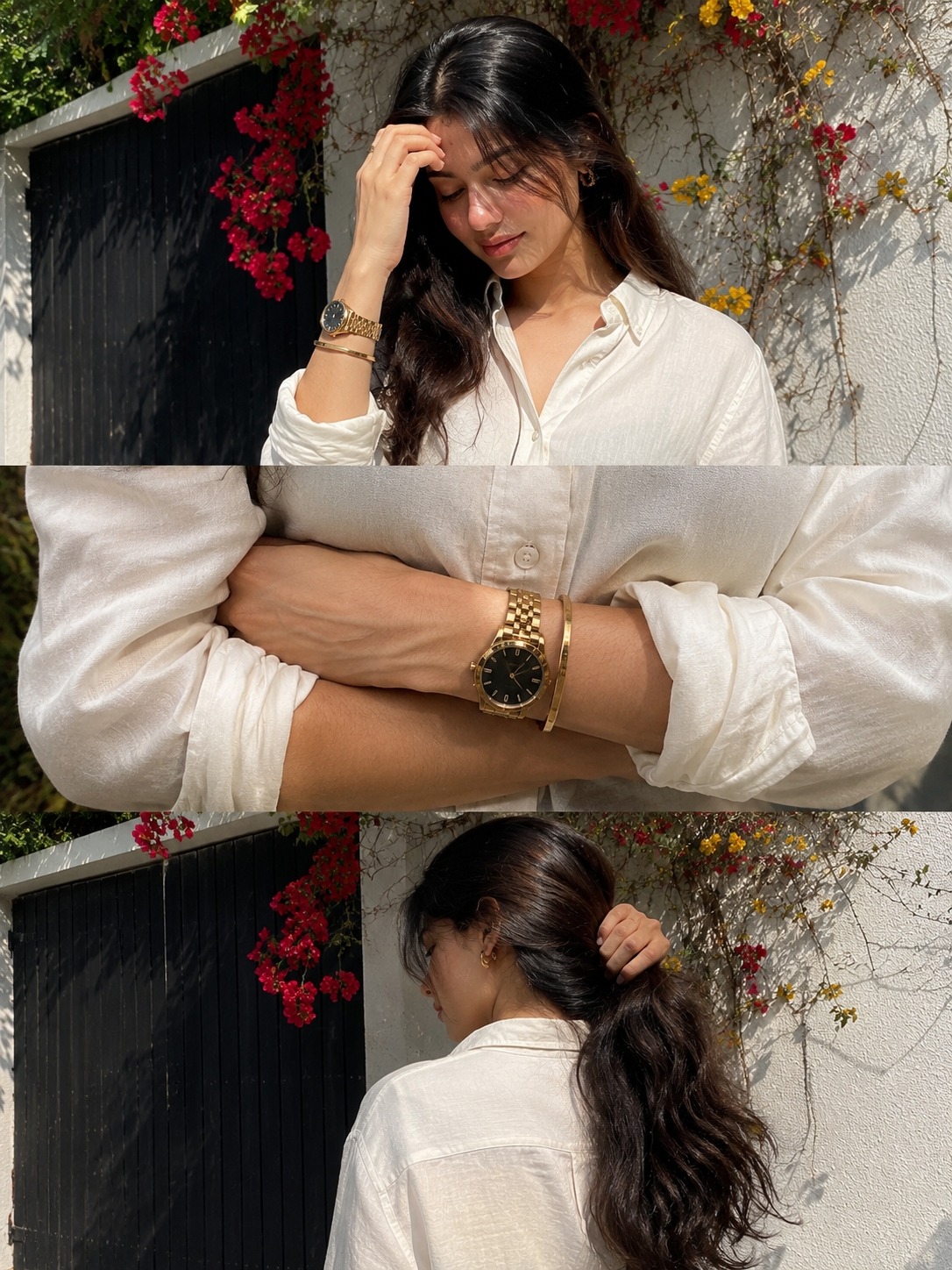
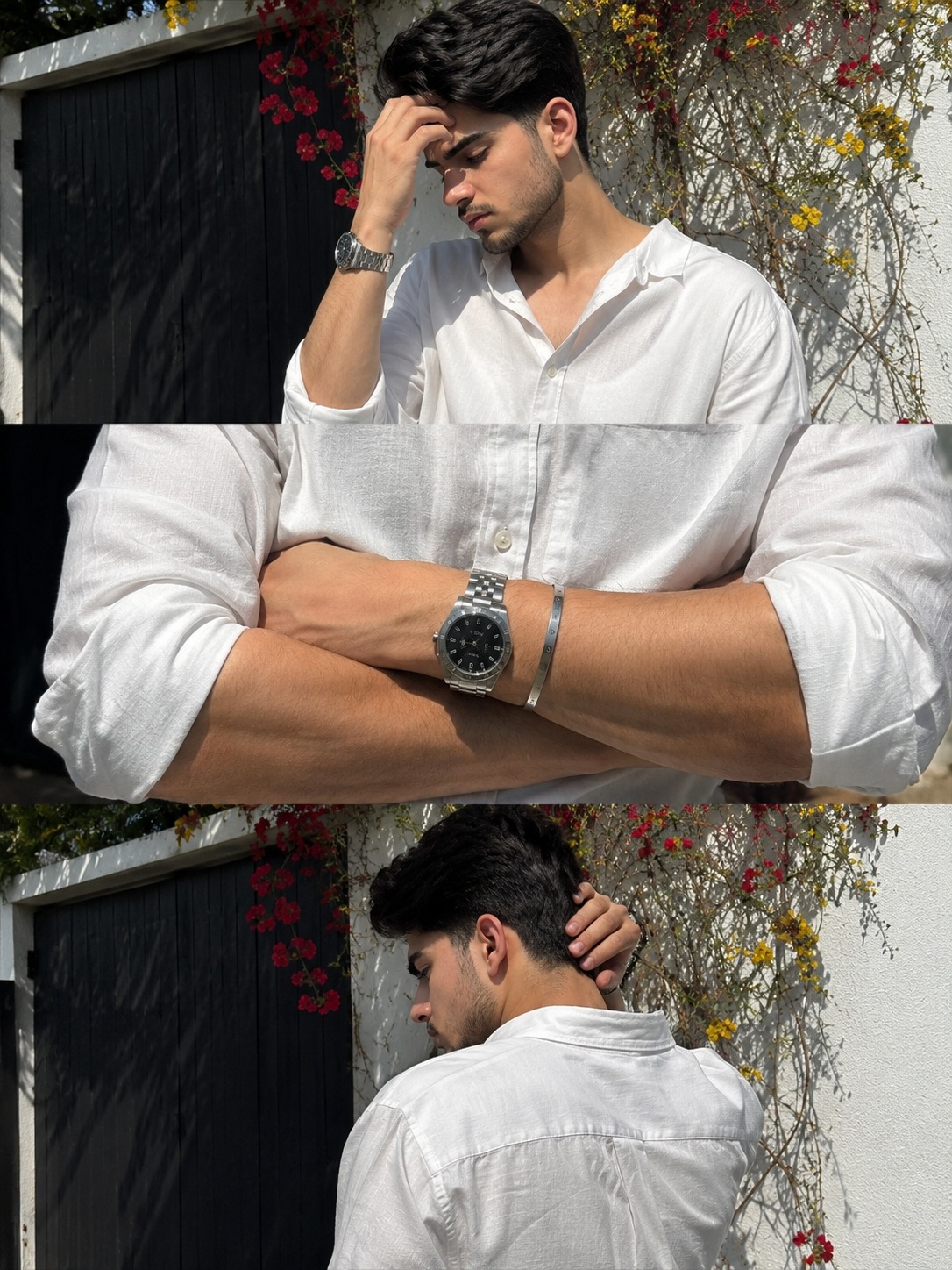
Trending Collage White Outdoor Photo Editing Prompt
By Prompt Scene ·
Trending collage white outdoor photo editing prompts are becoming very popular on Instagram, Pinterest, and TikTok. These edits look simple, clean, and highly aesthetic because of their natural lighting, white wall backgrounds, and realistic candid poses. Many creators are now using AI prompts to create professional-looking collage photos in just a few minutes.
The best thing about this editing style is its realistic smartphone photography feel. The combination of white outdoor backgrounds, dark gates, flowers, soft shadows, and natural sunlight creates a premium cinematic look without heavy editing. That’s why this trend is getting huge attention on social media.
In this article, I will show how go make this type of trending white outdoor collage photo editing prompt, how it works, and why people are using it to create ultra-realistic iPhone-style photos for reels, posts, and profile pictures.
Use my uploaded image as reference for the same person, same facial features and skin tone. Ultra-realistic iPhone 15 Pro Max 3-frame collage (vertical stack), candid shots taken seconds apart. Same person, same outfit, same location.
background: Pure white outdoor boundary wall and a dark gate. Red and yellow climbing flowers on the wall.
Top frame: upper body shot, subject slightly turned sideways, head tilted down with one hand touching forehead, natural thoughtful expression, messy medium-length hair falling forward.
Middle frame: tight crop of forearms crossed in front, focus on viens, wristwatch and bracelet, visible shirt wrinkles, real skin texture and veins, no face.
Bottom frame: back/side angle of subject near the same wall and gate, one hand raised to the back of head, relaxed posture, head slightly down, part of jawline/side profile still visible (face not fully hidden).
Outfit: relaxed fit off-white linen button down shirt with sleeves rolled to forearms, minimal accessories including a premium wristwatch and metal bracelet.
Lighting: natural daylight with slightly harsh highlights and uneven shadows from one side, realistic exposure.
Shot handheld on smartphone with slight tilt, imperfect framing, mild grain, natural colors. No filters, no cinematic grading, raw candid realistic phone photography. 4x5 RATIO
Use my uploaded image as the exact facial reference for the same person — preserve identical facial structure, hairstyle texture, skin tone, body proportions, expression style, and natural imperfections. Create an ultra-realistic iPhone 15 Pro Max candid 3-frame vertical collage, shots captured seconds apart like spontaneous street-fashion photography. RAW unedited smartphone aesthetic, emotionally cinematic but still natural and believable.

Location & Background:
Bright outdoor luxury residential setting with a pure matte white boundary wall and a tall dark charcoal-black metal gate. Natural red and yellow climbing bougainvillea flowers spread across the wall with realistic branches, leaves, shadows, and sunlit texture. Soft dust particles in sunlight, subtle depth from background foliage, slightly uneven wall texture for realism.

Frame 1 (Top Shot):
Upper-body portrait, subject standing slightly sideways near the wall, head tilted down naturally with one hand touching forehead. Thoughtful calm expression, relaxed jawline, soft lips, eyes partially lowered. Medium-length messy hair falling naturally across forehead from sunlight breeze. Strong sunlight from one side creating harsh realistic highlights and imperfect facial shadows. Shirt fabric catching light naturally with realistic linen texture and folds. Slight overexposure on bright areas like authentic phone HDR.

Frame 2 (Middle Shot):
Tight cinematic crop of crossed forearms only, no face visible. Focus on realistic veins, skin pores, arm hair, subtle tan gradients, rolled sleeve wrinkles, premium stainless steel wristwatch, and minimal metal bracelet. Extremely detailed linen fabric texture with compression wrinkles, realistic skin shine from sunlight, shallow depth of field, handheld focus imperfection like accidental candid capture.

Frame 3 (Bottom Shot):
Back/side angle of the same subject near the same wall and gate. One hand raised behind head holding hair slightly. Relaxed posture, shoulders loose, head tilted downward. Small portion of jawline and side profile still visible, face not fully hidden. Natural hair movement, realistic neck shadows, sunlit ear edge glow, soft shirt creases across back. Flowers and gate remain visible in background continuity.

Outfit:
Relaxed-fit off-white premium linen button-down shirt, slightly oversized, sleeves rolled naturally to forearms, subtle wrinkles and transparency in sunlight. Minimal luxury styling with elegant wristwatch and sleek metal bracelet only.

Lighting & Camera Feel:
Natural harsh daylight around golden afternoon, realistic smartphone dynamic range, uneven exposure, tiny blown highlights, soft shadow clipping, mild sensor grain, realistic skin texture, subtle motion blur from handheld movement, slight tilt framing, imperfect composition, authentic iPhone 15 Pro Max 4K portrait realism. No beauty retouching, no cinematic color grading, no filters, no AI-art look. Pure candid luxury lifestyle photography aesthetic.

Style Keywords:
ultra realistic, RAW iPhone photography, handheld candid, luxury minimal aesthetic, natural skin texture, realistic daylight shadows, editorial street-style realism, soft wind movement, imperfect framing, authentic smartphone exposure, premium fashion candid, 85mm portrait compression look, shallow depth of field, DSLR realism mixed with iPhone processing, cinematic realism without filters.

Aspect Ratio:
4:5 vertical collage, stacked triptych layout, ultra high detail, realistic smartphone sharpness.
White outdoor collage photo editing prompts are one of the easiest ways to create stylish and realistic social media photos. With the right prompt, you can generate natural-looking collage images that feel professional while still keeping the raw smartphone photography vibe.
This trend is perfect for anyone who wants aesthetic Instagram photos without expensive cameras or advanced editing skills. Just use a detailed AI prompt, choose the right reference image, and create cinematic collage photos in seconds.
As You know Ai Photo Editing is continuously Growing . So if you want your photos to stand out online, this trending editing style is definitely worth trying.
Transform the uploaded photograph into a premium minimalist editorial collage inspired by luxury travel magazines, contemporary fashion editorials, and artistic outdoor photography FORMAT & COMPOSITION: Create a strict 3:4 vertical canvas. Use a warm ivory/off-white background with subtle paper texture and generous negative space Place a large, clean-edged vertical rectangular crop of the original
Place this person in the second photo in a realistic manner and adjust them to match the second photo; do not change anything else. Keep the background exactly as it is-do not alter it at all-and do not change the face. Enhance the image to 8K quality and set the aspect ratio to 3:4. And Backgroud ke accoding person size adjust
Create a cinematic 4K, highly detailed, photorealistic video by transferring the EXACT dance movements, body motion, performance, timing, expressions, and camera movements from the REFERENCE VIDEO onto the person shown in the TARGET IMAGE. Completely replace the original main dancer with the person from the TARGET IMAGE. Preserve the target person's exact facial identity, facial features, skin ton
Transform the uploaded mirror selfie into a luxury LED Mirror portrait. Replace the existing mitor frame with an elegant irregular organic shape mirror 1,832 featuring a soft warm golden LED Backlight glow around entire edge .keep the subject same
Create a **10-second photorealistic image-to-video recreation of the uploaded reference video**. ### REFERENCE PRIORITY — CRITICAL Use the uploaded references as follows: **REFERENCE IMAGE 1 — MY PHOTO** Use this as the ONLY identity reference for the main person. Preserve my exact face, facial proportions, eyes, eyebrows, nose, lips, jawline, skin tone, hairstyle and overall identity throughout t
Video-to-video character replacement. Keep @Video 1 exactly the same: same handheld iPhone camera movement and shake, same framing, timing, red backstage lighting, background, crowd, bodyguards, and the fan in the foreground holding the phone and the big DSLR lens. Do not change anyone else. Replace only the main man in the center (the one who walks in, talks to the fan and laughs) with the person
MASTER PROMPT — Ultra-Realistic Bridal Nail Art Car Selfie (9:16) Use the uploaded selfie as the STRICT FACIAL IDENTITY REFERENCE. Preserve the person's exact facial features, natural skin tone, eyes, nose, lips, face shape, age, and realistic skin texture. Do not beautify, reshape, or alter the facial identity. REFERENCE COMPOSITION: Create an ultra-realistic golden-hour photograph of a beautiful
Use the reference video as the exact blueprint. Recreate the SAME actions, hand movements, facial expressions, camera movement, timing, framing and transition — do not invent or change anything. Start with the first reference image as the opening look, then transition into the second reference image at the EXACT same moment and using the EXACT same transition style as the reference video. In the s