Top 10 Instagram Viral ChatGPT Prompts For Photo Editing
By Prompt Scene ·
Freinds you have noticed that in recent time ChatGPT generated AI photo are going very viral on Instagram. If you want to create those viral ChatGPT photo so this will be easy for you because in this post I will give 10 best ChatGPT photo editing prompts for boys and girls.
The main reason of going viral of these photos is ChatGPT generated very high quality and realistic image.
I have crafted these prompts very carefully to get highly accurate output from ChatGPT.
Let’s continue with more details on how to create your own AI photo using ChatGPT and also how to use these prompts for best results.
ChatGPT Photo Editing Prompts Trending
Just Click on “prompt” automatically prompt will be copied.
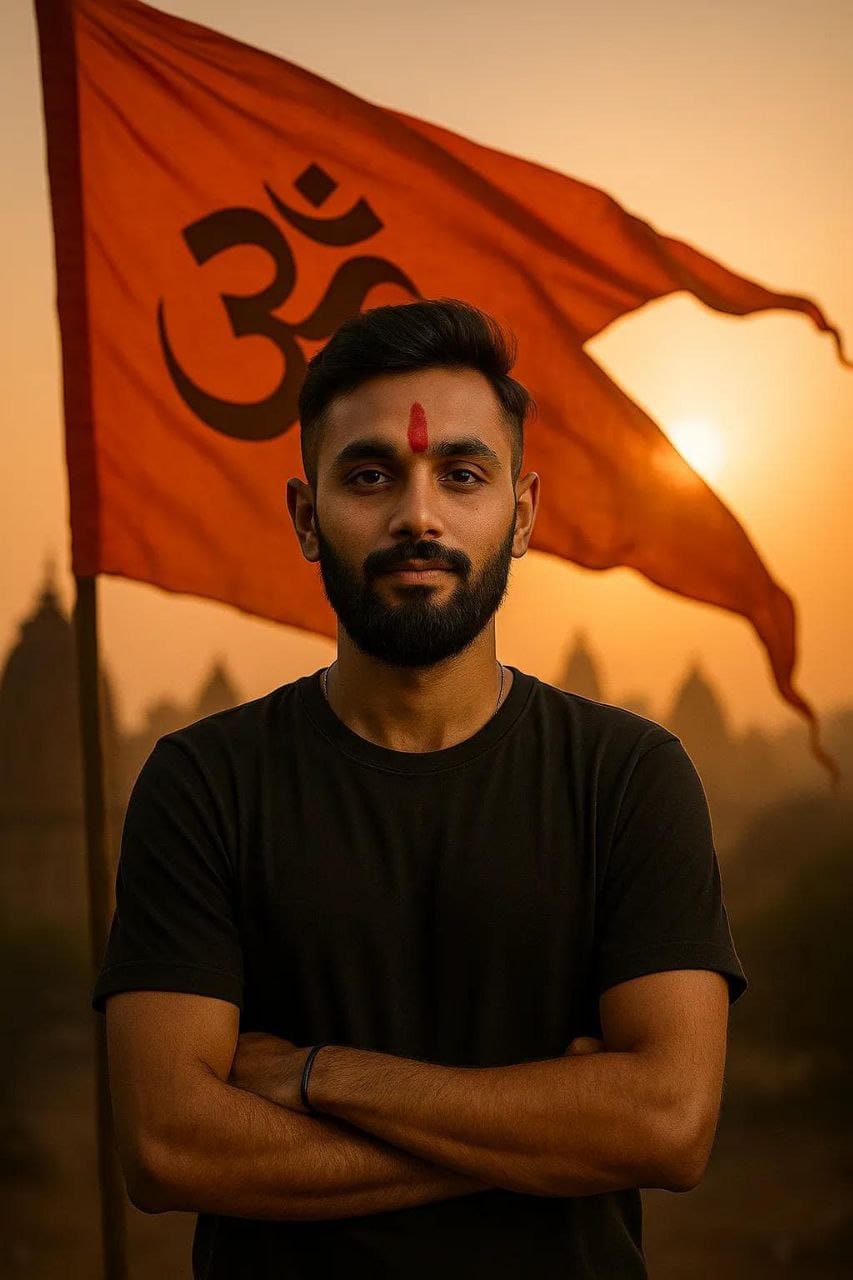
A super-realistic 8K portrait of a confident young Hindu man standing proudly, with a calm yet powerful expression. He is wearing a simple modern outfit (like a black or white shirt), no religious attire or beads, but has a striking red tilak on his forehead symbolizing devotion. Behind him, a large saffron Hindu flag (Bhagwa Dhwaj with Om symbol) is waving in the wind. The background features warm, glowing sunlight and faint silhouettes of ancient Hindu temples.
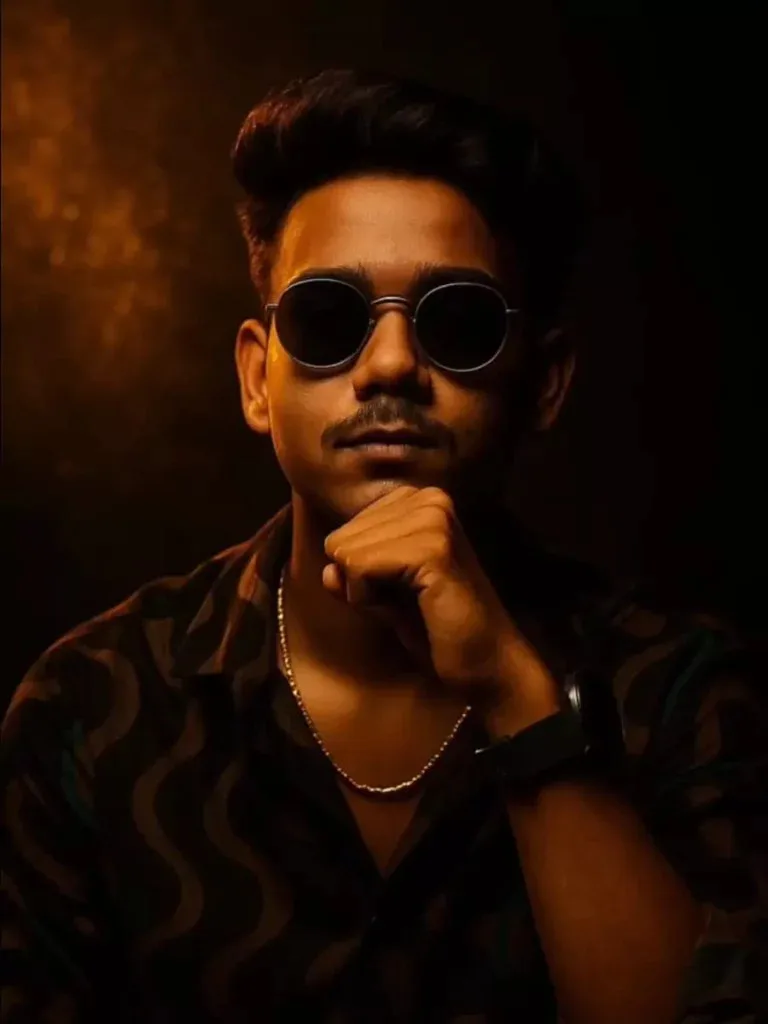
A modern black watch on his wrist. His pose is stylish and bold, with one fist gently raised near his chin. The background features warm, textured golden particles illuminated by a side light, blending into deep shadows for a moody, studio-style atmosphere. The lighting is soft but directional, creating strong highlights and shadows on the face. Ultra-realistic, high-resolution, 85mm lens look, shallow depth of field, professional fashion editorial lighting.
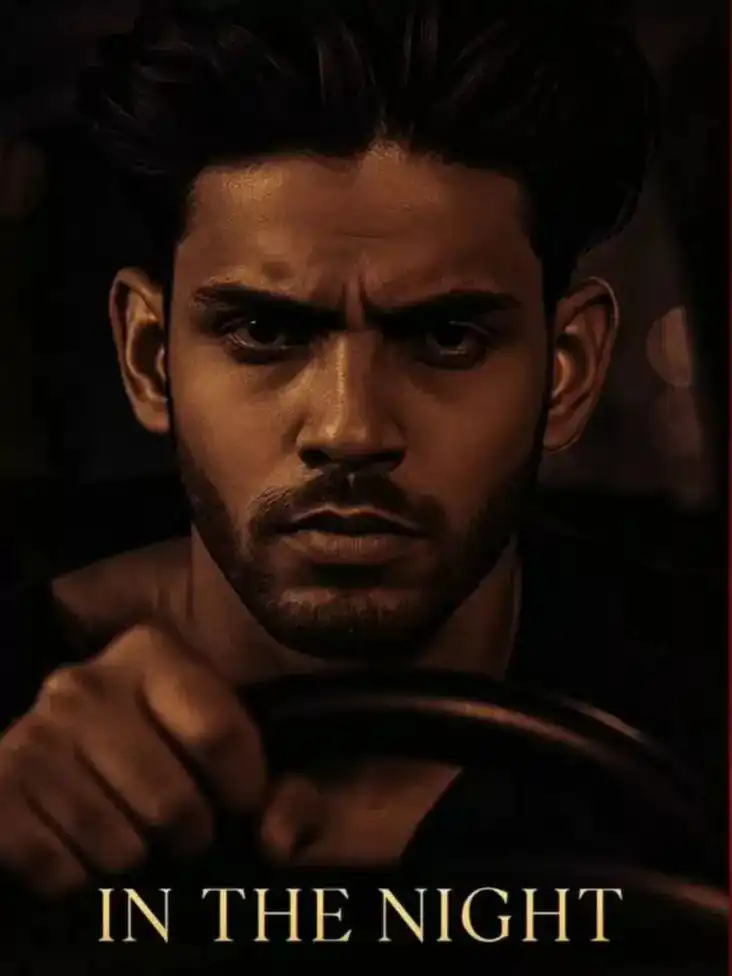
The steering wheel with a serious expression, his face partially shadowed. Replace the driver’s face with the face from the uploaded image, keeping the facial features exactly the same. A “Neo-noir” thriller vibe, high contrast lighting, shallow depth of field, ultra-realistic, photographed through the car window. Text at the bottom reads “IN THE NIGHT” in subtle, elegant font.
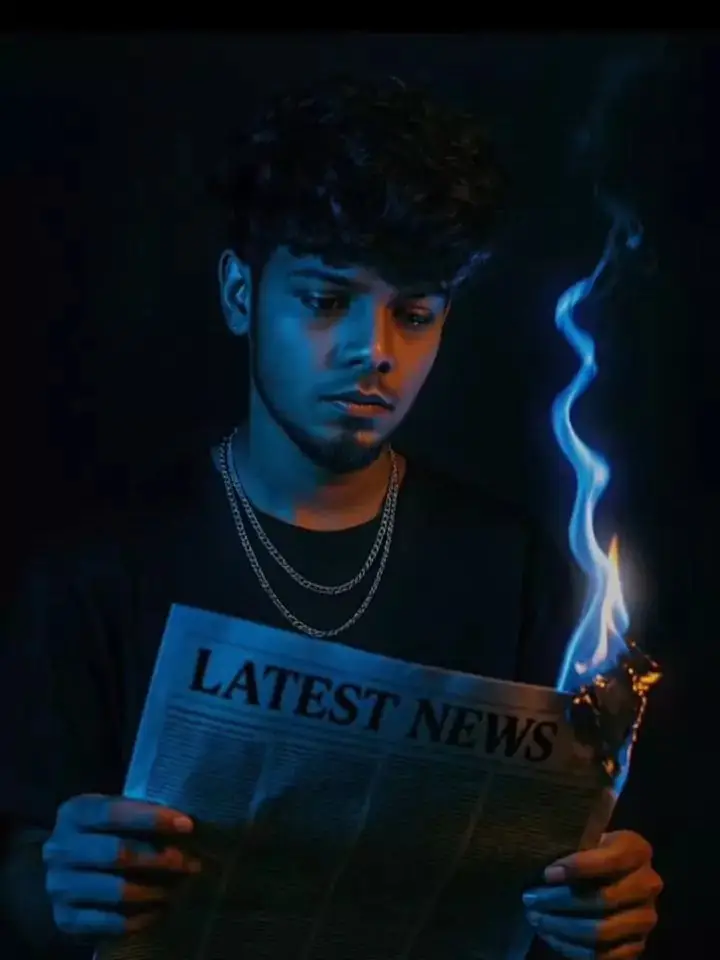
Person standing against a black background. The person is holding a newspaper labeled ‘LATEST NEWS’, which is partially on fire at one corner, with blue flames and a faint smoke trail. The fire should be stylized and visually striking. The lighting on the person should be moody and cinematic, primarily from the blue fire, casting blue highlights and shadows across the face and hands. The subject should wear a black shirt and layered silver chains for a bold, modern look. The expression should be serious and contemplative as the person looks down at the burning newspaper. The atmosphere should be intense and mysterious
Just Click on “prompt” automatically prompt will be copied.
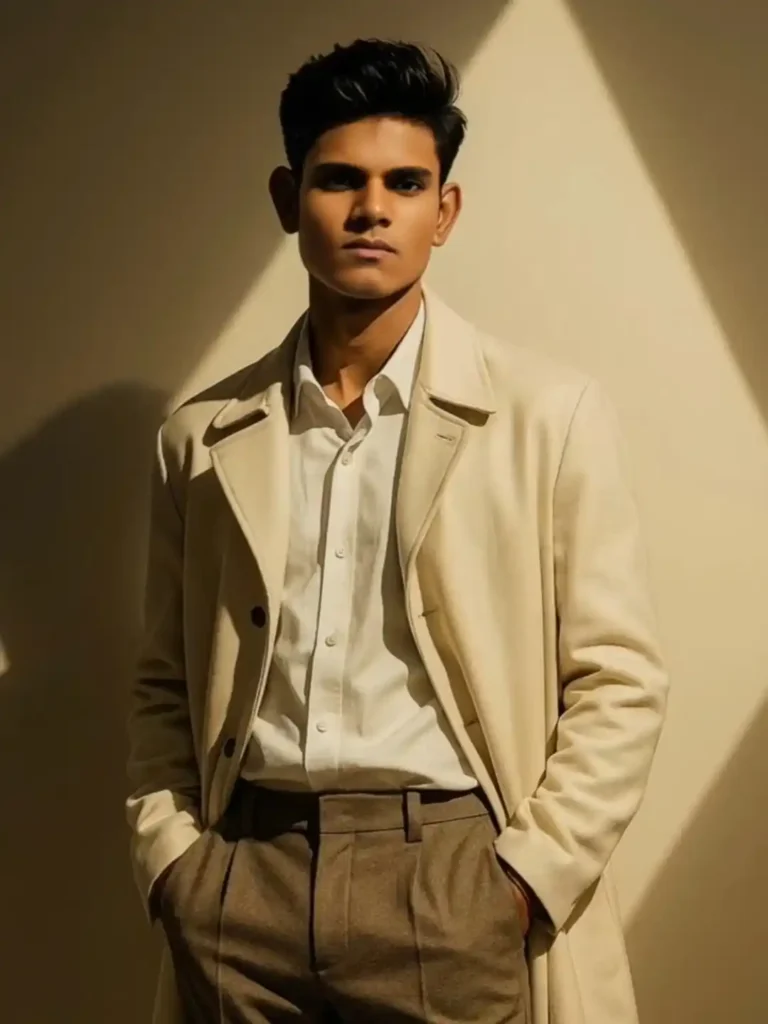
me poses confidently under dramatic lighting. I wear a cream-colored trench coat over a white button-up shirt and taupe trousers, my hands casually tucked into my pockets. A sharp triangular beam of light is projected on the wall behind me, casting bold shadows and adding a cinematic, modern flair to the scene. My expression is calm and confident, with a minimalist, high-fashion editorial vibe, captured in ultra-high
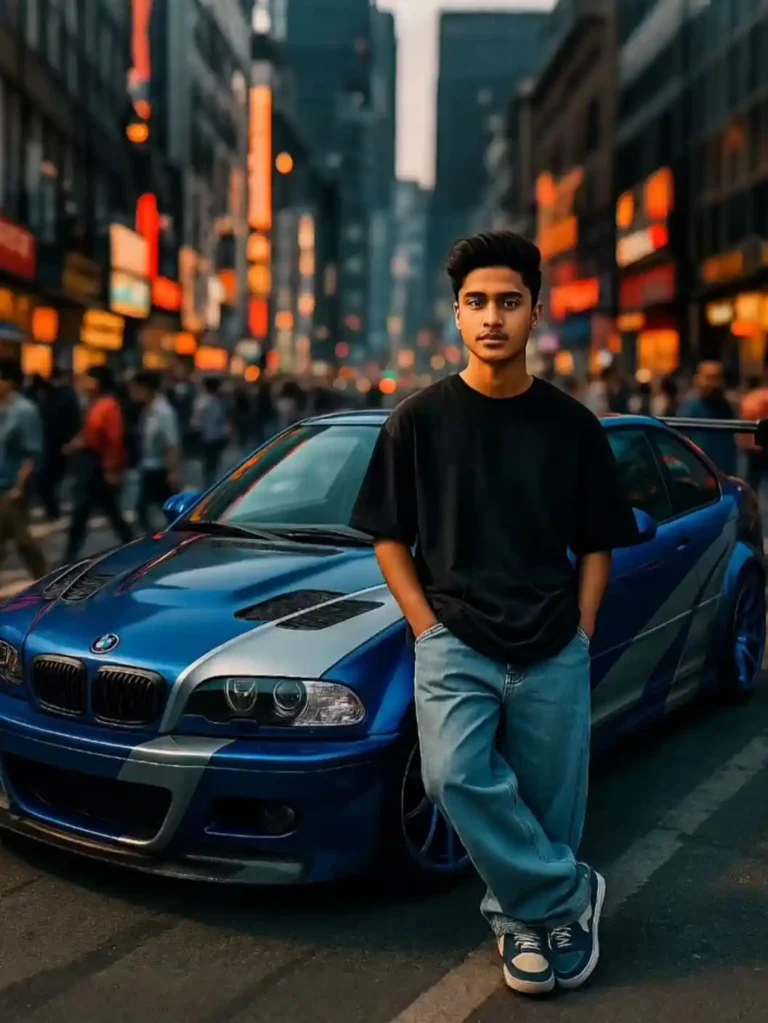
Visualise me as A young man wearing drop shoulder t-shirt and baggy jeans confidently leaning against my customised BMW E46 M3. The car is modified and blue and silver paintjob is done modernly street racing aesthetic. I am in a middle of a busy Phaka city road where people are rushing in motion. The style is inspired bya street racing game Need for speed.
A young man with dark hair(maintain exact face and skin tone with sharp features) wearing a black hoodie sits in a rustic wooden booth, staring intensely at the camera with one hand supporting his chin and the other reaching forward as if performing telekinesis. Dozens of playing cards fly around him in mid-air, captured n dynamic slow-motion with motion blur. The background shows vertical wooden panels and a framed photo of a man playing cards.
Just Click on “prompt” automatically prompt will be copied.
Many people ask me how to use ChatGPT to generate AI images. So here’s a step-by-step guide for you.
First Step: Use ChatGPT Plus or Pro Plan You need to have access to GPT-4 or GPT-4.5 with image tools enabled. If you are using free plan, image generation may not work. So upgrade to ChatGPT Plus to get full features.
Second Step: Choose Your Prompt From the list of AI photo editing prompts I will give you, copy the one you like. You can change details like gender, age, background, outfit, hairstyle etc. according to your choice.
Third Step: Add a Reference Photo (Optional but Best) You can upload your own photo in ChatGPT and ask it to generate similar image in AI style using the prompt. This gives most realistic and personal results. Your face, features, and style are copied better.
Fourth Step: Download and Share After generating your photo, just save it and share on Instagram, Snapchat, Threads, or wherever you like. Make sure to use trending hashtags like #chatgptai, #aiphoto, #aestheticedit etc.
A lot of people just copy the prompt but forget the little details. Here are few tips I have learned after trying 100+ AI photos.
Use your own photo as reference for best results. ChatGPT makes it look more like you.
Change the background, lighting and expression to match trending styles.
Add accessories like sunglasses, jewelry, or props.
Use portrait orientation if you’re planning to post on Instagram Reels or Stories.
Use natural poses – not too stiff or robotic.
Try cinematic filters like soft blur, lens flare, golden hour glow etc.
Is ChatGPT the Best AI Tool to Generate Viral Photos?
Yes. Right now, ChatGPT with image generation tools is one of the best platforms because:
It understands your prompt in detail.
It can use your photo for reference.
It gives very realistic, clear and high-res photos.
You don’t need any editing knowledge.
You might have seen many creators posting ChatGPT-generated AI photos with captions like “AI made me look like this” or “This is not me, this is AI”. These posts are going super viral because people are amazed by how real the photo looks.
Best Hashtags to Use for AI Photo Posts
If you want your photo to go viral, use some trending and popular hashtags. Here are few:
#chatgptai
#aiphotography
#aestheticphoto
#chatgptedits
#viraledit
#aiphotodump
#trendingai
#aiboylook
#aigirlpic
#explorepage
Use 5 to 10 hashtags that match your photo style.
Related Questions People Ask About ChatGPT AI Photos
Let me answer some commonly searched queries in simple words:
Can ChatGPT edit my photo?
Yes, ChatGPT with image tools can take your photo and apply edits or generate a new one using it as reference. You just upload the image and give your prompt.
Can ChatGPT make AI images?
Yes, ChatGPT can generate AI photos from just a text prompt or from your photo plus a prompt. Results are very realistic if your prompt is clear.
Is it free to use ChatGPT for AI photo generation?
It depends. Free version may not have image tools. For best AI photo generation, use ChatGPT Plus which gives access to GPT-4 with image capability.
Can I use ChatGPT photos for Instagram?
Yes, you can post AI photos on Instagram. Many influencers are already doing it and going viral. Just make sure you follow platform guidelines and give credit if required.
Final Words
If you are someone who wants to go viral on Instagram or just want to see yourself in new style, then AI photo editing using ChatGPT is the best and easy option.
You don’t need to hire any editor or buy expensive presets. Just a prompt and a photo is enough.
I hope this guide helped you understand how to create AI photo using ChatGPT.
Don’t forget to try the 10 prompts I gave you and see which one goes most viral for you. You can even remix them or combine 2 prompts into one for unique results.
If you want more such viral prompts, comment below or message me and I will share Part 2 of this series soon.
Would you like me to turn this into a PDF guide or Instagram carousel post format next?
Transform the uploaded photograph into a premium minimalist editorial collage inspired by luxury travel magazines, contemporary fashion editorials, and artistic outdoor photography FORMAT & COMPOSITION: Create a strict 3:4 vertical canvas. Use a warm ivory/off-white background with subtle paper texture and generous negative space Place a large, clean-edged vertical rectangular crop of the original
Place this person in the second photo in a realistic manner and adjust them to match the second photo; do not change anything else. Keep the background exactly as it is-do not alter it at all-and do not change the face. Enhance the image to 8K quality and set the aspect ratio to 3:4. And Backgroud ke accoding person size adjust
Create a cinematic 4K, highly detailed, photorealistic video by transferring the EXACT dance movements, body motion, performance, timing, expressions, and camera movements from the REFERENCE VIDEO onto the person shown in the TARGET IMAGE. Completely replace the original main dancer with the person from the TARGET IMAGE. Preserve the target person's exact facial identity, facial features, skin ton
Transform the uploaded mirror selfie into a luxury LED Mirror portrait. Replace the existing mitor frame with an elegant irregular organic shape mirror 1,832 featuring a soft warm golden LED Backlight glow around entire edge .keep the subject same
Create a **10-second photorealistic image-to-video recreation of the uploaded reference video**. ### REFERENCE PRIORITY — CRITICAL Use the uploaded references as follows: **REFERENCE IMAGE 1 — MY PHOTO** Use this as the ONLY identity reference for the main person. Preserve my exact face, facial proportions, eyes, eyebrows, nose, lips, jawline, skin tone, hairstyle and overall identity throughout t
Video-to-video character replacement. Keep @Video 1 exactly the same: same handheld iPhone camera movement and shake, same framing, timing, red backstage lighting, background, crowd, bodyguards, and the fan in the foreground holding the phone and the big DSLR lens. Do not change anyone else. Replace only the main man in the center (the one who walks in, talks to the fan and laughs) with the person
MASTER PROMPT — Ultra-Realistic Bridal Nail Art Car Selfie (9:16) Use the uploaded selfie as the STRICT FACIAL IDENTITY REFERENCE. Preserve the person's exact facial features, natural skin tone, eyes, nose, lips, face shape, age, and realistic skin texture. Do not beautify, reshape, or alter the facial identity. REFERENCE COMPOSITION: Create an ultra-realistic golden-hour photograph of a beautiful
Use the reference video as the exact blueprint. Recreate the SAME actions, hand movements, facial expressions, camera movement, timing, framing and transition — do not invent or change anything. Start with the first reference image as the opening look, then transition into the second reference image at the EXACT same moment and using the EXACT same transition style as the reference video. In the s