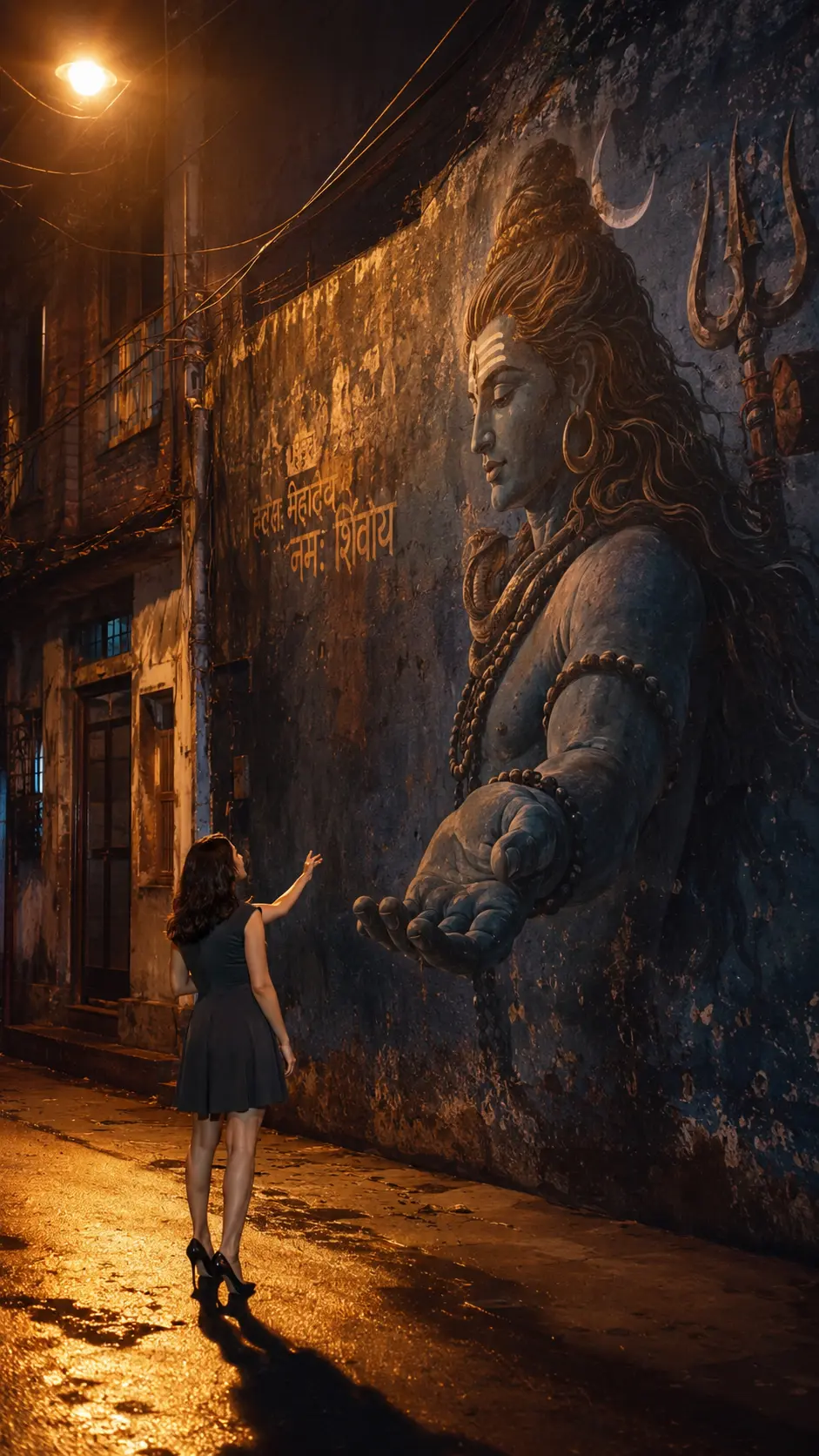
Handshake With Lord Mahadev Photo and Video Prompt
By Prompt Scene ·
▶ Result generated with this prompt
Have you seen that viral video where a boy is standing in front of a huge Lord Shiva mural on a wall — and the moment he extends his hand, Shiva’s hand slowly comes out of the wall to hold it?
It looks absolutely magical. And the best part? You can make one with your own photo. No special skills needed.
I tried this myself, and honestly, the result was stunning. In this guide, I’ll show you exactly how to do it — step by step — using just ChatGPT and Google Flow AI.
What Is the Lord Shiva Handshake Trend?
This is one of the most emotional and spiritual AI video trends on Instagram right now.
Here’s what happens in the video:
A person stands in a dark Indian alley, looking at a large Shiva mural painted on an old wall
They slowly raise their hand toward the mural
Shiva’s hand appears to come out of the wall in 3D
The two hands meet — it feels divine and cinematic
People are loving this because it connects faith with technology. Even though everyone knows it’s made with AI, they still feel something watching it. That’s the power of a good idea.
What You Need Before Starting
A full body photo of yourself (your whole body should be visible — not just face)
A ChatGPT account (free works, but GPT-4o gives better image quality)
A Google Flow AI account (go to labs.google/flow)
A good internet connection
That’s it. No app downloads. No complicated tools.
Step 1 — Create the AI Photo Using ChatGPT
First, we create the base image. This photo will show you standing in front of a Lord Shiva mural in a cinematic night setting.
Send it and wait for ChatGPT to generate the image
Download and save the image to your phone or computer
Important: Use a photo where your full body is clearly visible. The better your original photo, the better the final result.
📋 Photo Prompt (Copy This Exactly)
Use uploaded photo for exact face & outfit (no changes). Ultra-realistic DSLR night shot, vertical 9:16, full body. Subject small, bottom-left, side/back profile, camera slightly behind, looking up. Huge Lord Shiva mural on old wall (back view, long hair, trishul), painted style but realistic. COLOR & LIGHTING (MOST IMPORTANT): Warm orange sodium streetlights casting golden highlights. Deep blue & teal shadows on wall and skin. Muted cinematic tones (no bright colors). Wet ground reflecting orange light. Soft glow from streetlight (top corner). Dark moody contrast, slightly desaturated. Natural haze + low-light grain. Skin and wall catching warm highlights + cool shadows balance. 3D Shiva hand emerging from wall, same blue tone, realistic shadows. No touch, small gap between hands (spiritual feel). Old Indian alley, dark, cinematic, realistic textures. No glow effects, no fantasy, no CGI — pure real photo look. 8K, ultra-detailed, cinematic, realistic.
Full body photo is a must. If only your face or half body is visible, the AI won’t place you properly in the scene.
Use a plain background photo if possible. It helps ChatGPT focus on you.
If the first result doesn’t look right, try again — sometimes you need 2–3 attempts to get a great image.
Google Flow AI may take a few minutes to generate the video. Don’t close the tab while it’s processing.
After downloading, you can add a devotional song in the background using CapCut before posting on Instagram Reels.
Why This Trend Is Going Viral
Anything related to faith and spirituality connects deeply with people — especially in India. Lord Shiva videos, Ram Navami edits, Jai Mahakal content — all of these consistently get millions of views.
This trend combines:
A cinematic AI photo that looks real
A smooth animation that creates the illusion of Shiva reaching out to you
An emotional story — it feels like a blessing
When something touches people’s belief and also looks beautiful, it goes viral. That’s exactly what this does.
Conclusion
This Lord Shiva handshake AI video is one of the most beautiful trending edits I’ve seen recently. And the good news is — it’s genuinely easy to create once you have the right prompts.
All you need is your photo, ChatGPT, and Google Flow AI. Follow the steps above, copy the prompts exactly, and you’ll have your own divine video ready to post.
If you try this and it works, I’d love to see your result. Share it in our Telegram community — the link is on Prompt Scene.com.
Har Har Mahadev 🙏
Frequently Asked Questions (FAQ)
Q1. Can I use a face-only photo instead of a full body photo? No. For this video to look good, your whole body must be visible in the original photo. A face-only photo won’t work well with this prompt.
Q2. Is ChatGPT free to use for image generation? ChatGPT’s free plan has limited image generation. For best results, GPT-4o (available on ChatGPT Plus) gives sharper, more realistic images.
Q3. Is Google Flow AI free? Yes, Google Flow AI is currently free to use. You just need a Google account to sign in at labs.google/flow.
Q4. My video doesn’t look realistic. What went wrong? Two common reasons: (1) Your original photo wasn’t a clear full-body shot, or (2) the photo prompt wasn’t followed exactly. Try again with a better photo and copy the prompts carefully.
Q5. Can I make this video for someone else — like my parents or friends? Absolutely! Just use their full-body photo and follow the same steps. It makes a very meaningful and touching gift.
Q6. Can I post this on Instagram Reels? Yes! This type of video does very well on Instagram Reels. Add a Mahadev bhajan or devotional background music using CapCut before posting for best engagement.
Q7. How long does Google Flow AI take to generate the video? Usually 2–5 minutes. Just keep the tab open and don’t refresh the page while it’s generating.
Transform the uploaded photograph into a premium minimalist editorial collage inspired by luxury travel magazines, contemporary fashion editorials, and artistic outdoor photography FORMAT & COMPOSITION: Create a strict 3:4 vertical canvas. Use a warm ivory/off-white background with subtle paper texture and generous negative space Place a large, clean-edged vertical rectangular crop of the original
Place this person in the second photo in a realistic manner and adjust them to match the second photo; do not change anything else. Keep the background exactly as it is-do not alter it at all-and do not change the face. Enhance the image to 8K quality and set the aspect ratio to 3:4. And Backgroud ke accoding person size adjust
Create a cinematic 4K, highly detailed, photorealistic video by transferring the EXACT dance movements, body motion, performance, timing, expressions, and camera movements from the REFERENCE VIDEO onto the person shown in the TARGET IMAGE. Completely replace the original main dancer with the person from the TARGET IMAGE. Preserve the target person's exact facial identity, facial features, skin ton
Transform the uploaded mirror selfie into a luxury LED Mirror portrait. Replace the existing mitor frame with an elegant irregular organic shape mirror 1,832 featuring a soft warm golden LED Backlight glow around entire edge .keep the subject same
Create a **10-second photorealistic image-to-video recreation of the uploaded reference video**. ### REFERENCE PRIORITY — CRITICAL Use the uploaded references as follows: **REFERENCE IMAGE 1 — MY PHOTO** Use this as the ONLY identity reference for the main person. Preserve my exact face, facial proportions, eyes, eyebrows, nose, lips, jawline, skin tone, hairstyle and overall identity throughout t
Video-to-video character replacement. Keep @Video 1 exactly the same: same handheld iPhone camera movement and shake, same framing, timing, red backstage lighting, background, crowd, bodyguards, and the fan in the foreground holding the phone and the big DSLR lens. Do not change anyone else. Replace only the main man in the center (the one who walks in, talks to the fan and laughs) with the person
MASTER PROMPT — Ultra-Realistic Bridal Nail Art Car Selfie (9:16) Use the uploaded selfie as the STRICT FACIAL IDENTITY REFERENCE. Preserve the person's exact facial features, natural skin tone, eyes, nose, lips, face shape, age, and realistic skin texture. Do not beautify, reshape, or alter the facial identity. REFERENCE COMPOSITION: Create an ultra-realistic golden-hour photograph of a beautiful
Use the reference video as the exact blueprint. Recreate the SAME actions, hand movements, facial expressions, camera movement, timing, framing and transition — do not invent or change anything. Start with the first reference image as the opening look, then transition into the second reference image at the EXACT same moment and using the EXACT same transition style as the reference video. In the s