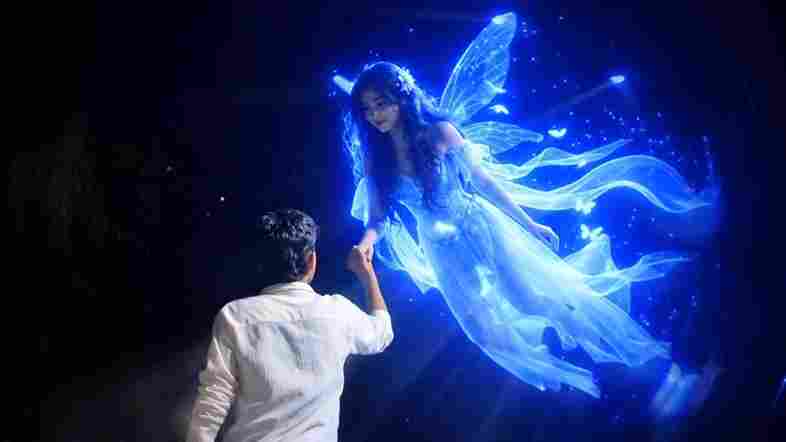
AI video generation has become much more advanced, and tools like Google Flow AI make it possible to turn simple ideas into cinematic videos.
One of the most popular concepts right now is creating a couple AI dance video using your own reference photos..
A cinematic ultra-realistic 4K/8K video (9:16) of a young man wearing a black textured blazer over a black button-down shirt and black trousers, barefoot, and a young woman with long open flowing hair wearing a teal-green long coat, a blue-and-grey striped scarf, black trousers, and beige ankle boots, performing an emotional expressive dance together on a dimly lit circular wooden stage, dramatic single spotlight illuminating them from above against a deep black background, theatrical premium cinematic look with rich full color grading — warm skin tones, deep blacks, and glowing blue-white stage light, not desaturated or dull, smooth fluid slow-motion quality throughout every movement. A small, subtle watermark reading 'NoorEditing07' stays fixed in the bottom corner throughout the entire video, minimal white or light-colored font, low opacity, appearing only once at all times.

CRITICAL: use the two uploaded reference photos as the exact identity source for each person — any person and any woman can upload their own individual reference photos to generate this video with their own likeness. Same faces, same exact facial features, same exact bone structure, same natural smooth clear skin with no blemishes or texture flaws, and the exact same body types and builds as shown in the uploaded photos, maintained precisely and identically in every single scene with absolutely zero facial drift, zero identity change, and zero morphing between scenes for either person. The face of each person must remain exactly the same from Scene 1 through Scene 7, never shifting, blending, or turning into a different-looking face at any point, even during fast movement, spins, or lifts. This must work accurately for any two people of any age or body type who upload their own reference photos — the generated faces, skin, and bodies must always match the uploaded photos exactly, never generic or different faces.

Scene 1: Wide shot — they hold hands and walk together smoothly onto the center of the dimly lit stage, her long hair flowing naturally over her shoulders, a single spotlight glowing above them, warm intimate connection, deep black backdrop, gentle unhurried pacing.

Scene 2: Medium shot — they stand facing each other, hands clasped together, gazing warmly into each other's eyes, her hair softly framing her face, soft spotlight illuminating their faces against the dark stage, calm smooth stillness.

Scene 3: Wide shot — they raise their joined hands together in a smooth joyful gesture, both smiling, spotlight glowing warmly above them, her hair catching the light, fluid graceful motion.

Scene 4: Dynamic full-body wide shot — he holds her close and smoothly lifts her as he spins her in one continuous fluid full 360-degree rotation around himself, her long open hair flying outward and swirling gracefully with the full turn, her teal coat and scarf flaring outward at the same time, her feet lifting off the ground as she completes the entire seamless circular rotation around him, both moving in perfect fluid sync on the wooden stage, camera smoothly circling to capture the complete 360-degree spin without any jarring motion.

Scene 5: Wide shot — they stand with arms spread wide apart while holding hands, leaning back smoothly in a joyful, free-spirited pose, her hair gently flowing with the motion, warm spotlight glowing above them.

Scene 6: Dramatic wide shot — he smoothly dips her gently backward in a graceful classic dance dip, her long hair cascading downward toward the floor as she leans back, one of her legs lifting gracefully off the ground with her boot pointed, her coat draping elegantly as he supports her fully with both arms in one fluid controlled motion, intimate romantic moment under the spotlight, then he smoothly and gently lifts her back upright.

Scene 7: Final emotional shot — he smoothly lifts her fully off the ground into his arms, cradling her securely, and rotates in one continuous fluid full 360-degree turn while carrying her, her hair and coat both flying outward gracefully throughout the entire seamless rotation, her legs lifting gracefully with the spin, both smiling warmly at each other, then as the rotation completes he gently and smoothly lowers her into a warm close embrace, her hair settling softly around her shoulders as they hug, one foot lifted off the ground, spotlight glowing softly around them, cinematic slow zoom-out to finish.

Overall style: same faces, same identities, same natural smooth skin, same exact body types for both people as shown in their uploaded reference photos, same black blazer-and-trousers outfit for him and teal-green coat with scarf and long open flowing hair for her consistent in every single scene, no outfit change, no identity, body, or facial change for either person in any scene, same real dimly lit circular stage location with dramatic spotlight throughout, smooth fluid graceful full-body dance movement including full seamless 360-degree spins, twirls, dips, and lifts exactly matching an expressive live dance performance, with her hair and coat both dynamically flying and flowing gracefully during every turn and spin, no jerky or abrupt motion anywhere, realistic skin and fabric texture, rich full premium cinematic color grading with warm tones, deep blacks, and glowing spotlight highlights — full natural color, not faded or desaturated — filmic depth and contrast, smooth cinematic transitions between poses, ultra-realistic premium 4K/8K quality, vertical 9:16 format, continuous emotional story flow from start to end, no scene skipped, only 7 scenes total exactly as described.

Watermark (final instruction): keep a single small, subtle, clean text watermark reading 'NoorEditing07' fixed in the same bottom corner position throughout the entire video, minimal white or light-colored font, low opacity, non-intrusive, appearing only once on screen at any given time.
With the right prompt and reference images, you can create a romantic, cinematic dance sequence featuring two people while keeping their appearance consistent throughout different scenes.
In this tutorial, you’ll learn how to use our Couple AI Dance Video Prompt in Flow AI and create a stylish vertical video that can be used for Instagram Reels, YouTube Shorts, or other social media platforms.
What Is a Couple AI Dance Video?
A couple AI dance video is an AI-generated video where two people appear together in a cinematic dance performance. Instead of filming the entire performance with a camera, you provide reference photos and a detailed text prompt describing the characters, location, clothing, movements, camera angles, and overall visual style.
The AI then uses those instructions to generate the video.
Our prompt is designed around a cinematic dance performance on a circular wooden stage. It includes dramatic lighting, slow-motion movements, expressive dancing, spins, dips, and a final emotional embrace.
The result is designed to look like a premium cinematic performance rather than a basic AI animation.
What You Need Before Starting
Before generating your video, prepare the following:
- One clear reference photo of the man
- One clear reference photo of the woman
- The Couple AI Dance Video Prompt
- Access to Flow AI
- A little patience for generating and refining the video
For the best results, choose reference photos where the faces are clearly visible and the lighting is reasonably good.
Avoid heavily edited photos, extreme angles, or images where the face is partially hidden.
How to Create a Couple AI Video in Flow AI
Step 1: Prepare Your Reference Photos
Start by selecting two photos.
The first photo should represent the male character, while the second should represent the female character.
Use photos that clearly show each person’s face. Since the prompt asks the AI to maintain character consistency, good reference images can help the model understand the appearance of each person.
You can use your own photos or photos of people who have given you permission to use their likeness.
Step 2: Open Flow AI
Open Flow and start a new video generation project.
Depending on the version of Flow you are using, the interface and available generation options may change over time. Look for the option that allows you to create a video using text instructions and reference images.
Upload the two reference photos when the interface provides the option.
The goal is to tell the AI which image represents each character so it can maintain their appearance during the video.
Step 3: Add the Couple AI Dance Prompt
Now copy the complete prompt from this article and paste it into the video generation prompt field.
The prompt contains detailed instructions about the characters, outfits, environment, lighting, camera movements, and seven different scenes.
One of the most important parts is the character-consistency instruction.
It tells the AI to maintain the same facial identity, appearance, body type, hairstyle, and clothing throughout the sequence.
However, keep in mind that AI video models can still produce small changes between frames. A detailed prompt can improve consistency, but no prompt can guarantee perfect identity preservation in every generated frame.
Understanding the 7 Scenes
The prompt is divided into seven scenes to create a complete visual story.
Scene 1 – Entering the Stage
The couple walks onto the center of a circular wooden stage while holding hands.
A single spotlight illuminates them against a dark background. The slow movement creates an intimate opening and establishes the cinematic atmosphere.
Scene 2 – Looking at Each Other
The second scene moves closer to the couple.
They face each other while holding hands and looking into each other’s eyes. This gives the video an emotional and personal feeling.
Scene 3 – Joyful Movement
The couple raises their joined hands and smiles.
This scene introduces more energy while maintaining the graceful dance style.
Scene 4 – 360-Degree Spin
This is one of the most dynamic parts of the prompt.
The man holds the woman and performs a smooth 360-degree rotation while carrying her. Her long hair, coat, and scarf move naturally with the motion.
The camera also moves around them to emphasize the full rotation.
Scene 5 – Open Dance Pose
The couple spreads their arms while holding hands and leans backward slightly.
The spotlight and dark background create a dramatic stage-performance look.
Scene 6 – Classic Dance Dip
The man gently supports the woman as she leans backward into a classic dance dip.
Her hair falls toward the floor while the coat creates additional movement. He then brings her smoothly back to an upright position.
Scene 7 – Emotional Ending
The final scene creates the emotional conclusion.
The man lifts the woman and rotates while carrying her before gently lowering her into a close embrace.
The camera slowly zooms out while the spotlight remains around them, giving the video a cinematic ending.
Why the Prompt Uses Detailed Instructions
A common mistake when generating AI videos is using a very short prompt such as:
“Create a romantic couple dancing together.”
Although this describes the basic idea, it doesn’t tell the AI enough about the scene.
Our prompt provides instructions for:
- Character appearance
- Clothing
- Facial consistency
- Stage design
- Lighting
- Camera movement
- Dance movements
- Hair and fabric motion
- Color grading
- Slow-motion movement
- Scene transitions
- Video aspect ratio
- Watermark placement
This additional information gives the AI a much clearer creative direction.
Recommended Video Settings
For Instagram Reels, Shorts, and similar platforms, a 9:16 vertical format is a good choice.
The prompt is designed around a cinematic vertical composition, allowing the full bodies of both characters to remain visible during the dance.
If Flow provides options for quality, choose the highest quality available to you.
You can also experiment with different generation settings if the first result doesn’t perfectly follow the choreography.
How to Improve AI Video Results
Don’t worry if your first generation isn’t perfect.
AI video generation can sometimes struggle with complicated movements such as lifts, spins, hands, feet, or fast hair movement.
If a scene looks unnatural, try regenerating it with simpler movement instructions.
For example, if the 360-degree lift creates unwanted motion, you can generate that particular scene again with a slower rotation and clearer camera instructions.
Using consistent reference images and keeping the clothing description unchanged can also help maintain character continuity.
Adding the NoorEditing07 Watermark
The prompt includes a small watermark reading “NoorEditing07”.
It is instructed to remain in the same bottom corner throughout the video with low opacity and a minimal appearance.
If your video generator doesn’t render text accurately, you can add the watermark afterward using a video editing application. This can often provide cleaner and more consistent results.
Final Thoughts
Creating a cinematic couple AI dance video with Flow AI can be a fun way to turn ordinary reference photos into a creative visual story.
The key is using a detailed prompt that clearly explains the characters, environment, choreography, camera movement, lighting, and visual style.
Our seven-scene Couple AI Dance Video Prompt is designed to provide that complete direction, from the couple entering the stage to the final emotional embrace.
For the best results, use clear reference photos, carefully follow the instructions in Flow, and regenerate individual scenes when the AI struggles with complex movements.
You can copy the full prompt above and experiment with different reference photos, outfits, stage environments, and cinematic styles to create your own unique couple AI video.
Tip: Always use photos and likenesses that you own or have permission to use, especially if you plan to publish the resulting video publicly.