Trending Car Roof Backflip AI Video Editing Prompt
By Prompt Scene ·
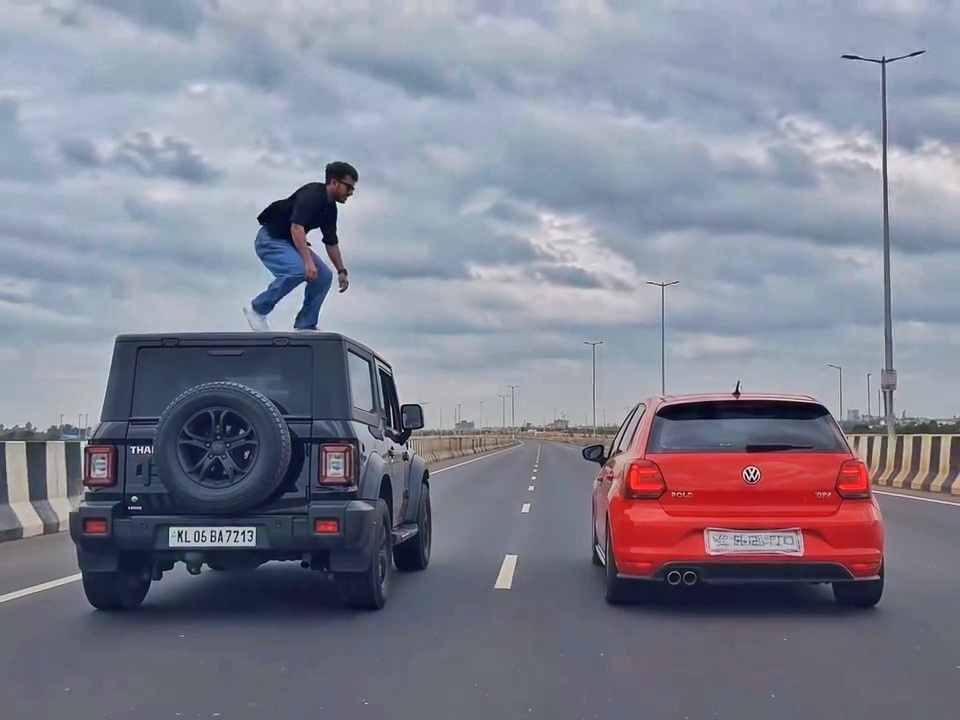
Trending Car Roof Backflip AI Video Editing is a creative AI video concept that turns a normal photo into an exciting cinematic action scene. In this trend, a person comes out from the roof of a moving black SUV, performs a dramatic backflip through the air, and lands on the roof of another moving car. The combination of realistic vehicles, fast movement, cinematic camera work, and action-style visuals makes this type of AI video perfect for short-form content. If you also want to create this unique Car Roof Backflip AI Video, you can use the prompt shared below with a compatible AI video generation tool.
Details of Car Roof Backflip AI Video Prompt
For this AI video, use a clear photo of yourself as the character reference and copy the prompt given below. The prompt creates a realistic cinematic action scene on a wide highway where a black SUV and a red hatchback drive parallel to each other. The person from your uploaded photo comes out through the roof of the black SUV, performs a dramatic backflip across the gap between the two cars, and lands on the roof of the red hatchback. The prompt also instructs the AI to maintain your facial identity, hairstyle, outfit, realistic vehicle details, natural movement, cinematic camera angles, lighting, shadows, and overall photorealistic quality.
How to Create Car Roof Backflip AI Video
To create this Car Roof Backflip AI Video, you can use Google Flow or Gemini. First, choose a clear, high-quality photo of yourself and upload it as the character reference. Open Flow AI or Gemini and select the video generation option. Upload your photo, then copy the Car Roof Backflip AI Video Editing Prompt from this page and paste it into the prompt box. If your tool supports video references, you can also upload a suitable reference video for the desired action and camera movement. After adding the required references and prompt, click Generate and wait for the video to be created. Once the video is ready, preview the result and generate another version if you want to improve the character, movement, or overall quality.
A rear-view, wide-angle cinematic shot on a wide highway under an overcast sky. A black SUV driving on the left lane and a red hatchback driving parallel on the right lane at medium speed. A young man emerges from the roof of the black SUV, stands up, and performs a dramatic acrobatic backflip through the air across the gap between the vehicles, successfully landing on top of the roof of the red hatchback. Photorealistic, high-octane action sequence, realistic lighting and dynamic camera tracking behind the cars, 4K quality, 9:16 vertical aspect ratio.
Detailed Prompt Breakdown (for fine-tuning):
Subject: Young man performing an acrobatic roof-to-roof backflip stunt between two moving cars.
Vehicles: A matte black SUV (left) and a bright red hatchback (right) moving synchronously.
Environment: Open multi-lane highway, gray overcast sky, realistic tarmac textures.
Camera Angle & Motion: Low-angle rear tracking shot maintaining continuous focus on both cars and the jump trajectory.
Style: Photorealistic cinematic stunt, fast-paced action movie aesthetic.
The vehicles and their movement are important parts of this concept. The black SUV and red hatchback should maintain consistent size, shape, position, reflections, and lighting throughout the video. The highway should also remain stable while the cars move naturally in their respective lanes. Realistic motion blur, shadows, road reflections, and camera movement can help make the scene look more cinematic. Avoid adding too many unnecessary effects because they can make the AI-generated video look artificial. A clean action sequence with consistent vehicles and natural movement usually gives a better overall result.
Final Words
Trending Car Roof Backflip AI Video Editing Prompt is a creative way to generate a high-energy cinematic car action scene using AI. With a clear reference photo and a detailed prompt, you can create a sequence featuring two moving cars, a dramatic backflip, and a cinematic landing while keeping the character and environment visually consistent. Since this is an AI-generated visual effect, do not attempt the stunt in real life. Use the prompt for creative digital content and always review the generated video before sharing it. I hope this guide helps you create your own Trending Car Roof Backflip AI Video.
Create a 10-second photorealistic cinematic video using the 2 uploaded reference images. Reference Image 1 = MAN and Reference Image 2 = WOMAN. Preserve both faces, identities, facial features, and hair exactly from the references. Create a scene inside an abandoned snow-covered mountain cabin. The man wears a beige beanie and petrol-blue winter parka and is crying while aiming a handgun at the wo
Use the uploaded reference video as the PRIMARY visual and motion reference. Recreate the video as closely as possible to the reference video, matching its exact shot structure, timing, pacing, camera movement, framing, subject movement, gestures, facial expressions, environment, lighting, transitions, motion blur and overall cinematic style. Do not reinterpret the sequence or create a different c
Cinematic ultra-realistic 16:9 video, 4K quality, real natural textures, rich built-in color grading, no scene cuts, continuous flow. Shots 1-3 are bright sunny daylight; during the 2-second pause in Shot 4 the sky slowly turns into a magical starry night. From Shot 5 onward everything moves in graceful SLOW MOTION. IDENTITY LOCK: the main person must be exactly the person in the uploaded referenc
Use the uploaded photo as the exact base and preserve everything already present without any changes, including my face, facial features, hair, body shape, clothes, pose, skin tone, objects, background, lighting, colors, camera angle, perspective, depth, and composition. Add only one realistic adult Indian woman wearing a simple, elegant saree, naturally running toward me from the front. Match her
A hyper-realistic, cinematic 8k portrait of a serene Indian goddess sitting on a mossy granite cliff ledge in the Himalayas, framed by snow-capped mountain peaks and a distant cascading waterfall in the mist. She is dressed in an opulent white silk saree featuring intricate gold zari borders and a matching fitted crop blouse with crossed gold body chains. She wears heavy royal temple jewelry: an e
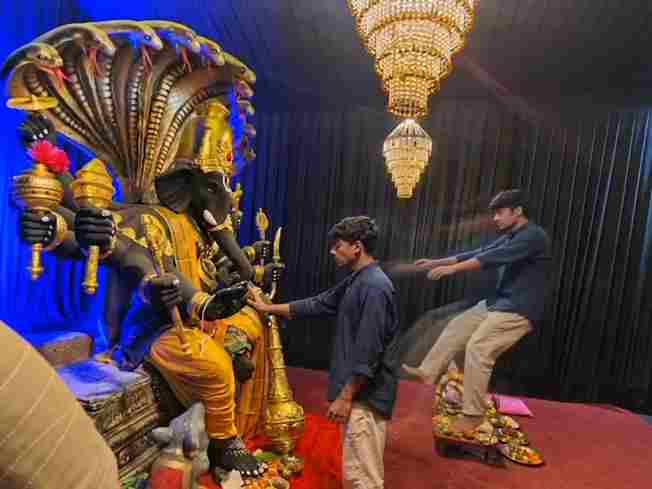
Create a near-square devotional VFX fantasy video inside a richly decorated Ganesh pandal hall. A young barefoot devotee with curly dark hair, light stubble, a dark navy button-up kurta-shirt, and beige trousers stands before a colossal graphite-black Ganesha murti seated in lalitasana on a carved throne. Ganesha wears a golden jeweled crown, white tusks, a left-curving trunk, multiple arms holdin
Swap the face of the lead male character in the source video with my face, using Image 1 as the identity reference. The attached collage shows me from several angles — use every angle to lock in an accurate likeness. Match my facial structure precisely: proportions, eye shape, nose, lips, jawline, and skin tone, along with any unique facial markers. My identity must stay stable and clearly recogni
Create an ultra-realistic REAL-WORLD CAMERA VIDEO, not an AI-looking or CGI-looking video. Use TWO uploaded references: REFERENCE VIDEO: This controls the exact car, car movement, camera movement, camera angle, framing, timing, scene transition, environment, lighting, actions and overall visual composition. CHARACTER IMAGE: This controls the exact identity and appearance of the person. The final r