
Prompt Scene

Girl Candlelight AI Photo Editing Prompt

By Prompt Scene ·

If you want to create a dramatic and unique portrait using AI, this Girl Candlelight AI Photo Editing Prompt can help you transform a normal reference photo into a cinematic low-light portrait. The edit focuses on a single burning red candle, deep darkness, realistic shadows, colorful glass bangles, and an expressive close-up composition. Only the eyes, eyebrows, and forehead remain visible while the crossed forearms cover the lower part of the face. This type of AI photo editing is perfect for creating an artistic Instagram post, profile picture, or cinematic portrait with a mysterious and emotional atmosphere.

Create a Girl Candlelight AI Photo

The main idea behind this Candlelight AI Photo Editing style is to create a portrait that looks like it was captured in complete darkness using only one candle as the light source. The red candle is placed very close to the camera on the left side, creating dramatic illumination across the subject while keeping the background completely dark. The crossed forearms add an interesting visual element and hide the lower half of the face. Colorful glass bangles and hanging ghungroo charms add traditional details, while the natural complexion and minimal makeup keep the portrait realistic.

Best Girl Candlelight AI Photo Editing Prompt
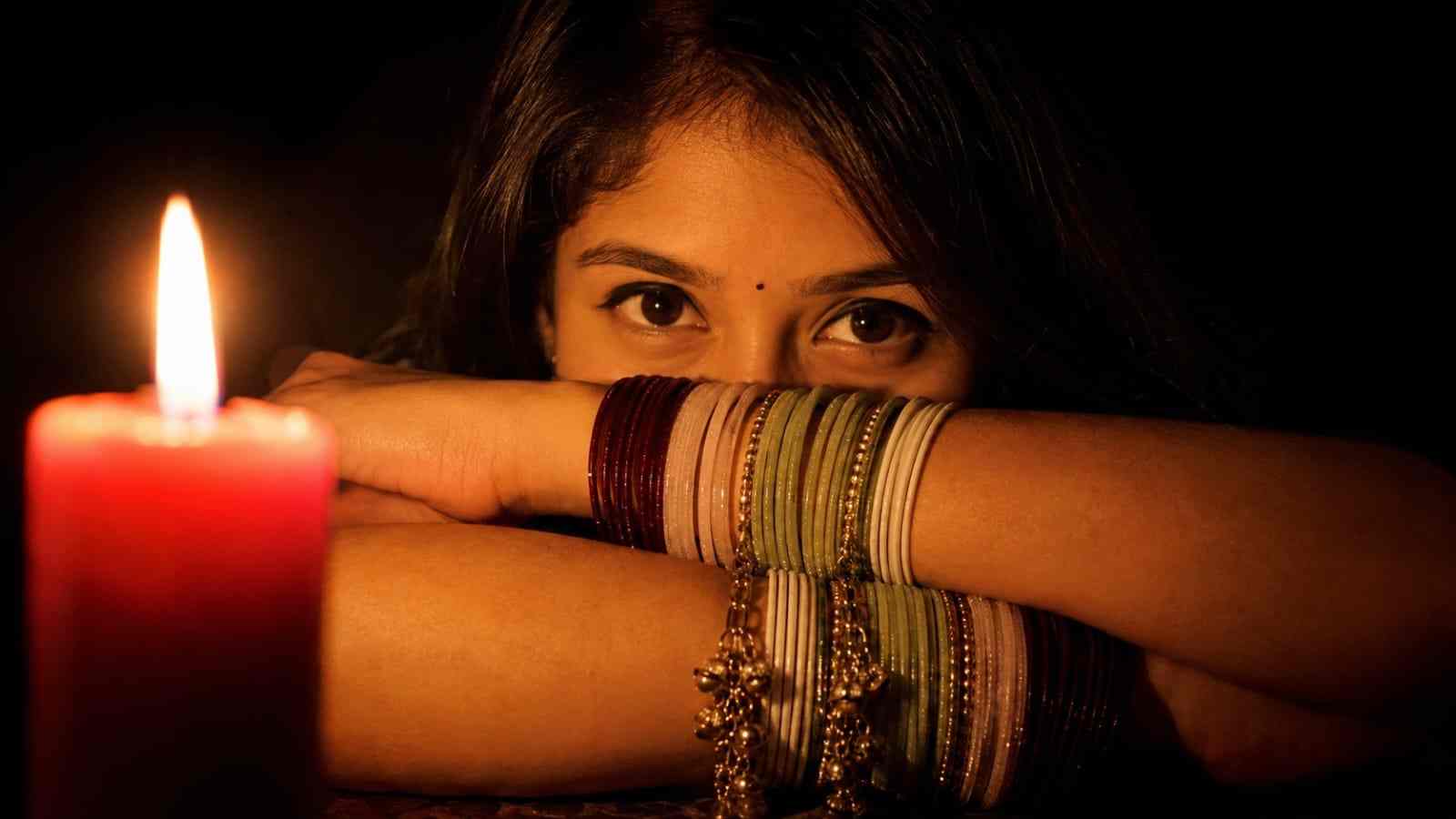
Create Ultra-realistic cinematic closeup low-light portrait of a woman (the reference image given) sitting in complete darkness, illuminated only by a single burning red candle placed very close to the camera on the left side of the frame. The portrait is a close-up composition where both forearms are crossed horizontally in front of her face, hiding the lower half of her face so that only her eyes, eyebrows, forehead visible.She gazes directly into the camera with calm, eyes. Both arms filled with stack of maroon, light pink, light green, white glass bangles and hanging charm(ghungroo )bangles. Warm golden-brown complexion of skin, no makeup only thin eyeliner on eyes. Lighting: one burning wax candle, dramatic chiaroscuro, deep black background. 16:9 ratio.

How to Create Girl Candlelight Photo with ChatGPT

Creating this beautiful candlelight portrait with ChatGPT is very easy. Just follow the simple steps below:


  1. Open ChatGPT and open the ChatGPT app or website.
  2. Log In and sign in to your ChatGPT account.
  3. Upload Photo and upload the clear reference image.
  4. Copy Prompt and copy the candlelight prompt from this article.
  5. Paste Prompt and paste it along with your uploaded photo.
  6. Generate Image and tap the generate option and wait for the result.
  7. Check Result and check the face, eyes, arms, bangles, candle, and lighting.
  8. Make Changes and ask ChatGPT to fix anything that looks unnatural.
  9. Save Photo and save the final cinematic portrait to your device.

Tips for Better Candlelight AI Results

For the best Girl Candlelight AI Photo Editing results, use a clear reference image with the face and hairstyle easily visible. Since the final composition uses extremely low lighting, the reference image should contain enough facial detail for the AI to understand the person’s appearance. Keep the prompt specific about the candle position, crossed arms, bangles, background, and lighting direction. If the AI creates incorrect hands, fingers, bangles, or facial details, ask it to correct that specific area without changing the original identity. Keeping the background completely dark also helps the candlelight remain the main focus of the image.

Conclusion

This Girl Candlelight AI Photo Editing Prompt is a great choice if you want to create something different from ordinary AI portraits. The combination of a burning red candle, complete darkness, crossed arms, colorful glass bangles, ghungroo charms, and dramatic chiaroscuro lighting creates a strong cinematic effect. Simply upload your reference image, copy the prompt, generate the image, and check the important details before saving the final result. You can also experiment with candle placement, bangle colors, camera framing, and expressions to create different versions while keeping the same mysterious candlelight photography style.

Related prompts

Minimalist Editorial Collage Photo Editing Prompt – Luxury Travel Aesthetic
Unique Prompts
35k 2.5k
5 days ago

Minimalist Editorial Collage Photo Editing Prompt – Luxury Travel Aesthetic


Transform the uploaded photograph into a premium minimalist editorial collage inspired by luxury travel magazines, contemporary fashion editorials, and artistic outdoor photography FORMAT & COMPOSITION: Create a strict 3:4 vertical canvas. Use a warm ivory/off-white background with subtle paper texture and generous negative space Place a large, clean-edged vertical rectangular crop of the original
Cinematic Baground Portrait Prompts
Unique Prompts
38k 4.0k
1 week ago

Cinematic Baground Portrait Prompts


Place this person in the second photo in a realistic manner and adjust them to match the second photo; do not change anything else. Keep the background exactly as it is-do not alter it at all-and do not change the face. Enhance the image to 8K quality and set the aspect ratio to 3:4. And Backgroud ke accoding person size adjust
Garba AI Dance Video Editing Tutorial – Create Viral AI Dance Videos
Unique Prompts
36k 9.7k
1 week ago

Garba AI Dance Video Editing Tutorial – Create Viral AI Dance Videos


Create a cinematic 4K, highly detailed, photorealistic video by transferring the EXACT dance movements, body motion, performance, timing, expressions, and camera movements from the REFERENCE VIDEO onto the person shown in the TARGET IMAGE. Completely replace the original main dancer with the person from the TARGET IMAGE. Preserve the target person's exact facial identity, facial features, skin ton
Viral Car Uno Reverse Transition: AI Video Editing Prompt and Tutorial
Unique Prompts
14k 5.7k
1 week ago

Viral Car Uno Reverse Transition: AI Video Editing Prompt and Tutorial


Create a **10-second photorealistic image-to-video recreation of the uploaded reference video**. ### REFERENCE PRIORITY — CRITICAL Use the uploaded references as follows: **REFERENCE IMAGE 1 — MY PHOTO** Use this as the ONLY identity reference for the main person. Preserve my exact face, facial proportions, eyes, eyebrows, nose, lips, jawline, skin tone, hairstyle and overall identity throughout t
Viral Fancam AI Video Tutorial: Create Trending AI Fancam Videos
Unique Prompts Video
35k 2.5k
1 week ago

Viral Fancam AI Video Tutorial: Create Trending AI Fancam Videos


Video-to-video character replacement. Keep @Video 1 exactly the same: same handheld iPhone camera movement and shake, same framing, timing, red backstage lighting, background, crowd, bodyguards, and the fan in the foreground holding the phone and the big DSLR lens. Do not change anyone else. Replace only the main man in the center (the one who walks in, talks to the fan and laughs) with the person
Navratri Birdal Nail Art Prompt
Unique Prompts
7.2k 2.9k
2 weeks ago

Navratri Birdal Nail Art Prompt


MASTER PROMPT — Ultra-Realistic Bridal Nail Art Car Selfie (9:16) Use the uploaded selfie as the STRICT FACIAL IDENTITY REFERENCE. Preserve the person's exact facial features, natural skin tone, eyes, nose, lips, face shape, age, and realistic skin texture. Do not beautify, reshape, or alter the facial identity. REFERENCE COMPOSITION: Create an ultra-realistic golden-hour photograph of a beautiful
Navratri Nails Transformation AI Video Tutorial
Unique Prompts Video
13k 5.0k
2 weeks ago

Navratri Nails Transformation AI Video Tutorial


Use the reference video as the exact blueprint. Recreate the SAME actions, hand movements, facial expressions, camera movement, timing, framing and transition — do not invent or change anything. Start with the first reference image as the opening look, then transition into the second reference image at the EXACT same moment and using the EXACT same transition style as the reference video. In the s





