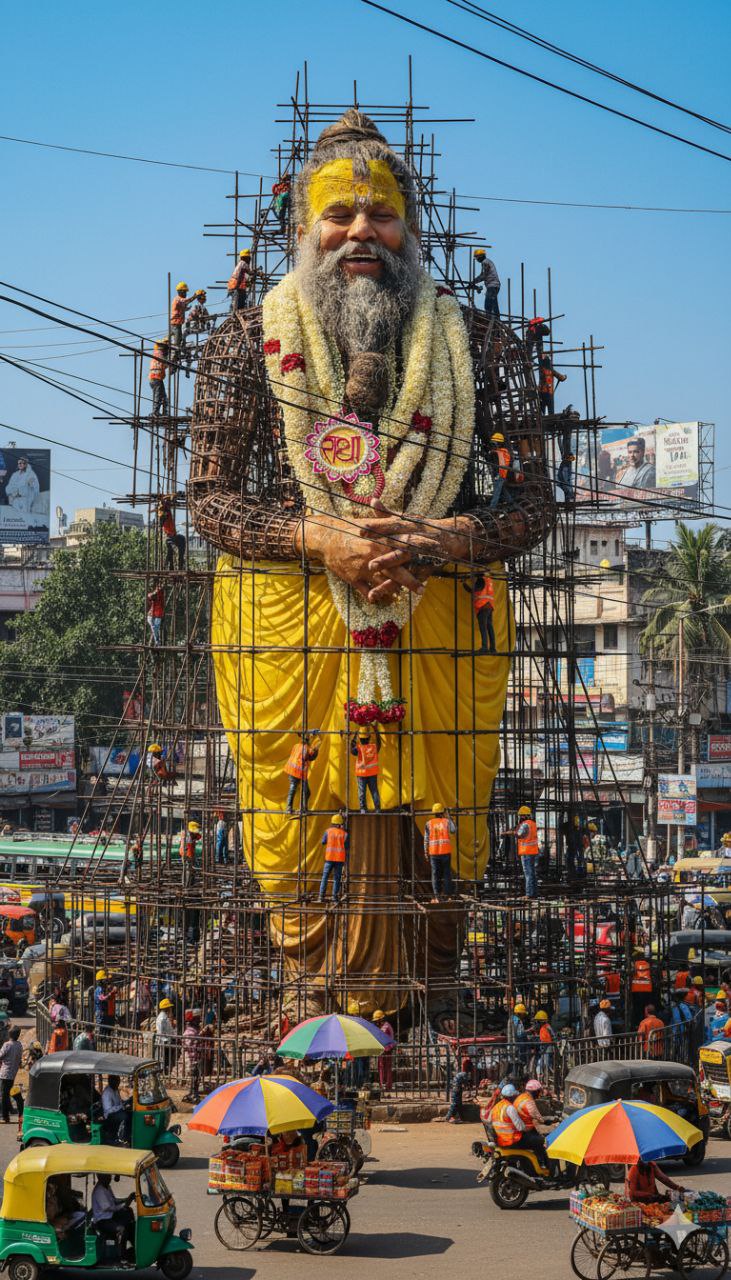
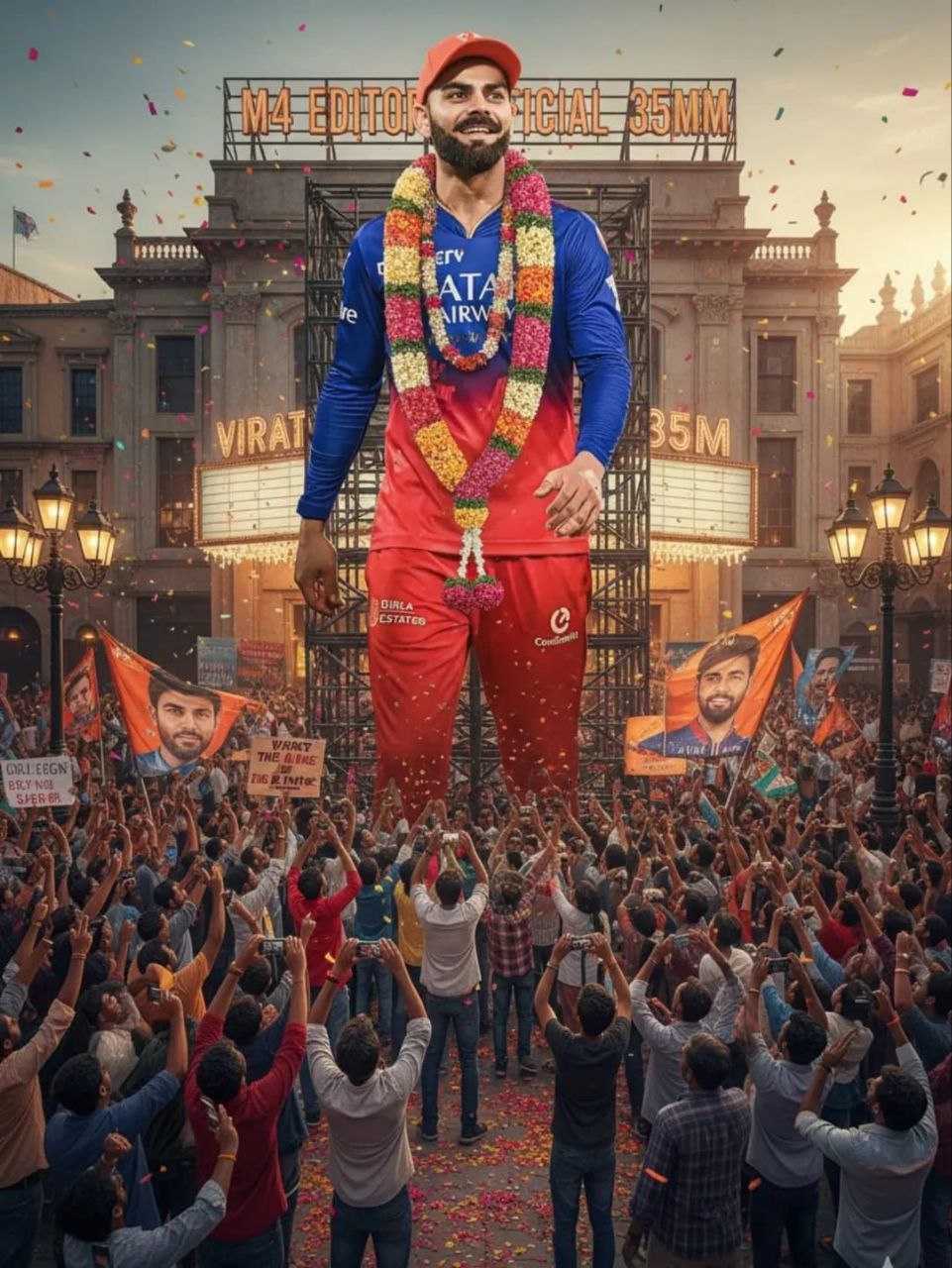
Hello friends you have seen this type of statue construction ai photo on instagram and other social media platfroms. In this post i will provide gemini photo prompts to create this type of image.
Gemini is now booming on instagram because of its high qualty and realistic images with fast processing.
Google’s gemini new model nano banana ai is overpassing chatgpt.
Create a giant hyper-realistic statue based on the given photo, keeping the original face exactly the same without changes. The statue stands tall in the middle of a roundabout in Dhaka, near a famous historical landmark. The statue is still under construction, surrounded by scaffolding, with many construction workers in yellow helmets and orange vests climbing, welding, and working on it. Parts of the statue's body are still exposed metal framework, while other sections are already detailed and finished. The background shows the realistic atmosphere of VARANASI CITY: crowded streets with colorful rickshaws, packed buses, and small cars circling the roundabout. Street vendors with tea stalls, fruit carts, and colorful umbrellas line the roadside. Shop signs, big billboards, and messy hanging electric wires crisscross above the streets, creating the typical Dhaka city vibe. The bright daytime sky shines above, with tropical trees and a bustling, lively atmosphere. Style: photorealistic, vibrant, and full of life
Create a hyper-realistic movie theatre outdoor featuring a massive 300-foot tall full-body cutout of the uploaded person, showing the entire figure from head to toe with lifelike detail and clarity. The cutout is decorated with a beautiful, vibrant flower garland draped gracefully around the neck and shoulders, adding a festive and respectful touch.Place the cutout on a sturdy support frame in a busy public square filled with a diverse crowd of enthusiastic fans facing and admiring it. Fans are cheering, holding flags, banners, and placards with the person’s image, some capturing the moment on their phones. The fans look up in awe, creating a natural, dynamic interaction.Add scattered fresh flower petals on the ground, colorful confetti floating gently in the air, and warm sunlight casting soft shadows over the scene. The environment should feel lively and celebratory, with realistic urban elements like theatre Name M4 Editor Official 35MM and street lamps framing the background
Why Is Gemini Statue Photo Editing Going Viral?
The reason behind this trend’s popularity is simple:
High-quality results – Gemini creates ultra-realistic statue effects in seconds.
Fast processing – No need for long hours of manual editing.
Instagram-ready aesthetics – These edits look cinematic, stylish, and unique.
People are using this effect to transform their selfies, portraits, or even couple photos into ancient Greek/Roman-style statues with a modern AI twist.
And the best part? Google Gemini’s new model, Nano Banana AI, is currently outperforming ChatGPT in photo generation speed and creativity.
How to Create Statue-Style Photos with Gemini AI
Creating these Instagram viral statue edits is super easy. Just follow these steps:
Download the Google Gemini App → Available on Play Store and App Store.
Sign In → Use your Google account to log in.
Upload Your Photo → Add a clear, full-face photo or portrait.
Paste a Prompt → Use any of the copy-paste prompts above.
Click Generate → Wait a few seconds for the AI to process.
Download Your Statue Photo → Save and post it directly to Instagram or any other social media platform.
Why Use Nano Banana AI for Statue Edits?
Google’s Nano Banana AI is the latest upgrade to Gemini, and it has made a big difference in photo editing:
⚡ Lightning-fast generation – Your statue photo is ready within seconds.
🎨 Ultra-realistic textures – Perfect marble and stone detailing.
📸 Instagram aesthetic ready – No need for extra editing.
This makes it one of the most powerful AI photo editing tools for trending edits.
Transform the uploaded photograph into a premium minimalist editorial collage inspired by luxury travel magazines, contemporary fashion editorials, and artistic outdoor photography FORMAT & COMPOSITION: Create a strict 3:4 vertical canvas. Use a warm ivory/off-white background with subtle paper texture and generous negative space Place a large, clean-edged vertical rectangular crop of the original
Place this person in the second photo in a realistic manner and adjust them to match the second photo; do not change anything else. Keep the background exactly as it is-do not alter it at all-and do not change the face. Enhance the image to 8K quality and set the aspect ratio to 3:4. And Backgroud ke accoding person size adjust
Create a cinematic 4K, highly detailed, photorealistic video by transferring the EXACT dance movements, body motion, performance, timing, expressions, and camera movements from the REFERENCE VIDEO onto the person shown in the TARGET IMAGE. Completely replace the original main dancer with the person from the TARGET IMAGE. Preserve the target person's exact facial identity, facial features, skin ton
Transform the uploaded mirror selfie into a luxury LED Mirror portrait. Replace the existing mitor frame with an elegant irregular organic shape mirror 1,832 featuring a soft warm golden LED Backlight glow around entire edge .keep the subject same
Create a **10-second photorealistic image-to-video recreation of the uploaded reference video**. ### REFERENCE PRIORITY — CRITICAL Use the uploaded references as follows: **REFERENCE IMAGE 1 — MY PHOTO** Use this as the ONLY identity reference for the main person. Preserve my exact face, facial proportions, eyes, eyebrows, nose, lips, jawline, skin tone, hairstyle and overall identity throughout t
Video-to-video character replacement. Keep @Video 1 exactly the same: same handheld iPhone camera movement and shake, same framing, timing, red backstage lighting, background, crowd, bodyguards, and the fan in the foreground holding the phone and the big DSLR lens. Do not change anyone else. Replace only the main man in the center (the one who walks in, talks to the fan and laughs) with the person
MASTER PROMPT — Ultra-Realistic Bridal Nail Art Car Selfie (9:16) Use the uploaded selfie as the STRICT FACIAL IDENTITY REFERENCE. Preserve the person's exact facial features, natural skin tone, eyes, nose, lips, face shape, age, and realistic skin texture. Do not beautify, reshape, or alter the facial identity. REFERENCE COMPOSITION: Create an ultra-realistic golden-hour photograph of a beautiful
Use the reference video as the exact blueprint. Recreate the SAME actions, hand movements, facial expressions, camera movement, timing, framing and transition — do not invent or change anything. Start with the first reference image as the opening look, then transition into the second reference image at the EXACT same moment and using the EXACT same transition style as the reference video. In the s