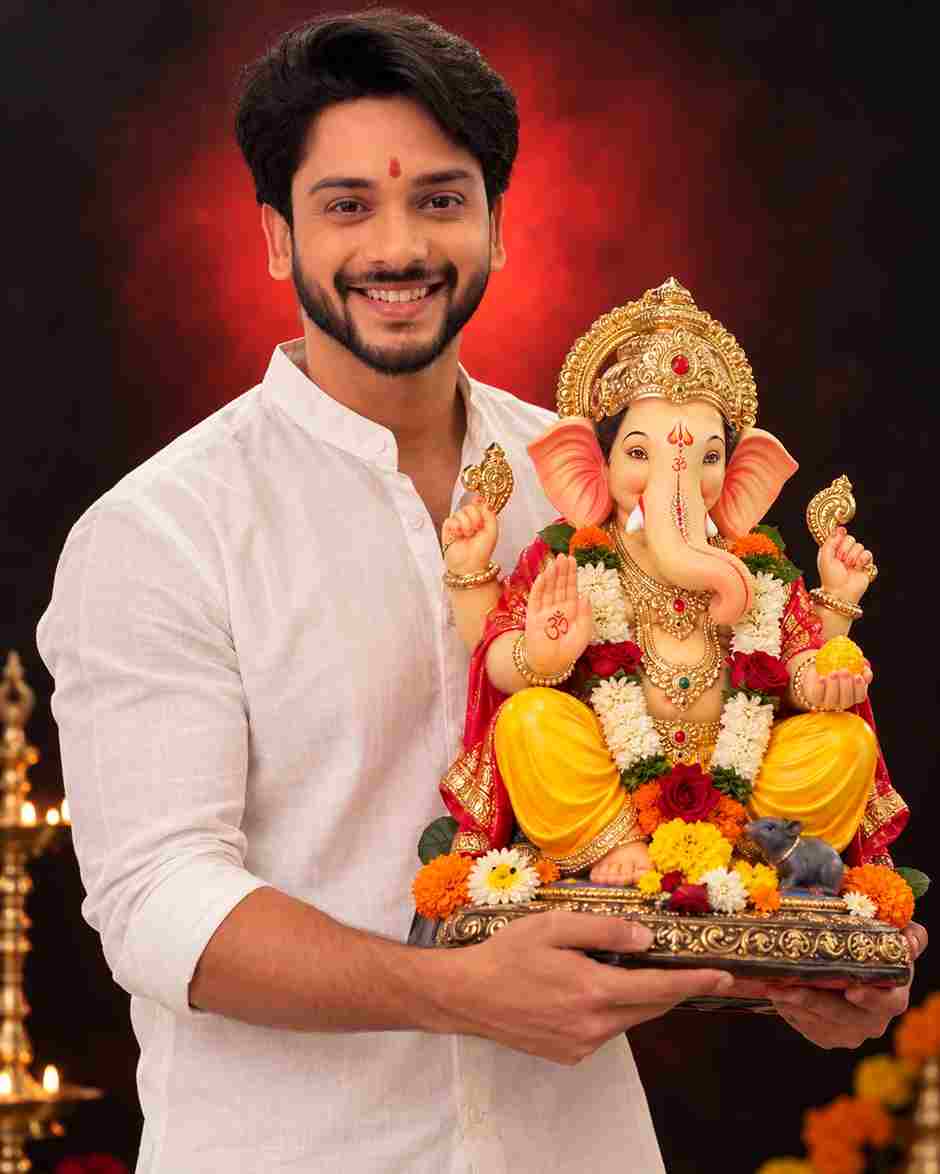
Looking for a Ganesh Chaturthi AI photo prompt to turn your own picture into a devotional Ganpati Bappa portrait? Ganesh Chaturthi 2026 is the perfect time to create a festive AI photo that you can post on Instagram, set as your WhatsApp status, or simply keep as a memory of Ganpati Bappa’s arrival at home. Instead of hiring a photographer or spending hours on manual photo editing, you can now use AI photo editing tools to place yourself beside a beautifully decorated Ganesha idol in seconds.
Below are 5 ready-to-use Ganesh Chaturthi AI photo prompts for 2026 — for boys and girls — that keep your real face while adding a beautifully decorated Ganesha idol, festive lighting, traditional jewelry, and devotional styling. Every Ganesh Chaturthi AI photo prompt in this collection is written specifically to preserve facial identity, so the final photo still looks like you, not a random AI-generated face. Just copy a prompt, upload your photo to ChatGPT, Gemini, or Nano Banana, and generate your Ganpati photo in seconds.
Ganesh Chaturthi AI Photo Editing Prompts
Pick any prompt below, copy it, and paste it into your AI photo editing tool along with a clear photo of your face. Each prompt below is designed for a specific look — devotional, traditional saree, festive kurta, or studio-style — so scroll through all 5 and pick the one that matches the mood you want for this year’s Ganpati Bappa Morya photo.
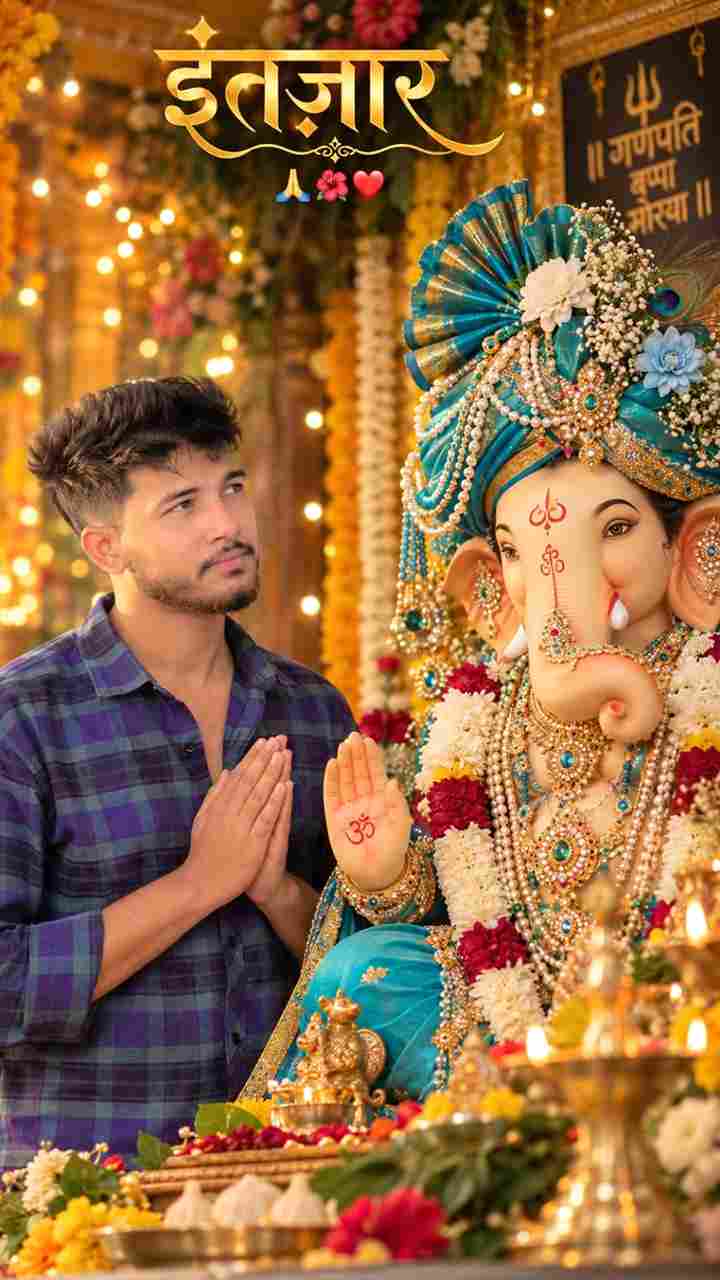
1. Devotional Portrait for Boys — Praying Beside Ganpati Bappa
create an ultra-realistic vertical 9:16 devotional portrait inspired by the reference image. a beautifully decorated lord ganesha idol is the main focus, wearing an elaborate turquoise-blue and golden turban adorned with flowers, pearls, jewels and intricate ornaments. ganesha has a peaceful, divine expression, detailed eyes, traditional tilak and richly decorated jewelry. the background is a warm festive ganesh chaturthi setting with colorful flowers, glowing golden bokeh lights and cinematic depth of field. in the foreground, a young indian man with short textured black hair and a neatly groomed beard stands respectfully beside the idol, looking toward lord ganesha. preserve natural skin texture and realistic proportions. warm cinematic lighting, shallow depth of field, dslr photography, sharp details, realistic colors, premium devotional atmosphere, 8k quality, no artificial ai look. add elegant hindi text "इंतज़ार" at the top with emojis.
This prompt creates a peaceful, prayerful moment beside Ganpati Bappa, with folded hands and a soft, respectful expression. The elegant Hindi text overlay (“इंतज़ार”) adds a personal, caption-style touch that works great as a WhatsApp status or Instagram Story on the day Bappa arrives home. The warm bokeh lighting and traditional turquoise-and-gold decorated idol give it a premium, festive feel without looking artificial.
Best for: vertical Instagram/WhatsApp status | Ratio: 9:16 | Works with: ChatGPT, Gemini, Nano Banana
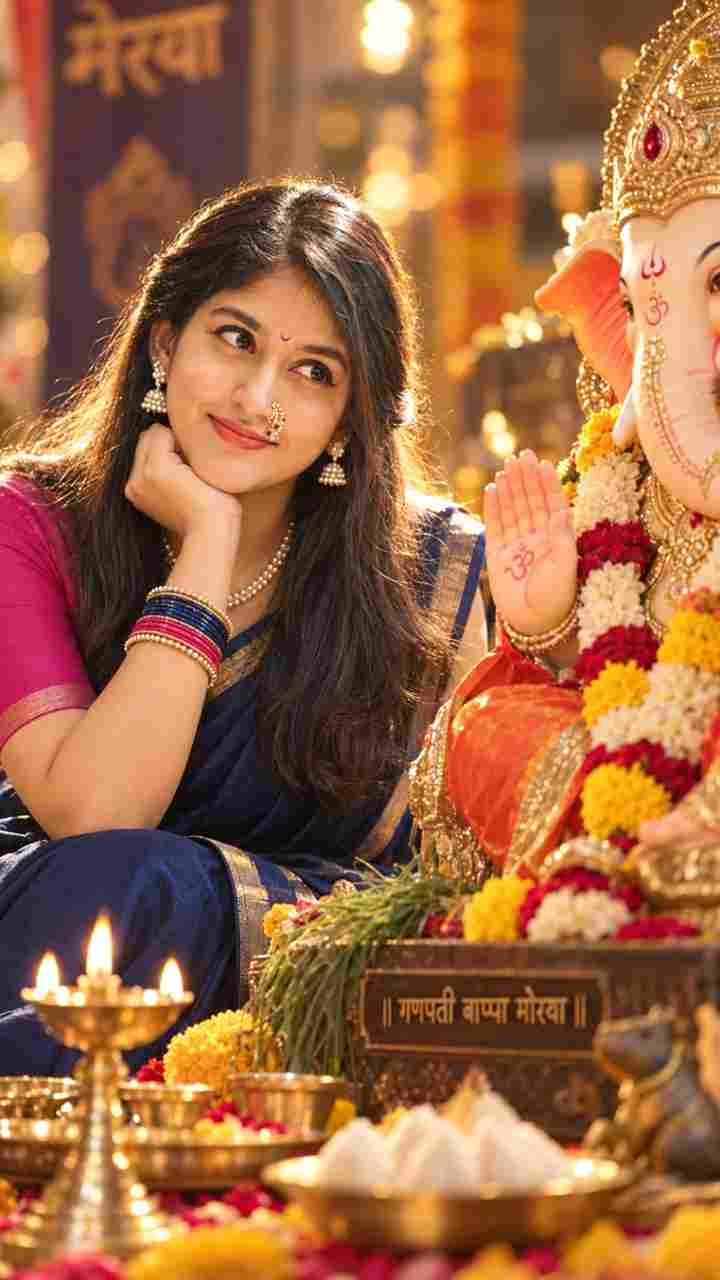
2. Ganpati Bappa Saree Look for Girls
Create an ultra-realistic cinematic devotional portrait using the uploaded woman's face as the primary facial reference. Preserve her exact facial features, skin tone, eye shape, nose, lips, smile, hairline, and overall identity. She is sitting beside a majestic Lord Ganesha idol during Ganesh Utsav, gazing lovingly toward Bappa with a peaceful smile, resting her chin gently on her hand. She wears a plain deep navy-blue silk saree with a subtle thin gold border and a plain dark pink blouse with minimal border detailing. Traditional Maharashtrian pearl nath with red stones, pearl necklace, pearl earrings, colorful bangles, and a small pink crescent bindi. Hair is straight, silky, half-tied at the back with the rest flowing naturally. Nude matte lipstick, soft natural makeup, glowing skin. Strong golden backlighting creates a brilliant rim light around her hair, while a soft front flash illuminates the face. Deep blurred background with creamy bokeh, smooth tonal gradations, rich contrast, hyper-clear details, pristine digital clarity, DSLR photography, 85mm lens, f/1.8, HDR, ultra-detailed, photorealistic, 8K, vertical 9:16 composition.
This is the most traditional and detailed prompt in the collection, built for a classic Maharashtrian saree look — navy-blue silk saree, pearl nath, pearl jewelry, and a soft golden rim light that mimics a real diya-lit mandap. Because the prompt calls out exact facial features (eye shape, nose, lips, hairline), it does a strong job of keeping your identity intact while still giving the photo a cinematic, magazine-style finish.
Best for: traditional saree look | Ratio: 9:16 | Works with: ChatGPT, Gemini, Nano Banana
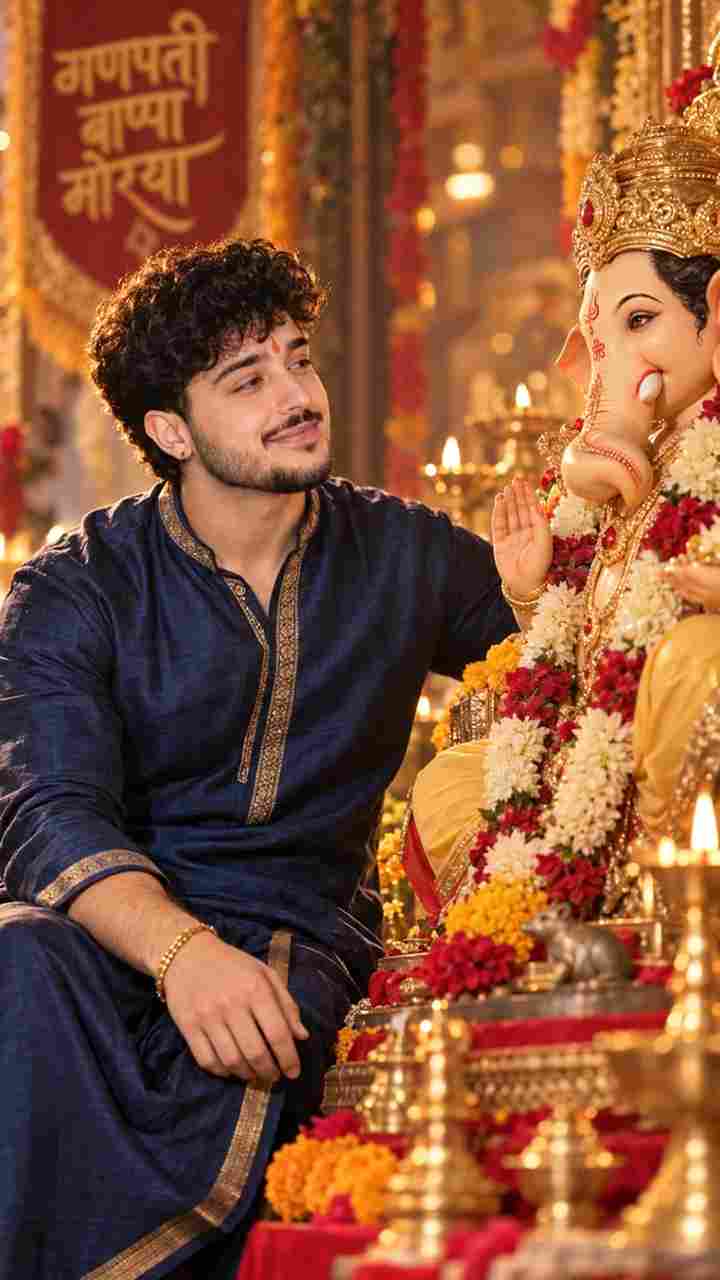
3. Ganpati Bappa Kurta Look for Boys
Create an ultra-realistic cinematic devotional portrait using the uploaded man's face as the primary facial reference. Preserve his exact facial features, skin tone, eye shape, nose, lips, smile, hairstyle, facial hair, and overall identity. Do not alter or feminize his appearance. He is sitting beside a majestic Lord Ganesha idol during Ganesh Utsav, gazing lovingly toward Bappa with a peaceful, genuine smile. His posture is relaxed and natural, with one hand gently resting near his knee and the other respectfully placed toward the Ganesha idol. He wears a plain deep navy-blue traditional silk kurta with a subtle golden border, paired with a matching or slightly darker traditional bottom. Minimal, elegant styling with a sophisticated festive look. Add a traditional Maharashtrian-style red/orange tilak, a simple gold bracelet/watch and subtle traditional accessories. Keep the overall styling masculine, classy and minimal. Hair should look natural, neatly styled, and realistic. If he has a beard or moustache in the reference image, preserve it exactly. Natural skin texture, subtle grooming, soft healthy glow, realistic facial details. Warm golden backlighting creates a beautiful rim light around his hair and shoulders, while a soft diffused front light naturally illuminates his face. The Ganesha idol should look majestic, detailed and beautifully decorated with traditional flowers and subtle festive elements. Deep, softly blurred background with creamy bokeh, warm golden and subtle red tones, smooth tonal gradients, rich cinematic contrast, realistic shadows, and a peaceful devotional atmosphere. Pristine DSLR photography, 85mm portrait lens, f/1.8, shallow depth of field, HDR, ultra-detailed skin texture, photorealistic, cinematic lighting, natural colors, 8K quality, highly realistic, premium devotional photography, vertical 9:16 composition. Important: Keep the man's identity exactly consistent with the uploaded reference image. No facial restructuring, no beautification that changes his features, no excessive makeup, no artificial-looking skin, no distorted hands or facial features.
Built specifically for men, this prompt explicitly instructs the AI not to feminize or alter facial features — a common problem with generic AI photo prompts. It pairs a navy-blue silk kurta with minimal gold accessories for a classy, understated festive look, and the “no facial restructuring” instruction near the end helps keep the output realistic instead of overly airbrushed.
Best for: festive kurta portrait | Ratio: 9:16 | Works with: ChatGPT, Gemini, Nano Banana
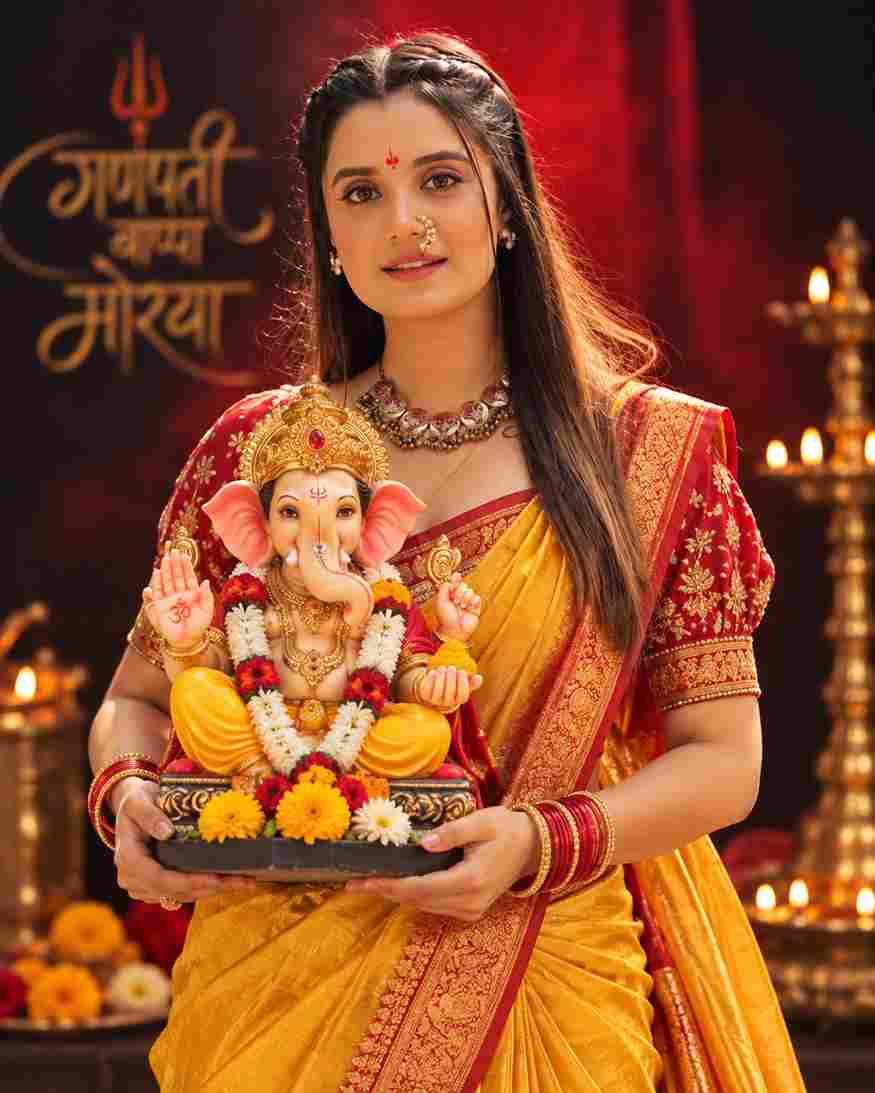
4. Ganpati Bappa Studio Portrait for Girls — Yellow Nauvari Saree
A high-quality studio portrait of a young Indian woman, same person as the uploaded image, holding a colorful, realistic Lord Ganesha idol during Ganesh Chaturthi celebration. She is wearing a vibrant yellow Nauvari saree with a rich red and gold embroidered blouse. She is looking straight ahead, adorned with traditional gold jewelry including a heavy choker necklace, a 'Nath' (nose ring), and red and gold bangles, standing against a dramatic dark background with a soft red light glow behind her. She has a natural smile, a small red tilak on her forehead, and is looking slightly upwards with devotion and joy. The Ganesha idol is highly detailed, richly decorated with flowers and jewelry. Preserve her exact facial features and identity from the reference photo. Studio lighting, photorealistic, sharp details, vertical portrait composition.
Unlike the home-mandap style prompts above, this one creates a clean, dramatic studio portrait — a plain dark background with a soft red glow, perfect if you want a bold, poster-style photo instead of a candid festival scene. The vibrant yellow Nauvari saree paired with heavy gold jewelry makes this a strong choice for a profile picture or a printed Ganpati Bappa photo frame.
Best for: studio-style festive portrait | Ratio: 4:5 | Works with: ChatGPT, Gemini, Nano Banana
5. Ganpati Bappa Studio Portrait for Boys — White Shirt
A high-quality studio portrait of a young Indian man, same person as the uploaded image, holding a colorful, highly detailed Lord Ganesha idol during Ganesh Chaturthi celebration. He is wearing a plain white shirt, standing against a dramatic dark background with a soft red light glow behind him. He has a natural smile, a small red tilak on his forehead, and an expression of devotion and joy. Preserve his exact facial features and identity from the reference photo. Studio lighting, photorealistic, sharp details, vertical portrait composition, ratio 4:5.
The simplest prompt in the collection, this one works well as a starting point if you’re new to AI photo editing. A plain white shirt keeps the focus entirely on the Ganesha idol and your expression, making it a quick, reliable option when you don’t want to fuss over saree drapes or jewelry details.
Best for: clean studio-style festive portrait | Ratio: 4:5 | Works with: ChatGPT, Gemini, Nano Banana
Which Ganesh Chaturthi AI Photo Prompt Should You Choose?
If you’re unsure which prompt to pick, here’s a quick way to decide. For an Instagram Story or WhatsApp status you’ll post today, go with the vertical 9:16 prompts (1, 2, or 3) since they’re already cropped for full-screen mobile viewing. If you want a photo for your Instagram feed, profile picture, or a printed frame, the 4:5 studio-style prompts (4 or 5) work better because they show more of the outfit and the Ganesha idol in one frame.
If this is your first time trying an AI photo prompt, start with prompt 1 or 5 — both are simpler, shorter prompts that are less likely to confuse the AI tool. Once you’re comfortable with the process, try the more detailed saree and kurta prompts (2 and 3), which give more realistic, magazine-style results but need a clearer reference photo to work well.
How to Create a Ganesh Chaturthi AI Photo (Step by Step)
Choose a clear, high-quality portrait where your face is fully visible.
Open an AI photo editing tool that supports reference images (ChatGPT, Gemini, or Nano Banana).
Upload your selected photo as the reference image.
Copy and paste any Ganesh Chaturthi AI photo prompt from above.
Generate the AI photo.
Check the face, clothing, hands, jewellery, and Ganesha idol for accuracy.
Review the decorations, lighting, and background.
Make small prompt adjustments if something looks off.
Generate the final image and save it to your device.
Tips for the Best Ganesh Chaturthi AI Photo
Use a well-lit, front-facing photo for the most accurate face match.
Avoid sunglasses, filters, or photos where the face is partially covered.
If the AI changes your facial features too much, add “preserve exact facial identity” to the prompt.
Try more than one prompt to see which festive style suits you best.
Common Mistakes to Avoid
A few small mistakes are responsible for most bad results with Ganesh Chaturthi AI photo prompts. Here’s what to watch out for:
Blurry or low-resolution reference photo: the AI copies details from your photo, so a blurry input almost always leads to a blurry or distorted face in the output.
Side-angle or half-face photos: prompts work best with a front-facing photo where both eyes, the nose, and the mouth are clearly visible.
Editing the prompt too much at once: change one detail at a time (like clothing color or background) instead of rewriting the whole prompt, so you can tell what caused a bad result.
Ignoring the hands and jewelry: AI tools sometimes distort hands or add extra fingers — always zoom in and check hands, bangles, and the Ganesha idol’s details before saving.
Why Do We Celebrate Ganesh Chaturthi?
Ganesh Chaturthi honors Lord Ganesha, worshipped as the remover of obstacles and the god of wisdom, knowledge, and new beginnings. The festival marks his birth and is celebrated with prayers, rituals, devotional songs, and the installation of Ganesha idols in homes and public places. People seek Ganesha’s blessings for happiness, prosperity, and success, and the festival brings families and communities together through celebration and devotion.
The festival, also known as Ganeshotsav or Vinayaka Chaturthi in different parts of India, typically lasts between 1 and a half to 11 days, ending with the immersion of the idol on Anant Chaturdashi. Homes and public pandals are decorated with flowers, lights, and rangoli, and families gather each evening for aarti. Many people now also use a Ganesh Chaturthi AI photo prompt to create a festive portrait alongside their idol and share the celebration with friends and family online, especially when everyone can’t be physically present for the festival.
Frequently Asked Questions
Which AI tools work best for Ganesh Chaturthi photo prompts?
These prompts work well with ChatGPT (with image upload), Google Gemini, and Nano Banana. Any AI tool that supports uploading a reference photo and generating an edited image will work.
Are these Ganesh Chaturthi AI photo prompts free?
Yes, all 5 prompts on this page are completely free to copy and use. You only need access to an AI photo editing tool.
Will the AI photo look exactly like me?
Each prompt is written to preserve your facial features, skin tone, and identity from the reference photo. Results can still vary slightly depending on the AI tool, so use a clear, well-lit photo for the best match.
Can I use these prompts for both boys and girls?
Yes. This collection includes separate prompts designed for men and women, covering saree looks, kurta looks, and studio-style portraits with Ganpati Bappa.
What image ratio should I use?
Most prompts here are set to a 9:16 vertical ratio, ideal for Instagram Stories and WhatsApp status. Two prompts use a 4:5 ratio, which works well for Instagram feed posts.
Why does the AI-generated Ganesha idol or my face look distorted?
This usually happens when the reference photo is blurry, low-resolution, or taken from an angle. Use a clear, front-facing, well-lit photo, and if the result still looks off, try regenerating the image or slightly simplifying the prompt.
Can I add Hindi text like गणपति बाप्पा मोरया to my AI photo?
Yes. You can add a line to any prompt such as: add elegant Hindi text गणपति बाप्पा मोरया at the top or bottom of the image, similar to the Hindi text used in prompt 1 above.
Do I need a paid subscription to use these prompts?
No. ChatGPT, Gemini, and Nano Banana all offer free tiers that support image uploads and prompt-based editing, though free plans may have daily generation limits.
These Ganesh Chaturthi AI photo prompts make it easy to create a beautiful festive portrait using your own photo, without needing a professional photoshoot or complex editing skills. Pick a prompt that matches your style, upload a clear reference photo, and generate your Ganpati Bappa portrait in minutes. Review the result carefully, tweak the prompt if needed, and try a few different styles to find your favorite.
Ganpati Bappa Morya! Wishing you a joyful and blessed Ganesh Chaturthi 2026 — share your AI-generated devotional portrait with family and friends this festive season.
Transform the uploaded photograph into a premium minimalist editorial collage inspired by luxury travel magazines, contemporary fashion editorials, and artistic outdoor photography FORMAT & COMPOSITION: Create a strict 3:4 vertical canvas. Use a warm ivory/off-white background with subtle paper texture and generous negative space Place a large, clean-edged vertical rectangular crop of the original
Place this person in the second photo in a realistic manner and adjust them to match the second photo; do not change anything else. Keep the background exactly as it is-do not alter it at all-and do not change the face. Enhance the image to 8K quality and set the aspect ratio to 3:4. And Backgroud ke accoding person size adjust
Create a cinematic 4K, highly detailed, photorealistic video by transferring the EXACT dance movements, body motion, performance, timing, expressions, and camera movements from the REFERENCE VIDEO onto the person shown in the TARGET IMAGE. Completely replace the original main dancer with the person from the TARGET IMAGE. Preserve the target person's exact facial identity, facial features, skin ton
Transform the uploaded mirror selfie into a luxury LED Mirror portrait. Replace the existing mitor frame with an elegant irregular organic shape mirror 1,832 featuring a soft warm golden LED Backlight glow around entire edge .keep the subject same
Create a **10-second photorealistic image-to-video recreation of the uploaded reference video**. ### REFERENCE PRIORITY — CRITICAL Use the uploaded references as follows: **REFERENCE IMAGE 1 — MY PHOTO** Use this as the ONLY identity reference for the main person. Preserve my exact face, facial proportions, eyes, eyebrows, nose, lips, jawline, skin tone, hairstyle and overall identity throughout t
Video-to-video character replacement. Keep @Video 1 exactly the same: same handheld iPhone camera movement and shake, same framing, timing, red backstage lighting, background, crowd, bodyguards, and the fan in the foreground holding the phone and the big DSLR lens. Do not change anyone else. Replace only the main man in the center (the one who walks in, talks to the fan and laughs) with the person
MASTER PROMPT — Ultra-Realistic Bridal Nail Art Car Selfie (9:16) Use the uploaded selfie as the STRICT FACIAL IDENTITY REFERENCE. Preserve the person's exact facial features, natural skin tone, eyes, nose, lips, face shape, age, and realistic skin texture. Do not beautify, reshape, or alter the facial identity. REFERENCE COMPOSITION: Create an ultra-realistic golden-hour photograph of a beautiful
Use the reference video as the exact blueprint. Recreate the SAME actions, hand movements, facial expressions, camera movement, timing, framing and transition — do not invent or change anything. Start with the first reference image as the opening look, then transition into the second reference image at the EXACT same moment and using the EXACT same transition style as the reference video. In the s