
Prompt Scene

Finger Snap Horse AI Video – Create a Viral AI Horse Video

By Prompt Scene ·

AI-generated videos are becoming one of the easiest ways to create unique and entertaining content for Instagram Reels, YouTube Shorts, and TikTok. The Finger Snap Horse AI Video is one such creative trend where a simple finger snap triggers a magical transformation or appearance of a horse, creating an eye-catching cinematic effect. This type of video can be made from a single photo or a short reference clip with the help of AI video-generation tools. The realistic horse movement, dramatic timing, smooth camera motion, and satisfying finger-snap transition make this concept perfect for short-form content. If you are looking for a simple AI video idea that can make your content more engaging, the Finger Snap Horse AI Video is worth trying.

What Is Finger Snap Horse AI Video?

Finger Snap Horse AI Video is an AI-generated video concept in which a person performs a finger snap and a horse appears, moves into the scene, or transforms the environment immediately after the snap. The main attraction is the synchronization between the hand movement and the horse appearance, which makes the transition feel natural and visually impressive. Depending on the AI video tool you use, you can create different versions of the effect, such as a horse suddenly appearing beside the person, running toward the camera, appearing from a magical flash, or being revealed after the finger snap. Adding cinematic lighting, realistic shadows, natural body movement, and a slightly dramatic camera movement can make the final result look much more professional.

Finger Snap Horse AI Video Prompt

Use the following ready-to-copy prompt to create the effect: “Create a highly realistic cinematic vertical video in 9:16 format using the uploaded reference image as the main character and preserve the person’s exact face, identity, skin tone, hairstyle, clothing, and overall appearance. The person stands naturally in the scene and slowly raises one hand toward the camera. The person makes a clear and natural finger snap, and immediately at the exact moment of the snap, a beautiful realistic horse suddenly appears beside them with a smooth cinematic reveal. The horse should have anatomically accurate proportions, realistic fur, natural eyes, detailed mane movement, and believable body motion. Add a subtle cinematic flash and small particles at the moment of the snap without making the effect look artificial. The horse reacts naturally and moves slightly toward the person while the person maintains a confident and natural expression. Use realistic environmental lighting, accurate shadows, smooth motion, shallow depth of field, cinematic camera movement, realistic textures, subtle film grain, high dynamic range, and professional color grading. Keep the movement physically natural and avoid distorted hands, extra fingers, duplicate limbs, warped faces, unnatural horse anatomy, flickering objects, or sudden camera jumps. Make the final video look like a professionally filmed cinematic scene rather than an obvious AI-generated video.”
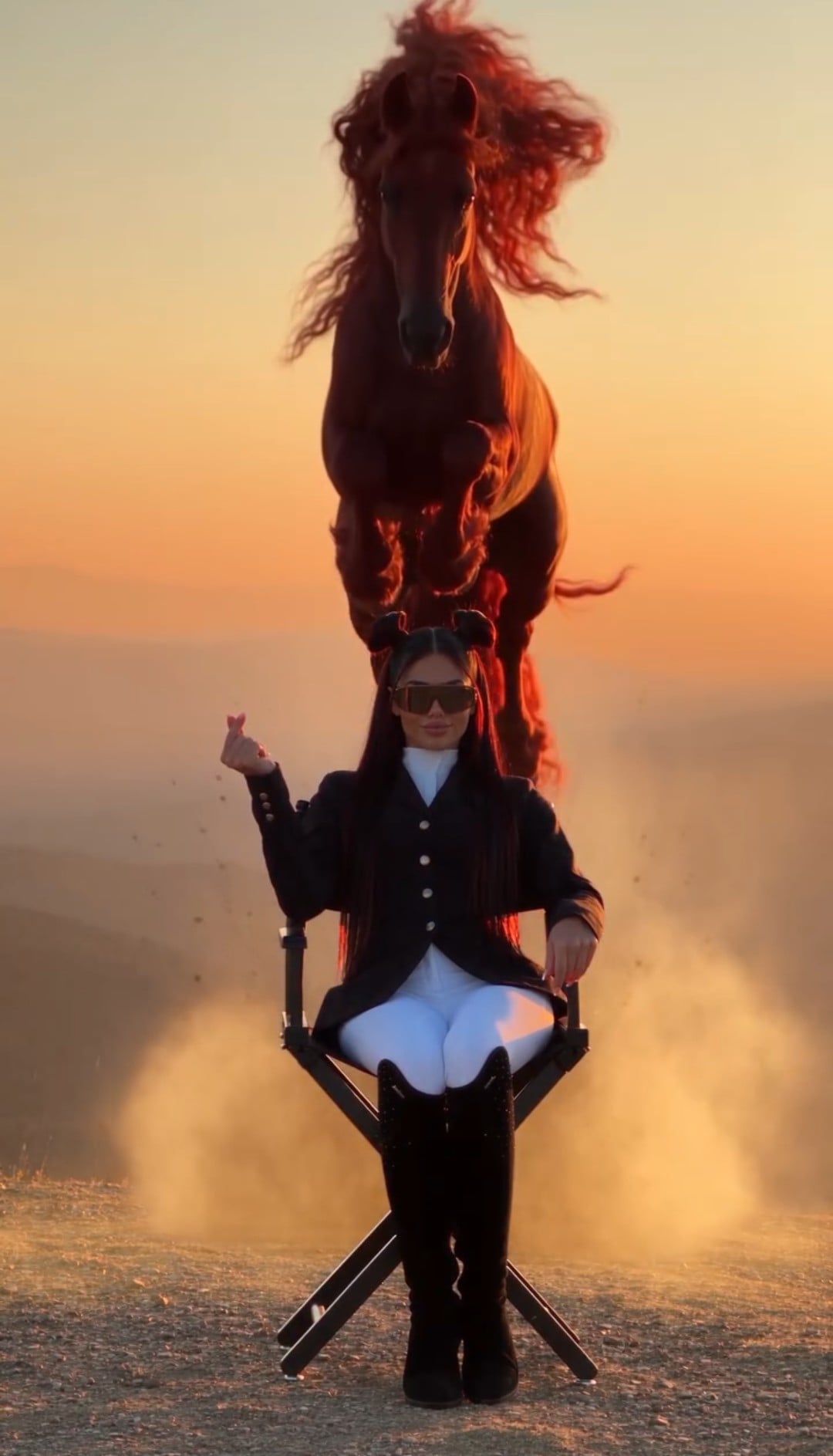

Video Prompt

A young man in a black suit and sunglasses sits on a director's chair on a mountain at sunset. He snaps his fingers, causing a massive red horse to magically drop from the sky behind him, kicking up a cloud of dust. The horse approaches, and he calmly strokes its face. Use the uploaded reference image for exact facial identity-maintain exact proportions, skin tone, and beard without stylization. 4k realistic cinematic video, smooth

motion, golden-hour backlight, volumetric dust.

How to Create Finger Snap Horse AI Video

To create this video, first choose a clear photo or short video in which your full upper body and one hand are visible. Upload the image or reference video to an AI video-generation tool that supports image-to-video or reference-video generation. Paste the Finger Snap Horse AI Video prompt into the prompt box and make sure the video ratio is set to 9:16 if you are creating content for Instagram Reels or YouTube Shorts. The most important part is the timing of the finger snap, so make sure your reference pose clearly shows the hand before the snap. Generate the video and check whether the horse appears exactly when the fingers snap. If the first result has unnatural hand movement or the horse appears too early or too late, slightly simplify the prompt and generate another version.

Tips for a More Realistic AI Horse Video

For a better result, use a high-quality reference image with good lighting and a clearly visible subject. Avoid images where the hands are hidden because the AI needs to understand the finger-snap movement. Keep the main action simple and give the AI enough visual information about the horse and environment. You can also improve the cinematic look by mentioning realistic shadows, natural motion blur, shallow depth of field, soft highlights, detailed horse fur, and subtle film grain. Try not to add too many effects because excessive particles, flashes, or camera movements can make the video look artificial. A short 5–8 second clip with a clear snap and quick horse reveal can work especially well for social media because the transformation happens quickly and keeps viewers interested.

How to Make the Video More Viral

After generating the Finger Snap Horse AI Video, you can take it into an editing application such as CapCut and add a suitable sound effect exactly when the fingers snap. A strong snap sound followed by a cinematic whoosh or horse sound can make the transition much more satisfying. You can also add a small zoom-in, speed ramp, motion blur, or flash transition at the snap point. Keep the opening few seconds visually interesting and avoid unnecessary text before the main effect. For Instagram Reels and YouTube Shorts, export the video vertically in high quality and choose a trending audio track that matches the mood of the video. A short caption such as “One snap and everything changed 🐎” can also make the concept more clickable.

.

Related prompts

Minimalist Editorial Collage Photo Editing Prompt – Luxury Travel Aesthetic
Unique Prompts
35k 2.5k
5 days ago

Minimalist Editorial Collage Photo Editing Prompt – Luxury Travel Aesthetic


Transform the uploaded photograph into a premium minimalist editorial collage inspired by luxury travel magazines, contemporary fashion editorials, and artistic outdoor photography FORMAT & COMPOSITION: Create a strict 3:4 vertical canvas. Use a warm ivory/off-white background with subtle paper texture and generous negative space Place a large, clean-edged vertical rectangular crop of the original
Cinematic Baground Portrait Prompts
Unique Prompts
38k 4.0k
1 week ago

Cinematic Baground Portrait Prompts


Place this person in the second photo in a realistic manner and adjust them to match the second photo; do not change anything else. Keep the background exactly as it is-do not alter it at all-and do not change the face. Enhance the image to 8K quality and set the aspect ratio to 3:4. And Backgroud ke accoding person size adjust
Garba AI Dance Video Editing Tutorial – Create Viral AI Dance Videos
Unique Prompts
36k 9.7k
1 week ago

Garba AI Dance Video Editing Tutorial – Create Viral AI Dance Videos


Create a cinematic 4K, highly detailed, photorealistic video by transferring the EXACT dance movements, body motion, performance, timing, expressions, and camera movements from the REFERENCE VIDEO onto the person shown in the TARGET IMAGE. Completely replace the original main dancer with the person from the TARGET IMAGE. Preserve the target person's exact facial identity, facial features, skin ton
Viral Car Uno Reverse Transition: AI Video Editing Prompt and Tutorial
Unique Prompts
14k 5.7k
1 week ago

Viral Car Uno Reverse Transition: AI Video Editing Prompt and Tutorial


Create a **10-second photorealistic image-to-video recreation of the uploaded reference video**. ### REFERENCE PRIORITY — CRITICAL Use the uploaded references as follows: **REFERENCE IMAGE 1 — MY PHOTO** Use this as the ONLY identity reference for the main person. Preserve my exact face, facial proportions, eyes, eyebrows, nose, lips, jawline, skin tone, hairstyle and overall identity throughout t
Viral Fancam AI Video Tutorial: Create Trending AI Fancam Videos
Unique Prompts Video
35k 2.5k
1 week ago

Viral Fancam AI Video Tutorial: Create Trending AI Fancam Videos


Video-to-video character replacement. Keep @Video 1 exactly the same: same handheld iPhone camera movement and shake, same framing, timing, red backstage lighting, background, crowd, bodyguards, and the fan in the foreground holding the phone and the big DSLR lens. Do not change anyone else. Replace only the main man in the center (the one who walks in, talks to the fan and laughs) with the person
Navratri Birdal Nail Art Prompt
Unique Prompts
7.2k 2.9k
2 weeks ago

Navratri Birdal Nail Art Prompt


MASTER PROMPT — Ultra-Realistic Bridal Nail Art Car Selfie (9:16) Use the uploaded selfie as the STRICT FACIAL IDENTITY REFERENCE. Preserve the person's exact facial features, natural skin tone, eyes, nose, lips, face shape, age, and realistic skin texture. Do not beautify, reshape, or alter the facial identity. REFERENCE COMPOSITION: Create an ultra-realistic golden-hour photograph of a beautiful
Navratri Nails Transformation AI Video Tutorial
Unique Prompts Video
13k 5.0k
2 weeks ago

Navratri Nails Transformation AI Video Tutorial


Use the reference video as the exact blueprint. Recreate the SAME actions, hand movements, facial expressions, camera movement, timing, framing and transition — do not invent or change anything. Start with the first reference image as the opening look, then transition into the second reference image at the EXACT same moment and using the EXACT same transition style as the reference video. In the s






