Dark Instagram Profile Picture Prompt for Cinematic DP
By Prompt Scene ·
Your profile picture is the first thing someone notices on Instagram — and a dark, cinematic DP stops the scroll instantly. Whether you want to look mysterious, dramatic, or just aesthetically sharp, the right dark Instagram profile picture prompt can generate that look in seconds using AI.
This article gives you ready-to-use dark DP prompts, explains what makes them work, and shows you how to tweak them to match your exact vibe. No design experience needed.
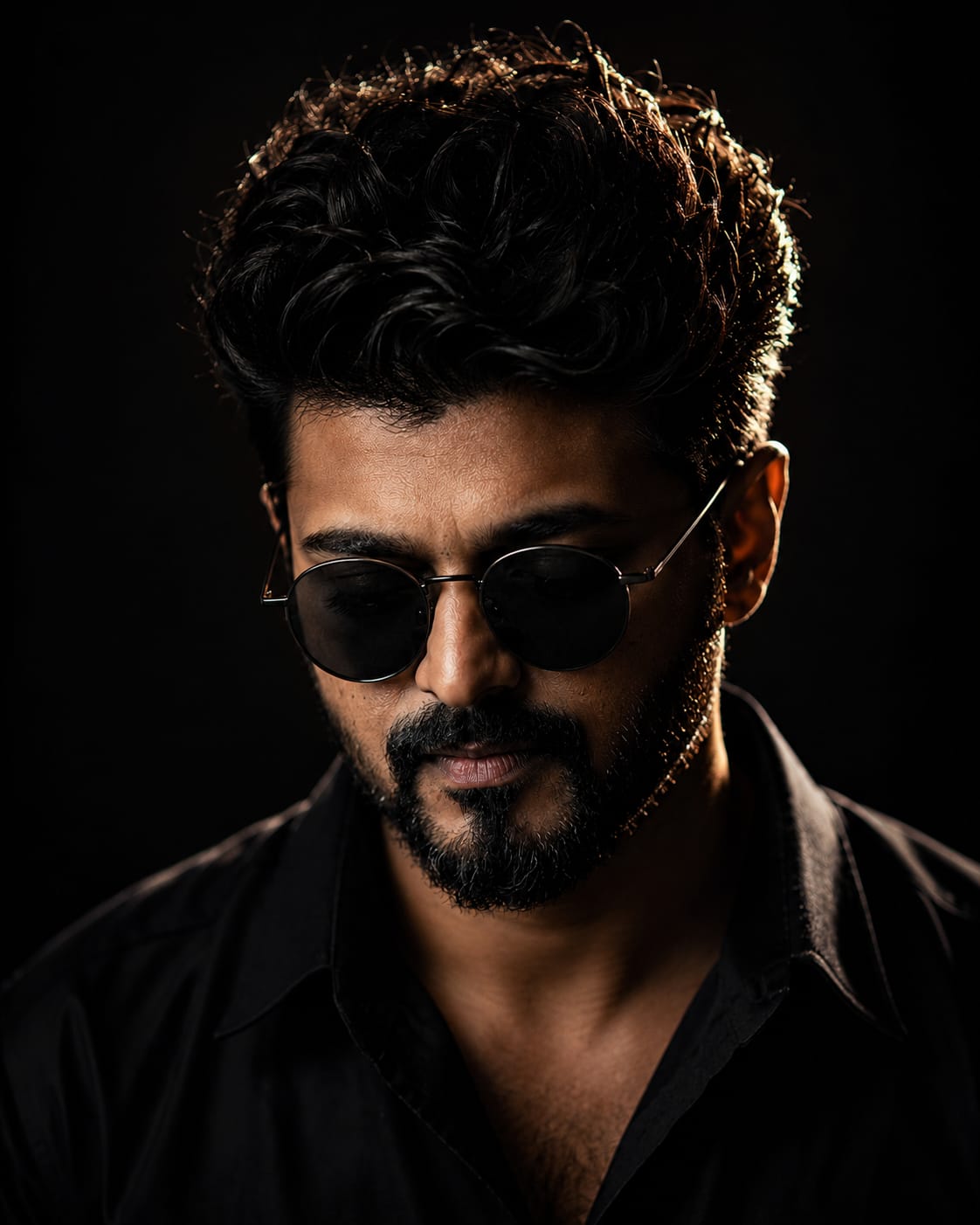
Ultra-realistic cinematic studio portrait of a young Indian man, front-facing pose with head slightly tilted down, eyes looking downward, serious and mysterious expression, black oversized curly textured hair with strong rim light highlights, wearing round black sunglasses and a black shirt, low-key lighting setup, dramatic side rim light outlining face and hair, deep shadows, dark black background, moody atmosphere, ultra detailed skin texture, sharp jawline, minimal light hitting the face, high contrast photography, editorial fashion portrait, volumetric lighting, DSLR quality, 85mm lens, shallow depth of field, ultra realistic, 8K, centered composition, Instagram aesthetic, cinematic color grading
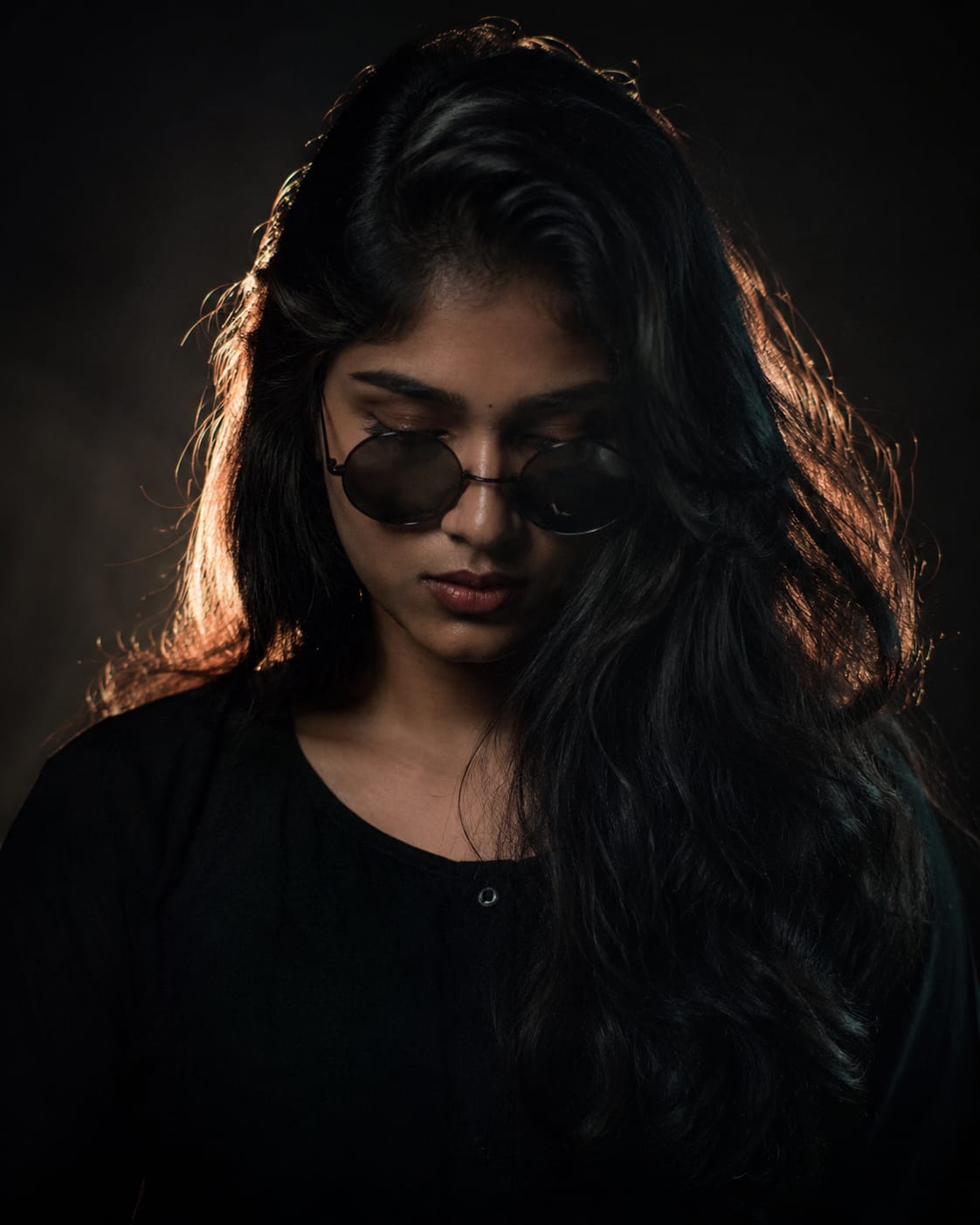
Ultra-realistic cinematic studio portrait of a young Indian woman, front-facing pose with head slightly tilted down, eyes looking downward, maintaining the exact same posture and body language as the reference image, serious and mysterious expression, long black voluminous curly textured hair with strong rim light highlights, wearing round black sunglasses and a black oversized shirt, low-key lighting setup, dramatic side rim light outlining face and hair, deep shadows, dark black background, moody atmosphere, ultra detailed skin texture, defined jawline, minimal light hitting the face, high contrast photography, editorial fashion portrait, volumetric lighting, DSLR quality, 85mm lens, shallow depth of field, ultra realistic, 8K, centered composition, Instagram aesthetic, cinematic color grading, soft facial features, elegant feminine presence, studio photography, luxury fashion magazine style, realistic hair strands, glossy lips, subtle makeup, dark aesthetic vibe.
What Is a Dark Instagram Profile Picture Prompt?
A prompt is a text instruction you give to an AI image generator. For a dark Instagram DP, the prompt controls the lighting style, background, color tone, facial mood, and overall aesthetic.
Most people type something generic like “dark profile picture” and get mediocre results. A well-written prompt is specific — it mentions the light source, the shadow direction, the color palette, and the mood.
Why the Prompt Wording Actually Matters
AI tools like DALL·E or Midjourney don’t read your mind. They generate exactly what you describe. If your prompt is vague, the output will be vague.
A specific prompt like “cinematic dark portrait, single rim light, deep navy shadows, sharp facial features, moody film grain, shallow depth of field” produces a dramatically different result than “dark aesthetic photo.”
Best Dark Instagram Profile Picture Prompts to Try
These are tested, ready-to-use prompts. Paste them directly into your AI tool of choice.
Cinematic Moody Portrait
Cinematic dark portrait of a young person, single rim light from the left, deep black background, strong contrast, film grain texture, sharp eyes, shallow depth of field, moody Instagram DP style, 1:1 square crop
Dark Aesthetic with Neon Accent
Dark Instagram DP, face partially lit by cold blue neon light, rest in deep shadow, cyberpunk aesthetic, high contrast, photorealistic, square format, close-up portrait
Dramatic Outdoor Night Look
Outdoor night portrait, dramatic side lighting, dark sky background, cinematic color grade, desaturated tones with orange skin glow, sharp detail, moody expression, Instagram profile picture style
Silhouette DP Prompt
Dark silhouette profile picture, subject standing against a deep red and black gradient sky, dramatic backlight, cinematic wide angle, moody atmosphere, square crop
Minimalist Dark DP
Minimalist dark portrait, soft studio light, dark grey background, clean composition, slight vignette, fashion editorial style, calm neutral expression, Instagram DP format
How to Write Your Own Dark DP Prompt
You don’t have to rely on pre-made prompts forever. Once you understand the structure, writing your own dark DP prompt takes less than two minutes.
The Four Elements Every Good Dark Prompt Needs
1. Subject description — Who or what is in the image. Be specific: age, gender, mood, expression.
2. Lighting style — This is the most important part for a dark aesthetic. Options include:
Rim lighting (light behind or to the side)
Single source light (one lamp or window)
Neon/colored light
Backlight or silhouette
3. Background and color tone — Deep black, dark navy, charcoal grey, dark teal, or gradient darks all work well for Instagram DPs.
4. Style reference — Add terms like cinematic, film grain, editorial, photorealistic, or moody color grade to guide the AI’s style output.
Example: “Young woman, soft rim light, dark charcoal background, desaturated warm tones, film grain, cinematic portrait, Instagram DP square format”
Dark DP Prompt vs Regular Portrait Prompt — What’s the Difference?
A regular portrait prompt focuses on clarity, natural lighting, and color accuracy. A dark Instagram DP prompt does the opposite — it intentionally reduces light, increases contrast, and prioritizes mood over realism.
Key Differences at a Glance
Lighting: Regular portraits use soft diffused light. Dark DP prompts use single-source or rim lighting.
Color palette: Standard portraits are warm and natural. Dark DPs use muted, desaturated, or cold tones.
Background: Bright or neutral for regular. Deep black, navy, or dark gradient for dark DP style.
Mood: Natural and approachable vs intentionally dramatic and mysterious.
If you want your Instagram profile to feel bold and artistic rather than casual, the dark cinematic DP prompt approach is the better choice.
Tips to Get Better Results from Any Dark DP Prompt
Even a great prompt can produce weak results if you skip a few basics. These adjustments make a measurable difference.
Always Specify the Crop Format
Instagram profile pictures display as a circle cropped from a square. Add “1:1 square format, face centered” to every prompt so the AI positions the subject correctly. Otherwise, faces often get cut off or pushed to the edge.
Use Negative Prompts When Available
On Midjourney and some other tools, you can add “–no blur, overexposure, watermark, cartoon” to actively exclude unwanted elements. This keeps the output clean and realistic.
Generate Multiple Variations
Don’t settle for the first output. Run the same prompt three to five times. AI image generators have randomness built in — the third or fourth output is often noticeably better than the first.
Adjust One Element at a Time
If you don’t like the result, change only one part of the prompt per attempt. Changing everything at once makes it impossible to know what improved the image.
FAQ
What is a dark Instagram profile picture prompt?
A dark Instagram profile picture prompt is a text description you give an AI image tool to generate a moody, cinematic-style DP. It typically includes lighting details, color tone, mood, and style keywords that guide the AI toward a dramatic aesthetic.
How do I make my AI-generated DP look more cinematic?
Add specific cinematic terms to your prompt such as film grain, shallow depth of field, single rim light, and moody color grade. These keywords push AI tools toward a more editorial and film-like output compared to generic photo styles.
Which AI tool works best for dark DP prompts?
Midjourney produces the most stylistically refined dark portraits. DALL·E 3 inside ChatGPT is more accessible for beginners. Adobe Firefly works well for photorealistic skin tones. Try the same prompt on two or three tools to compare results.
Can I use these dark DP prompts for a male profile picture?
Yes. Simply change the subject description in the prompt — for example, “young man, sharp jawline, intense expression” instead of a generic subject. The lighting and style instructions stay the same and work equally well for any gender.
Is a dark profile picture good for Instagram growth?
A visually strong profile picture builds trust and brand recall faster than a plain or low-effort one. Dark cinematic DPs tend to stand out in comment sections and search results, which indirectly supports profile growth over time.
Why does my dark DP prompt keep producing bright images?
Most AI tools default toward balanced, well-lit outputs unless explicitly told otherwise. Add “dark background, heavy shadows, low ambient light, high contrast” directly in your prompt to override that default behavior.
How long should a good dark DP prompt be?
Effective prompts typically run between 20 to 40 words. Too short and the AI fills in the gaps with generic choices. Too long and the model may ignore parts of the instruction. Focus on the four core elements: subject, lighting, background, and style.
Does the dark DP prompt style work for anime or illustrated DPs?
Yes. Simply replace photorealistic with anime style, digital illustration, or graphic novel art in your prompt. The dark cinematic lighting and moody color instructions apply across art styles, not just photography.
Make Your Profile Picture Impossible to Ignore
A well-written dark Instagram profile picture prompt gives you full creative control over your DP without any editing skills. The prompts in this article are a direct starting point — use them as-is or mix elements to build something that fits your exact aesthetic.
Pick one prompt, paste it into your AI tool of choice, and run it at least three times before deciding on a final result. Your profile picture is worth that two minutes of effort.
Transform the uploaded photograph into a premium minimalist editorial collage inspired by luxury travel magazines, contemporary fashion editorials, and artistic outdoor photography FORMAT & COMPOSITION: Create a strict 3:4 vertical canvas. Use a warm ivory/off-white background with subtle paper texture and generous negative space Place a large, clean-edged vertical rectangular crop of the original
Place this person in the second photo in a realistic manner and adjust them to match the second photo; do not change anything else. Keep the background exactly as it is-do not alter it at all-and do not change the face. Enhance the image to 8K quality and set the aspect ratio to 3:4. And Backgroud ke accoding person size adjust
Create a cinematic 4K, highly detailed, photorealistic video by transferring the EXACT dance movements, body motion, performance, timing, expressions, and camera movements from the REFERENCE VIDEO onto the person shown in the TARGET IMAGE. Completely replace the original main dancer with the person from the TARGET IMAGE. Preserve the target person's exact facial identity, facial features, skin ton
Transform the uploaded mirror selfie into a luxury LED Mirror portrait. Replace the existing mitor frame with an elegant irregular organic shape mirror 1,832 featuring a soft warm golden LED Backlight glow around entire edge .keep the subject same
Create a **10-second photorealistic image-to-video recreation of the uploaded reference video**. ### REFERENCE PRIORITY — CRITICAL Use the uploaded references as follows: **REFERENCE IMAGE 1 — MY PHOTO** Use this as the ONLY identity reference for the main person. Preserve my exact face, facial proportions, eyes, eyebrows, nose, lips, jawline, skin tone, hairstyle and overall identity throughout t
Video-to-video character replacement. Keep @Video 1 exactly the same: same handheld iPhone camera movement and shake, same framing, timing, red backstage lighting, background, crowd, bodyguards, and the fan in the foreground holding the phone and the big DSLR lens. Do not change anyone else. Replace only the main man in the center (the one who walks in, talks to the fan and laughs) with the person
MASTER PROMPT — Ultra-Realistic Bridal Nail Art Car Selfie (9:16) Use the uploaded selfie as the STRICT FACIAL IDENTITY REFERENCE. Preserve the person's exact facial features, natural skin tone, eyes, nose, lips, face shape, age, and realistic skin texture. Do not beautify, reshape, or alter the facial identity. REFERENCE COMPOSITION: Create an ultra-realistic golden-hour photograph of a beautiful
Use the reference video as the exact blueprint. Recreate the SAME actions, hand movements, facial expressions, camera movement, timing, framing and transition — do not invent or change anything. Start with the first reference image as the opening look, then transition into the second reference image at the EXACT same moment and using the EXACT same transition style as the reference video. In the s