If you want to transform a regular portrait into a beautiful outdoor cinematic photo, this Cinematic Outdoor AI Photo Editing Prompt 2026 can help you create a more professional-looking result. AI photo editing tools can change the background, lighting, atmosphere, and overall visual style while keeping the main subject recognizable. This prompt is designed for creating a natural outdoor portrait with a wide scenic background, soft clouds, green surroundings, and a cinematic appearance. You can use your own clear reference photo and apply the prompt to create a personalized image that looks suitable for social media posts, profile pictures, or creative photography projects.
What Is Cinematic Outdoor AI Photo Editing?
Cinematic outdoor AI photo editing is a creative way to transform a regular portrait into an outdoor scene with a more dramatic and photography-inspired appearance. Instead of manually changing the background, lighting, colors, and other visual elements, an AI image tool can generate these changes from a detailed text prompt. The final image can include natural surroundings, realistic lighting, depth, and a cinematic atmosphere. By using a reference image, you can also guide the AI to maintain important characteristics of the original person. This makes it easier to create an outdoor portrait with a polished look while keeping the overall composition natural.
Cinematic Outdoor AI Photo Editing Prompt
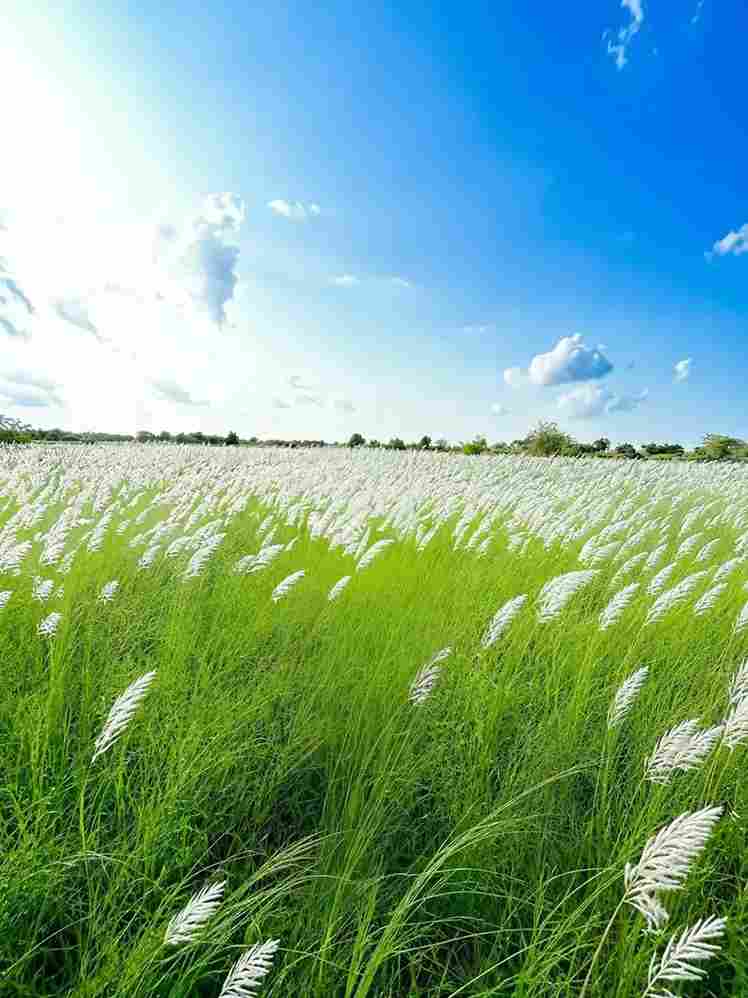
Download and use this reference image to recreate the exact same background in your photo.
Save this image on your device ⬇️
reference photo. He is wearing a black confident, calm expression. Wide scenic
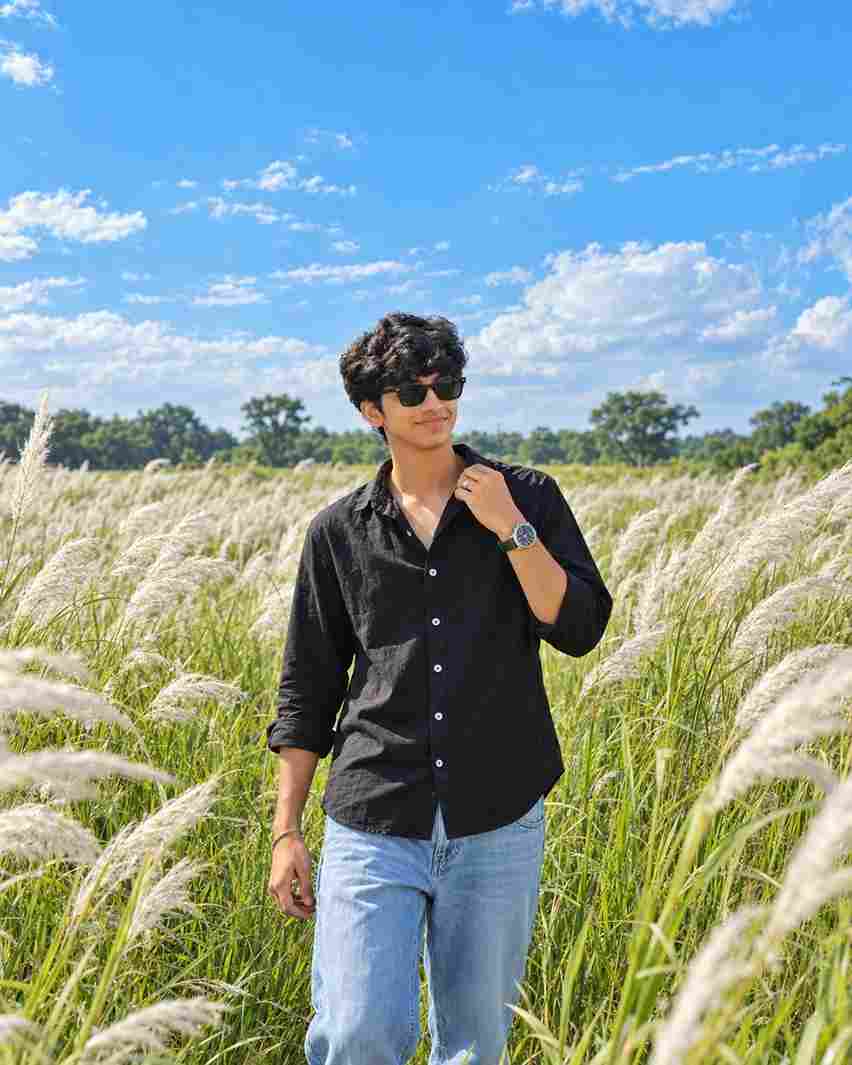
Ultra-realistic high-quality outdoor portrait of a young Indian man standing naturally in a vast green field filled with tall white Kash grass (Kans/Kaash flowers), under a bright vivid blue sky with soft white clouds. Preserve the person's face, hairstyle, skin tone, facial features, body proportions, and overall identity exactly like the reference photo. He is wearing a black full-sleeve button-up shirt with an open collar, light blue relaxed-fit jeans, and black sunglasses. One hand is casually touching the shirt collar while the other hand hangs naturally by his side, looking slightly to the side with a confident, calm expression. Wide scenic composition with the subject centered, tall grass surrounding him, distant green trees on the horizon, bright natural daylight, realistic shadows, detailed grass and flowers, cinematic depth, sharp facial details, professional DSLR photography, natural skin texture, ultra-detailed, 4K/8K quality, photorealistic, Instagram premium photograph.
First, save the image from the above paragraph to your phone as the background, and then copy the prompt. Now, click on the Create Image on ChatGPT button. You will be redirected to ChatGPT, or you can directly use the ChatGPT app for a better experience. Upload your face image or the saved background image to ChatGPT, paste the copied prompt, and click on the send icon. Wait for a while, and you will get a good result. If you don’t get the best result, you can try again.
Use a Clear Reference Photo
The quality of your reference photo can have an important effect on the generated image. Choose a photo where your face is clearly visible and there is enough detail for the AI tool to understand your appearance. A well-lit portrait with a natural pose can make it easier to maintain facial features and overall identity. Avoid heavily blurred photos or images with strong filters because they may make some details difficult to reproduce. If possible, use a high-resolution image with a clear view of the face, hairstyle, and clothing. A good reference image combined with a detailed prompt can help create a more consistent and realistic outdoor portrait.
Green Field and Kash Grass Background
The green field and tall white Kash grass are important visual elements of this outdoor AI photo concept. The grass can create a wide and natural landscape while the white flowers add contrast against the green surroundings. The prompt can describe the field as spacious and realistic, with the subject standing naturally in the center or preferred position. A bright blue sky with soft white clouds can add depth to the upper part of the image. Combining these elements creates a peaceful outdoor environment while allowing the subject to remain the main focus of the portrait.
Tips for Better AI Photo Results
For the best results, use a clear and high-quality reference image where the face and important features are easily visible. Since the Kash grass field and blue sky background are already described in the prompt, focus on maintaining the person’s facial features, hairstyle, skin tone, clothing, pose, and overall appearance. After generating the image, carefully check the face, hands, hair, clothing, and body proportions for any unwanted changes. If needed, make small adjustments to the prompt and generate another version. Keep your instructions clear and specific so the AI can better understand the desired cinematic outdoor photography style.
Final Words
The Cinematic Outdoor AI Photo Editing Prompt 2026 is a creative way to turn a regular portrait into a scenic outdoor image with a cinematic photography style. By using a clear reference photo and a detailed prompt, you can create a green field setting with tall white Kash grass, blue skies, natural lighting, and a professional-looking composition. Start with your best reference image, apply the prompt, review the generated result, and make small adjustments when necessary. You can experiment with different backgrounds and visual details to create your own version. I hope this guide helps you create a beautiful cinematic outdoor AI photo for your social media and creative projects.
Transform the uploaded photograph into a premium minimalist editorial collage inspired by luxury travel magazines, contemporary fashion editorials, and artistic outdoor photography FORMAT & COMPOSITION: Create a strict 3:4 vertical canvas. Use a warm ivory/off-white background with subtle paper texture and generous negative space Place a large, clean-edged vertical rectangular crop of the original
Place this person in the second photo in a realistic manner and adjust them to match the second photo; do not change anything else. Keep the background exactly as it is-do not alter it at all-and do not change the face. Enhance the image to 8K quality and set the aspect ratio to 3:4. And Backgroud ke accoding person size adjust
Create a cinematic 4K, highly detailed, photorealistic video by transferring the EXACT dance movements, body motion, performance, timing, expressions, and camera movements from the REFERENCE VIDEO onto the person shown in the TARGET IMAGE. Completely replace the original main dancer with the person from the TARGET IMAGE. Preserve the target person's exact facial identity, facial features, skin ton
Transform the uploaded mirror selfie into a luxury LED Mirror portrait. Replace the existing mitor frame with an elegant irregular organic shape mirror 1,832 featuring a soft warm golden LED Backlight glow around entire edge .keep the subject same
Create a **10-second photorealistic image-to-video recreation of the uploaded reference video**. ### REFERENCE PRIORITY — CRITICAL Use the uploaded references as follows: **REFERENCE IMAGE 1 — MY PHOTO** Use this as the ONLY identity reference for the main person. Preserve my exact face, facial proportions, eyes, eyebrows, nose, lips, jawline, skin tone, hairstyle and overall identity throughout t
Video-to-video character replacement. Keep @Video 1 exactly the same: same handheld iPhone camera movement and shake, same framing, timing, red backstage lighting, background, crowd, bodyguards, and the fan in the foreground holding the phone and the big DSLR lens. Do not change anyone else. Replace only the main man in the center (the one who walks in, talks to the fan and laughs) with the person
MASTER PROMPT — Ultra-Realistic Bridal Nail Art Car Selfie (9:16) Use the uploaded selfie as the STRICT FACIAL IDENTITY REFERENCE. Preserve the person's exact facial features, natural skin tone, eyes, nose, lips, face shape, age, and realistic skin texture. Do not beautify, reshape, or alter the facial identity. REFERENCE COMPOSITION: Create an ultra-realistic golden-hour photograph of a beautiful
Use the reference video as the exact blueprint. Recreate the SAME actions, hand movements, facial expressions, camera movement, timing, framing and transition — do not invent or change anything. Start with the first reference image as the opening look, then transition into the second reference image at the EXACT same moment and using the EXACT same transition style as the reference video. In the s