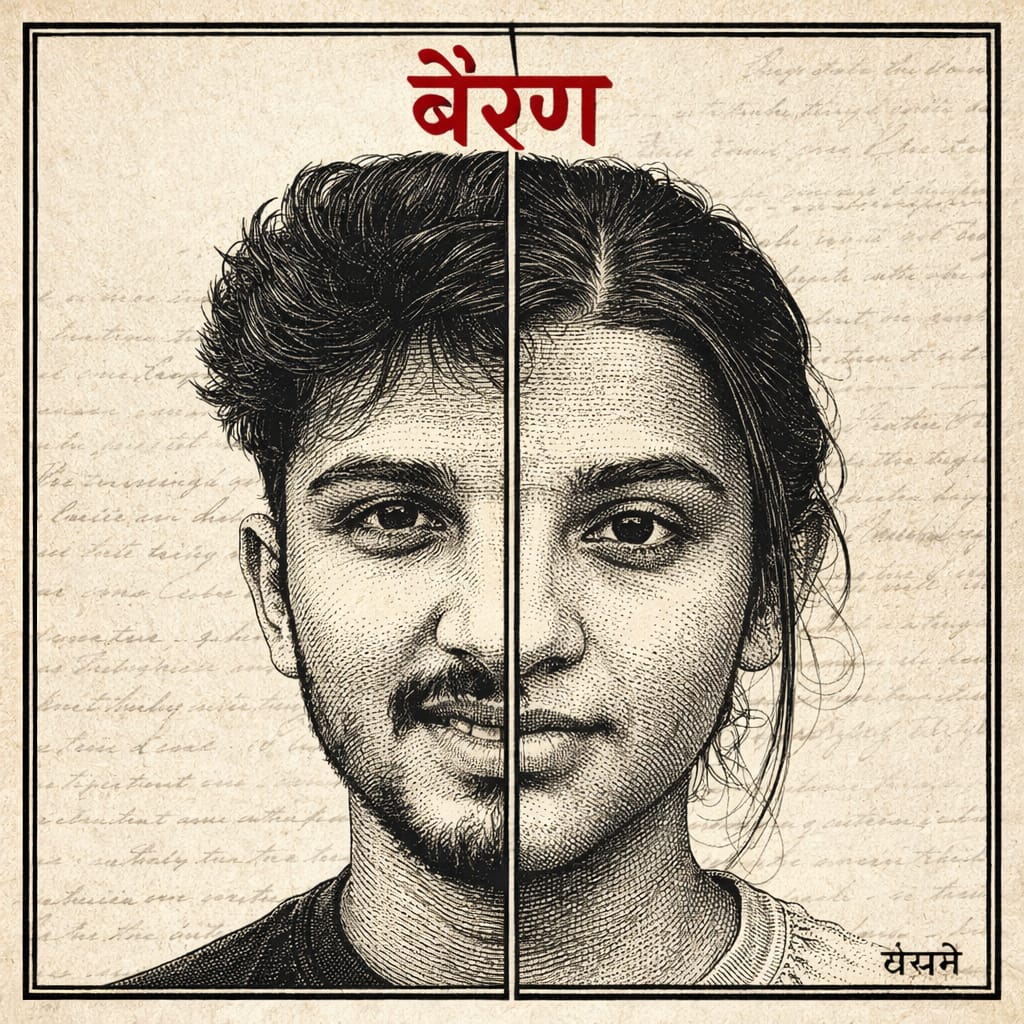
Create Viral Bairan Song Photo | Bairan Song Photo Editing
By Prompt Scene ·
In this guide, you will learn how to create a stunning Bairan song photo using simple editing prompts.
From choosing the right images to adding vintage effects, text, and dramatic tones, everything plays an important role.
Even beginners can follow these steps and create professional-looking edits.
Create a highly detailed vintage ink engraving style illustration using the two uploaded images as references.Merge both faces into a single square composition split vertically in the center — left half should be the boy and right half should be the girl.Preserve exact facial identity strictly (same eyes, eyebrows, nose shape, lips, skin details, and expression). Do not alter or beautify faces. Ensure perfect facial symmetry alignment so both halves match seamlessly at the eyes, nose, and lips.Use a classic hand-drawn engraving style with fine cross-hatching, ink linework, and detailed shading. Focus closely on the eyes and upper face, similar to a vintage book illustration.Add a bold vertical black divider line in the center where both faces meet.Place the portrait inside a thin black square frame.Background should be off-white vintage paper texture with subtle handwritten script or old document feel.At the top, add bold Hindi text “बैरण” in red color, clean and strong typography.At the bottom right, add small Hindi text “बंजारे” in black.Keep overall tone monochrome/sepia with high contrast.Ultra detailed, sharp focus, 4K resolution, cinematic lighting.”perfect facial symmetry alignment, no distortion, no mismatch between halves”
Creating a viral Bairan song photo doesn’t require expensive tools or advanced skills. With the right idea, basic editing knowledge, and a bit of creativity, anyone can design a powerful and engaging image.
The key is to keep your design simple, emotional, and visually appealing.Always experiment with different styles, fonts, and color tones to find what works best for your audience.
Pay attention to details like lighting, facial alignment, and text placement, as these small elements make a big difference in the final result.Start practicing today and keep improving your editing skills.
With consistency and creativity, your Bairan song photo can easily go viral and help you grow your social media presence.
Transform the uploaded photograph into a premium minimalist editorial collage inspired by luxury travel magazines, contemporary fashion editorials, and artistic outdoor photography FORMAT & COMPOSITION: Create a strict 3:4 vertical canvas. Use a warm ivory/off-white background with subtle paper texture and generous negative space Place a large, clean-edged vertical rectangular crop of the original
Place this person in the second photo in a realistic manner and adjust them to match the second photo; do not change anything else. Keep the background exactly as it is-do not alter it at all-and do not change the face. Enhance the image to 8K quality and set the aspect ratio to 3:4. And Backgroud ke accoding person size adjust
Create a cinematic 4K, highly detailed, photorealistic video by transferring the EXACT dance movements, body motion, performance, timing, expressions, and camera movements from the REFERENCE VIDEO onto the person shown in the TARGET IMAGE. Completely replace the original main dancer with the person from the TARGET IMAGE. Preserve the target person's exact facial identity, facial features, skin ton
Transform the uploaded mirror selfie into a luxury LED Mirror portrait. Replace the existing mitor frame with an elegant irregular organic shape mirror 1,832 featuring a soft warm golden LED Backlight glow around entire edge .keep the subject same
Create a **10-second photorealistic image-to-video recreation of the uploaded reference video**. ### REFERENCE PRIORITY — CRITICAL Use the uploaded references as follows: **REFERENCE IMAGE 1 — MY PHOTO** Use this as the ONLY identity reference for the main person. Preserve my exact face, facial proportions, eyes, eyebrows, nose, lips, jawline, skin tone, hairstyle and overall identity throughout t
Video-to-video character replacement. Keep @Video 1 exactly the same: same handheld iPhone camera movement and shake, same framing, timing, red backstage lighting, background, crowd, bodyguards, and the fan in the foreground holding the phone and the big DSLR lens. Do not change anyone else. Replace only the main man in the center (the one who walks in, talks to the fan and laughs) with the person
MASTER PROMPT — Ultra-Realistic Bridal Nail Art Car Selfie (9:16) Use the uploaded selfie as the STRICT FACIAL IDENTITY REFERENCE. Preserve the person's exact facial features, natural skin tone, eyes, nose, lips, face shape, age, and realistic skin texture. Do not beautify, reshape, or alter the facial identity. REFERENCE COMPOSITION: Create an ultra-realistic golden-hour photograph of a beautiful
Use the reference video as the exact blueprint. Recreate the SAME actions, hand movements, facial expressions, camera movement, timing, framing and transition — do not invent or change anything. Start with the first reference image as the opening look, then transition into the second reference image at the EXACT same moment and using the EXACT same transition style as the reference video. In the s