Prompt Scene

Toxic Movie Poster Editing Prompts 2026

By Prompt Scene ·

The Toxic Movie Poster Editing Prompts 2026 are a creative way to transform your ordinary portrait into a stylish cinematic movie-poster-inspired photo using AI. This editing style focuses on premium lighting, elegant backgrounds, dramatic composition, realistic details, and professional color grading. You can use your own portrait to create an eye-catching image for social media posts, thumbnails, website content, or creative projects. With a clear reference photo and a well-written prompt, you can create a polished poster-style image while keeping the person’s natural facial appearance and overall identity recognizable.

What Is Toxic Movie Poster AI Editing?

Toxic Movie Poster AI Editing is a creative photo-editing style inspired by the visual presentation of cinematic movie posters. The style can include premium backgrounds, sophisticated lighting, rich colors, realistic shadows, atmospheric details, and professional poster composition. AI image-editing tools can create these elements from a detailed text prompt, making the process easier for beginners. You can personalize the image by changing the outfit, background, pose, camera angle, lighting, and overall color style. The goal is to create an original cinematic poster-inspired image using your own reference photo.

Best Toxic Movie Poster Editing Prompt
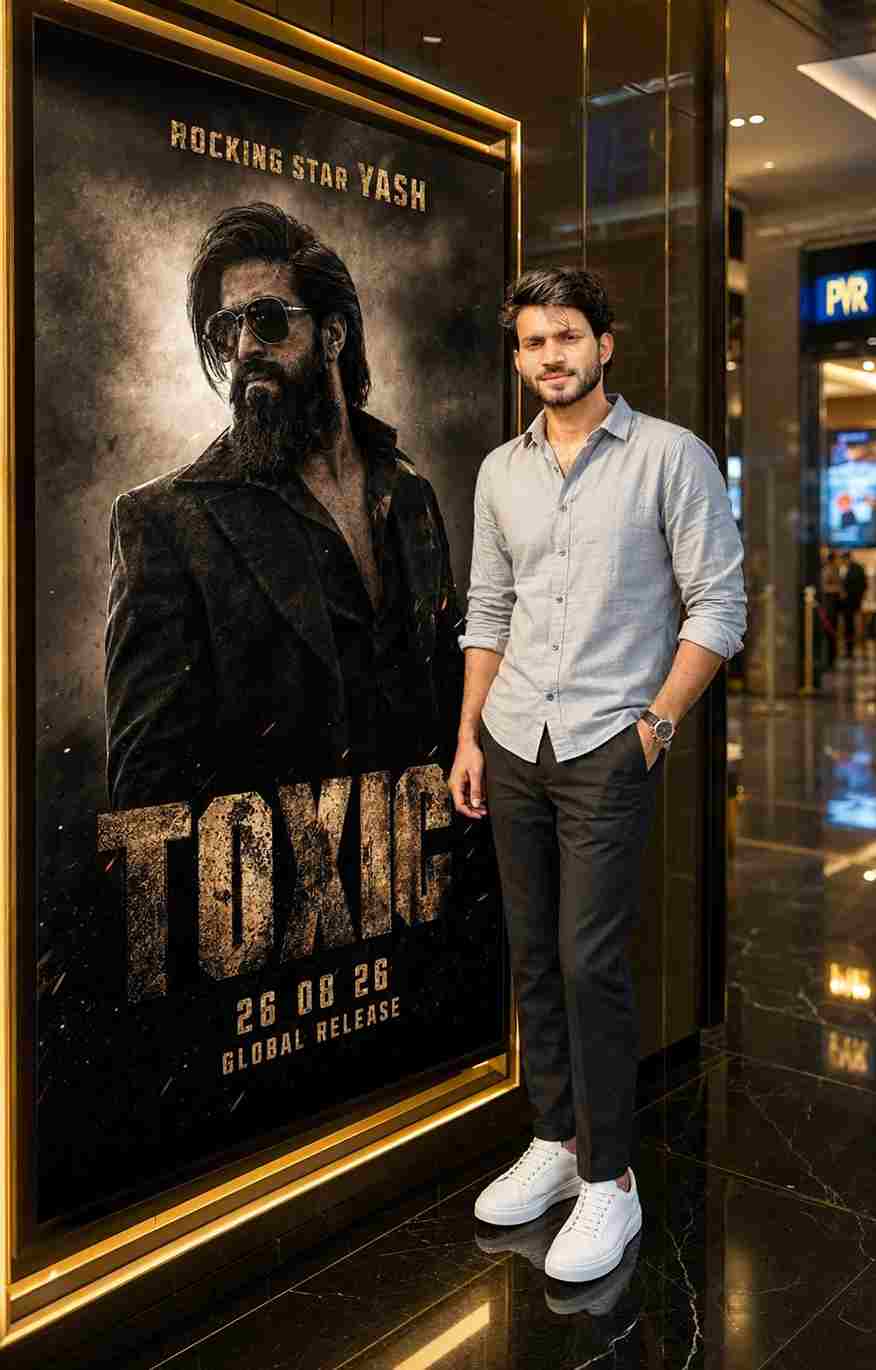
Create an ultra-realistic cinematic photo of the SAME person from the uploaded reference, preserving exact facial identity, hairstyle, skin tone, beard, age, and body proportions. Place him in a luxurious modern cinema lobby at night, standing on the RIGHT beside a large illuminated black-and-gold movie poster on the LEFT. He wears a light grey-blue rolled-sleeve shirt, dark trousers, white sneakers, and a watch, with one hand in his pocket and a natural smile.

The poster prominently features Yash as a rugged action hero in dark clothing and sunglasses, with dramatic smoke, sparks, dust, and cinematic lighting. No guns, weapons, blood, injuries, or graphic violence. Add the title “TOXIC”, “ROCKING STAR YASH,” “26 08 26”, and “GLOBAL RELEASE.” Luxury black marble, golden trims, glossy floors, warm lighting, subtle blue cinema signage, DSLR photography, realistic skin texture, shallow depth of field, 4:5 vertical composition, authentic cinematic look.
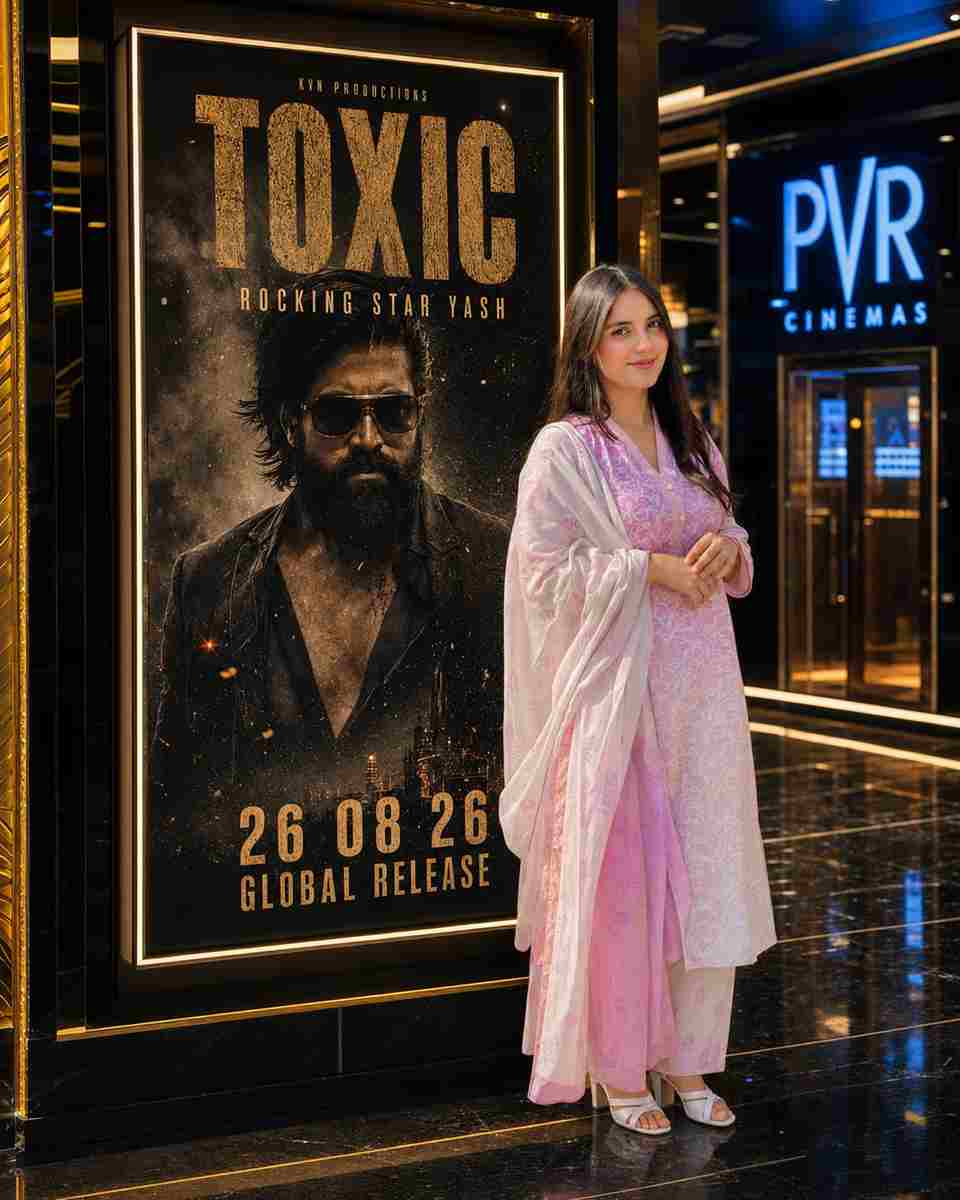
Create an ultra-realistic cinematic photo of the SAME girl from the uploaded reference, preserving her exact facial identity, facial structure, skin tone, hairstyle, age, and body proportions. Place her standing confidently on the RIGHT beside a large illuminated black-and-gold movie poster on the LEFT inside a luxurious modern cinema lobby at night. She wears the same clothes as in the uploaded image, with one hand in her pocket and a natural, confident smile.

The poster prominently features Yash as a rugged action hero in dark clothing and sunglasses, surrounded by dramatic smoke, sparks, dust, and cinematic lighting. No guns, weapons, blood, injuries, or graphic violence. Add the text “TOXIC”, “ROCKING STAR YASH”, “26 08 26”, and “GLOBAL RELEASE” clearly on the poster. Add luxury black marble, golden trims, glossy reflective floors, warm cinematic lighting, subtle blue cinema signage, realistic skin texture, DSLR photography, shallow depth of field, premium cinematic color grading, ultra-detailed photorealistic quality, and a 4:5 vertical composition.

How to Create a Toxic Movie Poster Photo

Creating a Toxic Movie Poster Photo with an AI image-editing tool is very easy. Just follow the simple steps below:
  1. Open your preferred AI image-editing tool.
  2. Upload a clear reference photo.
  3. Copy the cinematic poster prompt.
  4. Paste the prompt with your uploaded photo.
  5. Generate the poster-style image.
  6. Check the face, clothing, hands, and background.
  7. Ask for corrections if necessary.
  8. Try different lighting or background styles.
  9. Save the final image.

How to Get Better AI Poster Results

The quality of your reference image can make a big difference in the final result. Choose a clear photo where your face, hairstyle, and overall appearance are easily visible. Avoid extremely blurry or heavily edited images because they may make it harder for the AI tool to maintain a consistent appearance. You can experiment with different poses, outfits, backgrounds, camera angles, and lighting styles to create multiple versions. If the first result is not perfect, ask the AI to correct one specific element instead of changing the entire image.

Tips for a Professional Movie Poster Look

For a professional result, focus on composition, lighting, and realistic details instead of adding too many visual effects. You can try a close-up portrait, medium shot, or full-body composition depending on your preferred style. Make sure the face, hands, clothing, and body proportions look natural after generation. If an unwanted detail appears, simply ask the AI to remove or correct it while keeping the rest of the image unchanged. Creating several versions with different backgrounds, camera angles, and lighting setups can also help you find the style that best matches your creative idea.

Final Words


The Toxic Movie Poster Editing Prompts 2026 can help you transform a simple portrait into a polished cinematic poster-inspired image with AI. By using a clear reference photo and a detailed prompt, you can experiment with elegant backgrounds, premium lighting, realistic shadows, atmospheric details, and professional composition. Start with the prompt above, generate your first version, and make small adjustments until you are happy with the result. I hope this article helps you, and if you have any problems, please let me know in the comment box or on our Instagram page.

Related prompts

ChatGPT Photo Prompt for Girls: Pink Saree Portrait (Copy & Paste)
Photo Prompts
13k 773
21 hours ago

ChatGPT Photo Prompt for Girls: Pink Saree Portrait (Copy & Paste)


Use the uploaded reference photo for 100% facial identity, hairstyle, skin tone, and body proportions. Create an ultra-realistic 3:4 portrait of the same girl sitting indoors against a warm beige wall, wearing a soft pink floral embroidered saree, holding a bouquet of pink gerbera daisies and white flowers, with a white flower tucked behind one ear. Golden-hour sunlight enters from the left, casti
Urban Pop Art Portrait Prompt (Streetwear Graffiti Illustration)
Photo Prompts
14k 1.3k
1 day ago

Urban Pop Art Portrait Prompt (Streetwear Graffiti Illustration)


Maintain the exact facial structure, bone features, skin tone, eye shape, and identity of the person from the uploaded reference photo without alteration. An experimental, cinematic streetwear portrait illustration of the subject captured from the chest up. The subject wears dark rectangular sunglasses, thick silver signet and skull rings, and a textured black woolen overcoat. The pose is a finger
Gemini Bike Attitude Photo Edit Prompt (Cinematic Cafe Racer Portrait)
Photo Prompts
3
1 day ago

Gemini Bike Attitude Photo Edit Prompt (Cinematic Cafe Racer Portrait)


Cinematic outdoor portrait of a young Indian man with sharp attitude sitting on a matte black custom cafe racer superbike parked along a coastal highway during twilight. He wears a tailored distressed leather jacket, dark slim denim, and leather gloves, looking directly into the camera with an intense, confident gaze. Soft amber street lamp glow mixes with cool twilight blue skylight. 85mm f/1.4 l
Dussehra Photo With Ravan AI Prompts (Cinematic Festival Portraits)
Photo Prompts
3
3 days ago

Dussehra Photo With Ravan AI Prompts (Cinematic Festival Portraits)


Create an ultra-realistic, cinematic 8K portrait using my uploaded photo as the primary identity reference .Preserve my exact facial features, hairstyle, skin tone, glasses, beard, and natural body proportions. Show me standing casually beside a metal railing at a grand Indian Dussehra festival, wearing an oversized beige T-shirt, loose blue jeans, and white sneakers. One hand rests on the railing
Gemini AI Girl in Saree Prompt: Red Chiffon Golden Hour (90s Bollywood)
Photo Prompts
17k 3.6k
3 days ago

Gemini AI Girl in Saree Prompt: Red Chiffon Golden Hour (90s Bollywood)


Use the reference image for the girl’s face and slim body. Outfit: perfect plain chiffon saree in deep red, soft and flowing, draped elegantly in a retro 90s Bollywood aesthetic, minimal jewelry, emphasizing timeless beauty and grace. Hair: dark brown, wavy-curly, naturally voluminous, styled loosely with a small flower tucked visibly into her curls, moving gently in the soft, romantic breeze. Pos
Rainy Night Luxury Street Portrait (Cinematic Neon) AI Prompt
Photo Prompts
25k 6.9k
3 days ago

Rainy Night Luxury Street Portrait (Cinematic Neon) AI Prompt


Transform the uploaded reference photo into an ultra-photorealistic cinematic night portrait of the same person standing confidently on a sophisticated modern city street immediately after rainfall. Preserve the person's exact natural facial identity, facial proportions, eye shape, nose structure, jawline, hairstyle and skin tone from the reference image. Do not replace the face with a generic AI
Blue Sky Streetwear Portrait Prompt (Low-Angle Sneaker Perspective)
Photo Prompts
20k 6.3k
4 days ago

Blue Sky Streetwear Portrait Prompt (Low-Angle Sneaker Perspective)


Maintain the exact facial structure, bone features, skin tone, hair type, and identity of the person in the uploaded reference photo without alteration. Place them into the following low-angle streetwear scene: Master Guide: Low-Angle Blue Sky Streetwear Portraits Visual Style Breakdown Camera Angle & Perspective: Extreme low-angle worm's-eye view looking straight up from the ground. Pronounced wi
Minimalist Editorial Collage Photo Editing Prompt – Luxury Travel Aesthetic
Unique Prompts
35k 2.5k
5 days ago

Minimalist Editorial Collage Photo Editing Prompt – Luxury Travel Aesthetic


Transform the uploaded photograph into a premium minimalist editorial collage inspired by luxury travel magazines, contemporary fashion editorials, and artistic outdoor photography FORMAT & COMPOSITION: Create a strict 3:4 vertical canvas. Use a warm ivory/off-white background with subtle paper texture and generous negative space Place a large, clean-edged vertical rectangular crop of the original